

Clair Mind: AI Organized Notes
Clair Mind: AI Organized Notes is made and published by Ziad Emadaldeen. AppBrain is an independent app data site and isn't affiliated with Ziad Emadaldeen. The app name, icon, screenshots and description belong to Ziad Emadaldeen and are shown as published on the App Store.
AppBrain's verdict
- Last updated
- October 1, 2026
- Size
- 25.1 MB
User feedback
Ratings and reviews on the App StoreComments on Clair Mind: AI Organized Notes for iOS
We don't have enough comments to show example comments. Please check back later.
Store listing
By Ziad Emadaldeen, from the App Store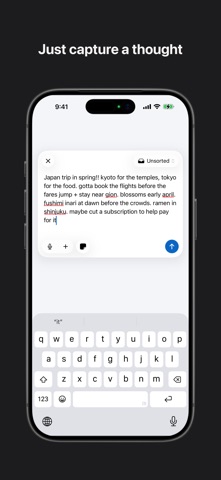


Description by Ziad Emadaldeen Written by the developer, not by AppBrain. Click to read.
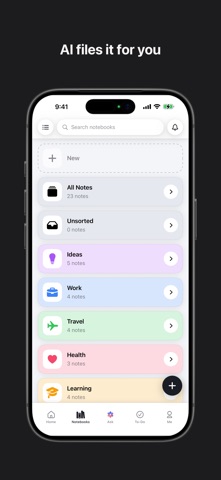
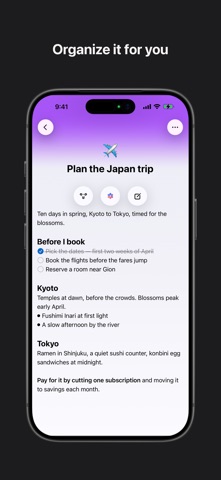
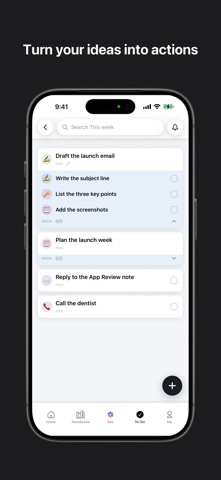
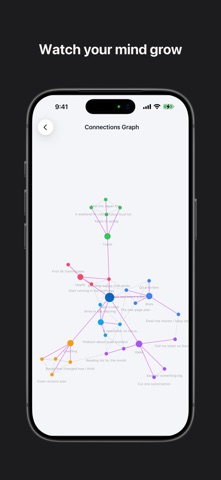
A private, local-first notes app. You capture a thought, it gets filed and titled for you, and over time you can see how your notes connect. Notes, notebooks, tasks and search all work fully offline and on-device.
SIGNING IN — PLEASE READ
The app offers Sign in with Apple and Sign in with Google only; there is no password-based login, so there are no demo credentials we can supply. Please tap "Sign in with Apple" and use your own Apple ID — account creation is instant, free, and requires no payment.
Everything except the AI features works WITHOUT any account. You can install, capture notes, create tasks, browse notebooks and search with no sign-in at all.
The AI features require an account because each request costs us money per call and is metered per user. Signing in is free and includes 1,000 words of AI per month at no charge.
WHERE TO FIND EACH FEATURE
- Capture a note: the round "+" button, bottom right of any tab. Type, then Save. The note lands in "Unsorted".
- Create a task: same "+" button, then tap the checklist icon at the bottom right of the sheet to switch from note to task.
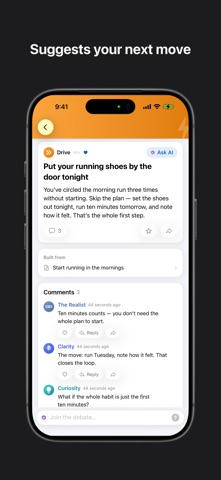
- Ask AI: the "Ask" tab, centre of the bottom bar. Type a question about your notes. Requires sign-in. Past conversations are behind the history icon, top left of that screen.
- Connections: open any note, then tap the flower icon above the note body.
- Notebooks: the "Notebooks" tab. Tap any notebook to see its notes.
- Tasks: the "To-Do" tab. Tap a list to open it; tap the circle on a row to complete it.
- Your activity, plan and settings: the "Me" tab, then the gear icon, top right.
FREE VS PRO
- Free, after signing in: the entire app, plus 1,000 words of AI per month.
- Pro (auto-renewing subscription): a much larger monthly AI allowance and voice capture (the microphone in the capture sheet and in Ask AI).
- The paywall appears when the free AI allowance runs out, and from the "Unlock AI with Pro" row on the Me tab.
- Restore Purchases: Me tab → gear icon → Account.
ACCOUNT DELETION
Me tab → gear icon → Account → Delete Account. It is a press-and-hold confirmation, then the account and its server-side data are removed.
PRIVACY
Notes live on the device. When you use an AI feature, the relevant note text is sent per-request to our AI provider to generate that one response; it is not stored server-side and is never used for training. This version adds analytics covering the first-run setup flow only, including a screen recording of onboarding with all typed text and images masked; recording stops before you reach your notes. Both are declared on the privacy label and in the app's privacy manifest, and described at https://clairmind.ai/privacy.
CONTACT
support@clairmind.ai — happy to answer anything or walk through a feature.
Safety and technology
Found in the app by AppBrain- Price
- Free
- App size
- 25.1 MB
- Content rating
- Everyone
Technologies used by Clair Mind: AI Organized Notes
Releases
Updates seen on the App Store- Version
- 1.3.1
- Launched
- June 2026
No changelog data
Alternatives
Similar apps and more from Ziad EmadaldeenMore from Ziad Emadaldeen

Rankings
App Store top chartsApp Store Rankings for Clair Mind: AI Organized Notes
About the app and developer
About Clair Mind: AI Organized Notes
Clair Mind: AI Organized Notes is a productivity app developed by Ziad Emadaldeen.
What is the rating of Clair Mind: AI Organized Notes?
Clair Mind: AI Organized Notes has no ratings yet.
Is Clair Mind: AI Organized Notes free?
Clair Mind: AI Organized Notes is free. The app size is 25.07 MB. The latest version available is 1.3.1. The last update was on October 1, 2026.
What are the requirements for Clair Mind: AI Organized Notes?
The app has a content rating of Everyone. The app has been available on the App Store since June 2026.
Developer information for Ziad Emadaldeen
Address:
Frequently asked questions about Clair Mind: AI Organized Notes
Is Clair Mind: AI Organized Notes free?
Yes. Clair Mind: AI Organized Notes is free on the App Store.
Is Clair Mind: AI Organized Notes still available?
Yes. Clair Mind: AI Organized Notes is on the App Store, and the last update we saw was on October 1, 2026.
How large is Clair Mind: AI Organized Notes?
Clair Mind: AI Organized Notes is 25.07 MB.
Is Clair Mind: AI Organized Notes suitable for children?
App Store rates the content of Clair Mind: AI Organized Notes as suitable for everyone.
Who made Clair Mind: AI Organized Notes?
Clair Mind: AI Organized Notes was developed by Ziad Emadaldeen. It is listed in the productivity category on the App Store.