

ClapsBoard is made and published by Amnas Ahamed. AppBrain is an independent app data site and isn't affiliated with Amnas Ahamed. The app name, icon, screenshots and description belong to Amnas Ahamed and are shown as published on the App Store.
AppBrain's verdict
- Last updated
- July 21, 2026
Rankings
App Store top chartsApp Store Rankings for ClapsBoard
This app is not ranked
Competitors
Similar apps and more from Amnas AhamedMore from Amnas Ahamed

Also available on Google Play

Releases
Updates seen on the App Store- Version
- 1.5.2
- Launched
- January 2026
No changelog data
User feedback
Ratings and reviews on the App StoreComments on ClapsBoard for iOS
We don't have enough comments to show example comments. Please check back later.
Technology
Found in the app by AppBrain- Price
- Free
- App size
- 3.63 MB
- Content rating
- Everyone
Technologies used by ClapsBoard
About the app and developer
About ClapsBoard
ClapsBoard is an education app developed by Amnas Ahamed.
What is the rating of ClapsBoard?
ClapsBoard has no ratings yet.
Is ClapsBoard free?
ClapsBoard is free. The app size is 3.63 MB. The latest version available is 1.5.2. The last update was on July 21, 2026.
What are the requirements for ClapsBoard?
The app has a content rating of Everyone. The app has been available on the App Store since January 2026.
Developer information for Amnas Ahamed
Address:
Store listing
By Amnas Ahamed, from the App Store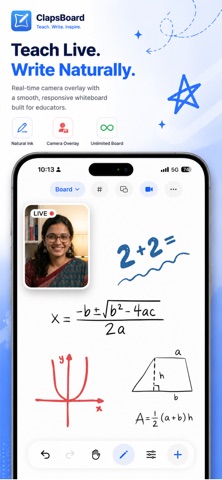

Screenshots by Amnas Ahamed, from the the App Store listing
Description by Amnas Ahamed Written by the developer, not by AppBrain. Click to read.
Transform your iPad into a powerful interactive whiteboard designed specifically for teachers, tutors, and online educators. ClapsBoard combines the simplicity of a traditional whiteboard with advanced digital tools to create an engaging learning environment.
KEY FEATURES:
- Professional Whiteboard
Draw, write, and explain concepts with a responsive, low-latency ink engine. Whether you are solving math problems or diagramming complex systems, the writing experience feels natural and fluid.
- Picture-in-Picture Tutor Mode
Build a personal connection with your students. Use the front or rear camera to display a floating, movable view of yourself overlaying the whiteboard content. It’s perfect for maintaining eye contact while explaining materials.
- Document Integration
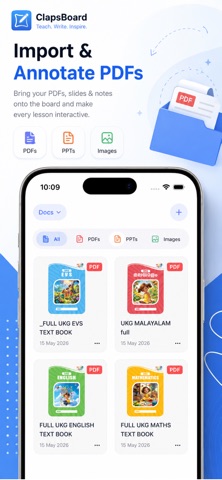
Import your existing teaching materials directly onto the board. ClapsBoard supports:
- PDF Documents
- PowerPoint Presentations (PPT/PPTX)
- Images from your Photo Library
Annotate directly over your slides and worksheets without switching apps.
- Class Planner & Schedule
Stay organized with the built-in "Plan" tab. Schedule your upcoming classes and receive automatic notifications 5 minutes before they start, ensuring you never miss a session.
- Easy Sharing
Save your class notes and whiteboard sessions as images directly to your Photo Library, ready to be shared with students or parents.
- Native iOS Design
Built with SwiftUI, ClapsBoard feels right at home on your device, supporting native features like Split View, Drag & Drop, and Dark Mode.
Perfect for remote teaching, recording educational videos, or in-person classroom projection. Download ClapsBoard today and elevate your teaching experience.
KEY FEATURES:
- Professional Whiteboard
Draw, write, and explain concepts with a responsive, low-latency ink engine. Whether you are solving math problems or diagramming complex systems, the writing experience feels natural and fluid.
- Picture-in-Picture Tutor Mode
Build a personal connection with your students. Use the front or rear camera to display a floating, movable view of yourself overlaying the whiteboard content. It’s perfect for maintaining eye contact while explaining materials.
- Document Integration
Import your existing teaching materials directly onto the board. ClapsBoard supports:
- PDF Documents
- PowerPoint Presentations (PPT/PPTX)
- Images from your Photo Library
Annotate directly over your slides and worksheets without switching apps.
- Class Planner & Schedule
Stay organized with the built-in "Plan" tab. Schedule your upcoming classes and receive automatic notifications 5 minutes before they start, ensuring you never miss a session.
- Easy Sharing
Save your class notes and whiteboard sessions as images directly to your Photo Library, ready to be shared with students or parents.
- Native iOS Design
Built with SwiftUI, ClapsBoard feels right at home on your device, supporting native features like Split View, Drag & Drop, and Dark Mode.
Perfect for remote teaching, recording educational videos, or in-person classroom projection. Download ClapsBoard today and elevate your teaching experience.