Class Notes: Handwritten Notes is made and published by
TAKASHI KOJIMA.
AppBrain is an independent app data site and isn't affiliated with TAKASHI KOJIMA.
The app name, icon, screenshots and description belong to TAKASHI KOJIMA and are shown as
published on the App Store.
About Class Notes: Handwritten Notes
Class Notes: Handwritten Notes is an education app developed by TAKASHI KOJIMA.
What is the rating of Class Notes: Handwritten Notes?
Class Notes: Handwritten Notes has no ratings yet.
Is Class Notes: Handwritten Notes free?
Class Notes: Handwritten Notes is free. The app size is 7.11 MB. The latest version available is 1.4. The last update was on October 12, 2026.
What are the requirements for Class Notes: Handwritten Notes?
The app has a content rating of Everyone. The app has been available on the App Store since September 2026.
Description by TAKASHI KOJIMA(from the App Store)
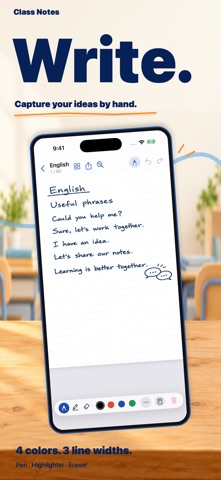
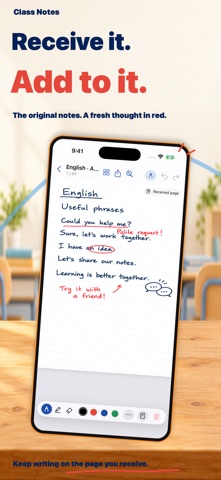
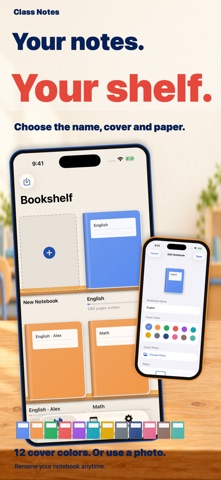
Class Notebook is a handwriting notebook app designed for students. Just like a 60-page paper notebook, you can organize your notes by subject or theme. You can share your handwritten pages with friends or teachers, and the recipient can directly add their own handwriting to the shared page. ■ Device Compatibility (Recommended) This app is designed for handwriting with Apple Pencil. Due to screen size, we highly recommend using an iPad. While you can handwrite with your finger or a stylus on an iPhone, an iPad provides a much more comfortable experience for writing across a full notebook page. ■ Manage Notes on a Bookshelf Find and open your class notes instantly from a wooden bookshelf design. When creating a notebook, you can choose the name, cover color (12 colors), and paper type. You can also rename it or set a photo as the cover later. The cover also displays your page progress. ■ Premium Handwriting Experience ・ On iPad, use standard Apple pen tools (Pen, Marker, Eraser, etc.). ・ On iPad, toggle "Draw with Finger" on or off. ・ On iPhone, choose from Pen, Marker, and Eraser, along with color and line thickness. ・ Undo/Redo and clear entire page (with a confirmation prompt to prevent accidental deletion). ・ Pinch to zoom in for easily writing fine text. ・ On iPad, write seamlessly in the same paper size regardless of screen orientation (portrait or landscape). ■ Paper Styles for Every Class In addition to Blank, Lined, and Grid paper, the Premium "Paper Pack" unlocks 6 more styles: Dot, Cornell, English 4-Line, Manuscript (Vertical writing), Vertical Lined, and Sheet Music. Paper styles can be set per notebook and are reflected in exported PDFs or images. ■ Share Handwritten Pages Send written pages via AirDrop or Files. Recipients can check the content, import it into a blank page in their own notebook, and add their notes directly. Perfect for sharing notes with an absent friend or getting corrections from a teacher. ・ Choose whether to include the sender's name. ・ Imported pages are marked with a "Received Page" stamp. ・ A confirmation screen appears when importing onto a page that already contains writing, allowing you to revert to the previous state. ・ Even without an existing notebook, you can create a new one on the spot to receive the page. ■ Review History via Calendar Features an "Edit History" tab to review pages by the date they were written. See at a glance when and in which class notebook you wrote. You can also check the writing history for each specific notebook. ■ Export Features (Great for Submissions) ・ Export a single page as an image. ・ Select multiple pages and export them as a single PDF. ・ Export an entire notebook as a PDF (choose whether to include blank pages). If you register your name in the settings, your name and the date will be automatically printed at the bottom of exported pages. At a glance, everyone knows who wrote it and when—perfect for submitting homework or reports. ■ Fully Functional Free Version Even in the free version, you can use all the following features within one notebook: ・ Handwriting, Eraser, Undo/Redo ・ Blank / Lined / Grid paper ・ Send and import pages ・ Export single pages, multiple pages, or the entire notebook ・ Change cover colors and photos Try it out with one notebook without any feature restrictions. ■ Premium (One-time Purchase) Pay once and use it forever. This is not a subscription. ・ Create unlimited notebooks (manage by subjects like English, Math, Science, History, etc.) ・ Unlock the Paper Pack (6 extra styles) ■ Recommended For: ・ Students who want to organize their class notes by subject. ・ Those who want to carry their handwritten notes on an iPad with Apple Pencil. ・ Users who want to easily exchange single note pages with friends or teachers. ・ Students who need to submit handwritten homework or assignments.
Write naturally like on a paper notebook, share pages when needed, and export data digitally. Give it a try for your everyday class notes!
Each subscription will automatically renew 3 days before the expiration date for
the same time period. Subscriptions can be cancelled at any time before the renewal.