

ClassBench: Teacher Workbench
ClassBench: Teacher Workbench is made and published by Longyan Xinluo Zhejia Technology Co., Ltd. AppBrain is an independent app data site and isn't affiliated with Longyan Xinluo Zhejia Technology Co., Ltd. The app name, icon, screenshots and description belong to Longyan Xinluo Zhejia Technology Co., Ltd and are shown as published on the App Store.
AppBrain's verdict
New- Rating on App Store
- 5.00
- 1 ratings
- Last updated
- September 19, 2026
- Size
- 28.7 MB
ClassBench: Teacher Workbench came out 74 days ago. It doesn't have enough ratings yet to judge what users think.
User feedback
Ratings and reviews on the App StoreComments on ClassBench: Teacher Workbench for iOS
We don't have enough comments to show example comments. Please check back later.
Store listing
By Longyan Xinluo Zhejia Technology Co., Ltd, from the App Store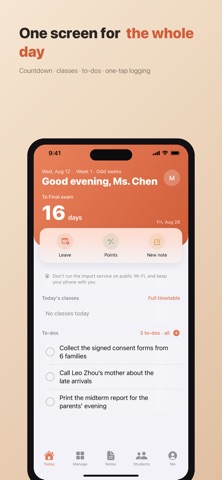


Description by Longyan Xinluo Zhejia Technology Co., Ltd Written by the developer, not by AppBrain. Click to read.
Running a class means keeping track of small, scattered things: who's on leave, whose turn it is for cleaning duty, which students you spoke with this week, how many days until the midterm. They end up spread across chat apps, notes and paper books — hard to find, harder to hand over. ClassBench keeps them in one place.
TODAY
Today's timetable, to-dos, exam countdowns and student birthdays on one screen. The timetable handles odd and even week rotations and shows the right classes for the current teaching week. To-do reminders are worded so no student information appears on your lock screen.
MANAGE
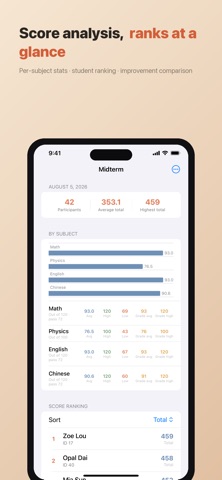
Log and clear leave, award or deduct points, schedule and rate cleaning duty, keep parent contacts, and pull a term report. Enter exam scores by subject or import them from Excel, and get per-subject averages, the list of students below the pass mark, and class statistics. Set subjects and pass marks once and they become the class default for every new exam. Grade Scale Reference simulates banded scoring against this class's own results — a teaching aid, not a real conversion.
STUDENT PROFILES
A profile for every student: basics, two guardians, points, leave, score trends and a growth timeline. Add students in bulk or import an Excel roster, and arrange, swap or resize seats on a seating chart. Guardian consent can be signed by hand on your phone, or photographed from a paper form and archived.
WORK NOTES
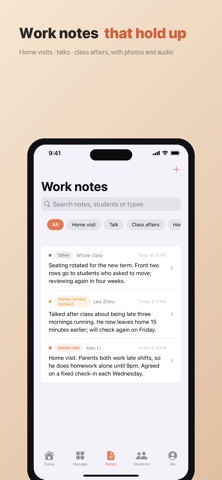
Jot down a home visit, a talk or a parent call, with photos, audio or video attached and linked to specific students. Recordings are transcribed by on-device speech recognition — the audio never leaves your phone. Note types are yours to maintain.
DESKTOP WORKBENCH
Start it manually and a computer on the same local network can open an encrypted web page, sign in with a one-time code, and enter students, scores and timetables in bulk. It never touches a server, stops itself when the app is backgrounded, and logs every access.
WIDGETS AND SHORTCUTS
Four widgets: today's timetable and to-dos, attendance, exam countdown, and quick actions. Long-press the app icon to log leave, award points or write a note. Siri works too — ask it to open a student or check the next exam.
BACKUP AND DEVICE TRANSFER
Export everything as an encrypted backup with a password you choose, photos and recordings included. Save it via AirDrop or Files, and open it to restore. Moving to a new phone is simpler still: put both on the same Wi-Fi, show the QR code on the old one, scan it with the new one, and the data moves directly between them, encrypted, without touching a server.
LANGUAGES AND ACCESSIBILITY
The interface is available in English, Simplified Chinese and Traditional Chinese, following your system language or set per app. VoiceOver reads every control, including score tables and trend charts. Text scales with Dynamic Type all the way to the accessibility sizes, and layouts reflow rather than truncate. Turning on Reduce Motion stops looping animations. Scores below the pass mark carry a triangle marker as well as red, so colour is never the only cue.
PRIVACY
This is the part ClassBench most wants to be clear about.
Student and parent information is encrypted with SM4-GCM and stored on the device. The master key lives in the system keychain, restricted to this device and excluded from backups. There are no ads, no analytics, no telemetry and no third-party SDKs, no account to register for, and no code path that sends data to the internet.
The app can be locked with a passcode, unlocked quickly with Face ID or Touch ID, and locks itself when backgrounded — student data never shows in the app switcher. Deletion works at three levels: one student, one class, or everything, so records can go the moment a student transfers, graduates, or a parent asks.
Please obtain guardian consent offline before entering student information. A printable consent form is built into the app.
Safety and technology
Found in the app by AppBrain- Price
- Free
- App size
- 28.7 MB
- Content rating
- Everyone
Technologies used by ClassBench: Teacher Workbench
Releases
Updates seen on the App Store- Version
- 1.8
- Launched
- August 2026
No changelog data
Alternatives
Similar apps and more from Longyan Xinluo Zhejia Technology Co., LtdAlternatives to ClassBench: Teacher Workbench


Rankings
App Store top chartsApp Store Rankings for ClassBench: Teacher Workbench
About the app and developer
About ClassBench: Teacher Workbench
ClassBench: Teacher Workbench is an education app developed by Longyan Xinluo Zhejia Technology Co., Ltd.
User Ratings
ClassBench: Teacher Workbench is rated 5.00 out of 5 stars. The rating is based on one rating ratings.
App Information
ClassBench: Teacher Workbench is freely available from the App Store. The app size is 28.75 MB. The latest version available is 1.8. The last update was on September 19, 2026.
Technical Requirements
The app has a content rating of Everyone. The app has been available on the App Store since August 2026.
Developer information for Longyan Xinluo Zhejia Technology Co., Ltd
Frequently asked questions about ClassBench: Teacher Workbench
Is ClassBench: Teacher Workbench free?
Yes. ClassBench: Teacher Workbench is free on the App Store.
Is ClassBench: Teacher Workbench still available?
Yes. ClassBench: Teacher Workbench is on the App Store, and the last update we saw was on September 19, 2026.
How large is ClassBench: Teacher Workbench?
ClassBench: Teacher Workbench is 28.75 MB.
Is ClassBench: Teacher Workbench suitable for children?
App Store rates the content of ClassBench: Teacher Workbench as suitable for everyone.
How do people rate ClassBench: Teacher Workbench?
ClassBench: Teacher Workbench has one rating of 5.00 stars on the App Store.
Who made ClassBench: Teacher Workbench?
ClassBench: Teacher Workbench was developed by Longyan Xinluo Zhejia Technology Co., Ltd. It is listed in the education category on the App Store.
What are the best alternatives to ClassBench: Teacher Workbench?
People looking at ClassBench: Teacher Workbench also look at these education apps: BeesTeacher, 班主任清单-教师好助手, 星光班主任工作台, 灵犀同学, 班级管理-轻量云班级助手.