




AppBrain's verdict
- Last updated
- October 6, 2026
- Size
- 42.8 MB
User feedback
Ratings and reviews on the App StoreComments on Clearbyte: Photo Storage for iOS
We don't have enough comments to show example comments. Please check back later.
Store listing
By ENFRAME CIC, from the App StoreDescription by ENFRAME CIC Written by the developer, not by AppBrain. Click to read.
Most cleanup apps hand you a grid of thumbnails and ask you to pick what to delete. Clearbyte works the other way round. It finds your oldest, heaviest files, saves each one back at roughly half the size, and then removes the heavy original once the smaller version is safely in your library.
HOW OPTIMIZE WORKS
Every optimized item is written as a new file and the original is removed afterwards. The new file carries the original's date, location, favourite status and album membership, so your library looks unchanged: same albums, same order, same memories. What changes is how much room they take.
Removing the originals is what actually gives the space back, and iOS asks you to confirm it. Anything removed goes to Recently Deleted, where it stays for 30 days.
WHAT IT DOES
Optimize. Each session works through a cohort of your oldest media, rebuilding files smaller. Sessions are time-boxed to well under a minute, and the next launch picks up where the last one stopped instead of redoing work.
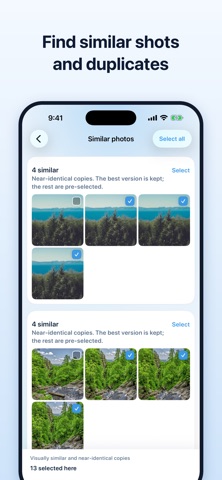
Smart Clean. Finds what is genuinely disposable: burst duplicates, out-of-focus shots, blank frames, screenshots of prices, chats and social posts, accidental one-second videos and long static clips. Nothing is removed until you confirm it in Apple's own delete sheet.
Compress. Pick specific photos or videos and shrink them on demand.
Secret Folder. Move photos, videos and documents into an on-device folder.
Network Scan. Check your connection: type, protocol, address, latency, jitter, stability and speed, with a graded result.
WHAT TO KNOW BEFORE YOU START
Optimizing replaces a file. The picture stays, and it keeps its date and its albums, but the original file itself is not kept alongside the smaller one — keeping both would save you nothing. If you want an untouched original of a particular shot, keep a copy outside your library first.
Nothing is deleted without your confirmation. Every removal goes through the system prompt, and Recently Deleted holds it for 30 days.
On device. Your photos and videos are processed on your iPhone and are never uploaded.
Built for readable text and large controls, with full Dynamic Type, VoiceOver and Reduce Motion support.
SUBSCRIPTION
Clearbyte Premium unlocks optimization, Smart Clean, Compress, the secret folder and network scan. Subscriptions renew automatically unless cancelled at least 24 hours before the end of the current period. Manage or cancel in App Store settings.
Terms: https://clearbyte-d50ba.web.app/terms.pdf
Privacy: https://clearbyte-d50ba.web.app/privacy.pdf
EULA: https://www.apple.com/legal/internet-services/itunes/dev/stdeula/
Safety and technology
Found in the app by AppBrain- Price
- Free
- App size
- 42.8 MB
- Content rating
- Everyone
Technologies used by Clearbyte: Photo Storage
Releases
Updates seen on the App Store- Version
- 1.1
- Launched
- September 2026
No changelog data
Alternatives
Similar apps and more from ENFRAME CICAlternatives to Clearbyte: Photo Storage


Rankings
App Store top chartsApp Store Rankings for Clearbyte: Photo Storage
About the app and developer
About Clearbyte: Photo Storage
Clearbyte: Photo Storage is an utilities app developed by ENFRAME CIC.
What is the rating of Clearbyte: Photo Storage?
Clearbyte: Photo Storage has no ratings yet.
Is Clearbyte: Photo Storage free?
Clearbyte: Photo Storage is free. The app size is 42.81 MB. The latest version available is 1.1. The last update was on October 6, 2026.
What are the requirements for Clearbyte: Photo Storage?
The app has a content rating of Everyone. The app has been available on the App Store since September 2026.
Clearbyte: Photo Storage is made and published by ENFRAME CIC. AppBrain is an independent app data site and isn't affiliated with ENFRAME CIC. The app name, icon, screenshots and description belong to ENFRAME CIC and are shown as published on the App Store.
Developer information for ENFRAME CIC
Address:
Frequently asked questions about Clearbyte: Photo Storage
Is Clearbyte: Photo Storage free?
Yes. Clearbyte: Photo Storage is free on the App Store.
Is Clearbyte: Photo Storage still available?
Yes. Clearbyte: Photo Storage is on the App Store, and the last update we saw was on October 6, 2026.
How large is Clearbyte: Photo Storage?
Clearbyte: Photo Storage is 42.81 MB.
Is Clearbyte: Photo Storage suitable for children?
App Store rates the content of Clearbyte: Photo Storage as suitable for everyone.
Who made Clearbyte: Photo Storage?
Clearbyte: Photo Storage was developed by ENFRAME CIC. It is listed in the utilities category on the App Store.
What are the best alternatives to Clearbyte: Photo Storage?
People looking at Clearbyte: Photo Storage also look at these utilities apps: Boost Station, CleanRadar: Storage Cleaner, Cleaner Tool for Phone & VPN, TorideKey: Password manager, ZEUS Browser.