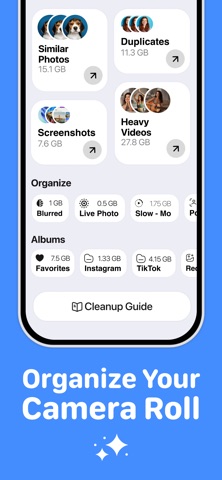
Clearly: Phone Storage Cleaner
Clearly: Phone Storage Cleaner is made and published by FlashSoft OU. AppBrain is an independent app data site and isn't affiliated with FlashSoft OU. The app name, icon, screenshots and description belong to FlashSoft OU and are shown as published on the App Store.
AppBrain's verdict
- Rating on App Store
- 5.00
- 4 ratings
- Last updated
- October 1, 2026
It doesn't have enough ratings yet to judge what users think.
Rankings
App Store top chartsApp Store Rankings for Clearly: Phone Storage Cleaner
Competitors
Similar apps and more from FlashSoft OUAlternatives to Clearly: Phone Storage Cleaner
More from FlashSoft OU
Releases
Updates seen on the App Store- Version
- 2.0.0
- Launched
- December 2025
No changelog data
User feedback
Ratings and reviews on the App StoreComments on Clearly: Phone Storage Cleaner for iOS
We don't have enough comments to show example comments. Please check back later.
Technology
Found in the app by AppBrain- Price
- Free
- App size
- 29.5 MB
- Content rating
- Everyone
Technologies used by Clearly: Phone Storage Cleaner
About the app and developer
About Clearly: Phone Storage Cleaner
Clearly: Phone Storage Cleaner is an utilities app developed by FlashSoft OU.
User Ratings
Clearly: Phone Storage Cleaner is rated 5.00 out of 5 stars. The rating is based on 4 ratings.
App Information
Clearly: Phone Storage Cleaner is freely available from the App Store. The app size is 29.54 MB. The latest version available is 2.0.0. The last update was on October 1, 2026.
Technical Requirements
The app has a content rating of Everyone. The app has been available on the App Store since December 2025.
Developer information for FlashSoft OU
Address:
Store listing
By FlashSoft OU, from the App StoreDescription by FlashSoft OU Written by the developer, not by AppBrain. Click to read.
Your camera roll grows every day: ten takes of the same sunset, screenshots you needed once, videos nobody will watch again. When your phone says storage is full, sorting it by hand takes an evening. Clearly does the sorting, you decide what goes.
PHOTOS
• Similar and duplicate photos grouped together, so you keep the best one
• Blurry photos, screenshots, selfies and bursts in their own lists
• Swipe Clean: swipe left to delete, right to keep, month by month
• Browse your library by year and start with the oldest photos
• Turn Live Photos into still photos and drop the video part
• Smart screenshots: receipts, chats, QR codes and memes sorted for you, right on your phone
• On This Day: photos from this date in past years, keep the best and clear the rest
VIDEOS AND FILES
• Compress videos with a quality slider, see the new size and compare before and after side by side
• Your biggest videos at the top of the list
• Large and duplicate files in the Files app, originals left alone
CONTACTS
• Merge duplicate contacts
• Find contacts with no name or no number
• Back up your contacts before you change anything
PRIVATE AND IN CONTROL
• Secret Space: hide photos behind a passcode or Face ID
• Photos are analyzed on your phone, nothing is uploaded
• Deleted photos go to Recently Deleted, so you can still change your mind
• A widget shows how full your storage is, on the Home Screen or Lock Screen
• Stats show how much space you have freed so far
• Step-by-step guides to offload unused apps and clear space other apps take up
WHO IT'S FOR
• Anyone who keeps seeing "Storage Full"
• Parents with thousands of near-identical photos of their kids
• Travelers making room before a trip
• Anyone moving to a new phone who wants to bring a tidy library
FREE AND PREMIUM
Free: scan your whole library, clear screenshots, blurry photos and heavy videos, use Swipe Clean and delete up to 250 items. Watch a short ad for 100 more deletions or to try a Premium tool.
Premium: duplicates, similar photos from any month, Smart Clean, large files, video compression and Secret Space, with no limits. Choose weekly with a free trial, or yearly.
Clearly works with your photos, videos, files and contacts. It does not remove system data or app caches: iOS does not let any app do that.