

Click. Cam is made and published by 健辉 谭. AppBrain is an independent app data site and isn't affiliated with 健辉 谭. The app name, icon, screenshots and description belong to 健辉 谭 and are shown as published on the App Store.
AppBrain's verdict
- Last updated
- August 4, 2026
Rankings
App Store top chartsApp Store Rankings for Click. Cam
Competitors
Similar apps and more from 健辉 谭Alternatives to Click. Cam


More from 健辉 谭


Releases
Updates seen on the App Store- Version
- 1.4
- Launched
- June 2026
No changelog data
User feedback
Ratings and reviews on the App StoreComments on Click. Cam for iOS
We don't have enough comments to show example comments. Please check back later.
Technology
Found in the app by AppBrain- Price
- Free
- App size
- 3.24 MB
- Content rating
- Everyone
Technologies used by Click. Cam
About the app and developer
About Click. Cam
Click. Cam is a photo & video app developed by 健辉 谭.
User Ratings
The app has no ratings yet.
App Information
Click. Cam is freely available from the App Store. The app size is 3.24 MB. The latest version available is 1.4. The last update was on August 4, 2026.
Technical Requirements
The app has a content rating of Everyone. The app has been available on the App Store since June 2026.
Developer information for 健辉 谭
Address:
Frequently asked questions about Click. Cam
Is Click. Cam free?
Yes. Click. Cam is free on the App Store.
Is Click. Cam still available?
Yes. Click. Cam is on the App Store, and the last update we saw was on August 4, 2026.
How large is Click. Cam?
Click. Cam is 3.24 MB.
Is Click. Cam suitable for children?
App Store rates the content of Click. Cam as suitable for everyone.
Who made Click. Cam?
Click. Cam was developed by 健辉 谭. It is listed in the photo & video category on the App Store.
What are the best alternatives to Click. Cam?
People looking at Click. Cam also look at these photo & video apps: LiveFilms, Loroca, Aschera: Film Camera & Filters, PlainCam, 拍拍贴 - 贴纸随手拍,让美好触手可及.
Store listing
By 健辉 谭, from the App Store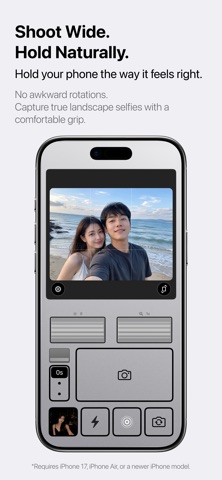

Description by 健辉 谭 Written by the developer, not by AppBrain. Click to read.
Shoot Landscape, Hold Naturally
No need to rotate your phone to capture landscape photos and videos.
Keep the familiar portrait grip while enjoying a wider frame that effortlessly fits scenery, friends, and memorable moments.
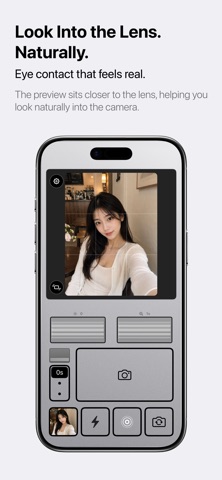
More Natural Eye Contact
With traditional front cameras, the preview area is often positioned far from the lens, causing your gaze to appear slightly off.
ClickCam places the viewfinder closer to the camera lens, helping your eyes align more naturally with the lens for more authentic selfies and better eye contact.
A Real Camera-Inspired Experience
A skeuomorphic camera interface, intuitive dial controls, and a familiar shutter layout bring the feel of a dedicated camera to your phone.
Every detail has been carefully crafted to make capturing moments easier and more enjoyable.
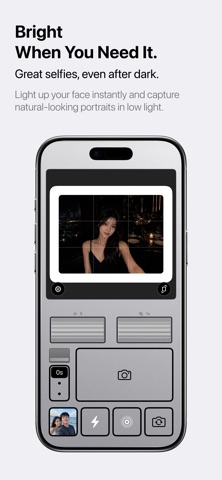
Front-Facing Fill Light
Whether you’re in a café, restaurant, or on the street at night, capture brighter and more natural-looking selfies.
The front-facing fill light is optimized for self-portraits, helping you look your best even in low-light conditions.
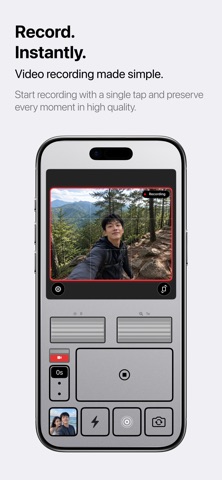
Instant Video Recording
Start recording with a single tap and capture life’s best moments instantly.
From travel memories to daily vlogs, creating videos becomes simple and effortless.
Key Features:
- Capture landscape photos and videos while holding your phone vertically
- Viewfinder positioned closer to the camera lens for more natural eye contact
- Front-facing fill light for selfies
- Quick video recording mode
- Camera-inspired skeuomorphic interface
- Clean and intuitive user experience