

ClientsTime is made and published by S. Cope. AppBrain is an independent app data site and isn't affiliated with S. Cope. The app name, icon, screenshots and description belong to S. Cope and are shown as published on the App Store.
AppBrain's verdict
- Last updated
- April 17, 2025
Rankings
App Store top chartsApp Store Rankings for ClientsTime
Releases
Updates seen on the App Store- Version
- 2.0
- Launched
- January 2025
No changelog data
User feedback
Ratings and reviews on the App StoreComments on ClientsTime for iOS
We don't have enough comments to show example comments. Please check back later.
Technology
Found in the app by AppBrain- Price
- $5.99
- App size
- 2.40 MB
- Content rating
- Everyone
Technologies used by ClientsTime
About the app and developer
About ClientsTime
ClientsTime is a productivity app developed by S. Cope.
What is the rating of ClientsTime?
ClientsTime has no ratings yet.
Is ClientsTime free?
ClientsTime costs $5.99. The app size is 2.40 MB. The latest version available is 2.0. The last update was on April 17, 2025.
What are the requirements for ClientsTime?
The app has a content rating of Everyone. The app has been available on the App Store since January 2025.
Developer information for S. Cope
Address:
Frequently asked questions about ClientsTime
Is ClientsTime free?
No. ClientsTime costs $5.99 on the App Store.
Is ClientsTime still available?
Yes. ClientsTime is on the App Store, and the last update we saw was on April 17, 2025.
How large is ClientsTime?
ClientsTime is 2.40 MB.
Is ClientsTime suitable for children?
App Store rates the content of ClientsTime as suitable for everyone.
Who made ClientsTime?
ClientsTime was developed by S. Cope. It is listed in the productivity category on the App Store.
Store listing
By S. Cope, from the App Store




Description by S. Cope Written by the developer, not by AppBrain. Click to read.
Designed for speed, clarity, and ease-of-use, ClientsTime helps professionals take control of their time — without subscription fees, unnecessary logins, or complicated setup.
Why Professionals Choose ClientsTime:
Track time by client, project, subject, and notes
Add entries manually or with the built-in stopwatch
Tap to edit, swipe to delete — everything is intuitive
Sync task reminders directly to your iPhone’s Reminders app
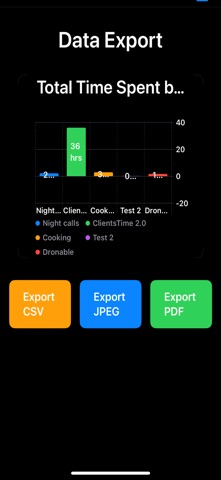
Export detailed data in CSV, PDF, or JPEG formats
Filter exports by client, date range, or notes for complete control
View total billable hours and beautiful summary charts
Enjoy full support for Light and Dark Mode
Share exports instantly via the iOS Share Sheet
No internet connection required — everything stays on your device
Powerful Stopwatch Functionality
With ClientsTime’s built-in stopwatch, you can track work as it happens. Simply tap “Start” to begin logging time and “Stop” to finish. The elapsed time is instantly recorded as a time entry, complete with notes and subject fields for maximum accuracy. It’s perfect for meetings, consultations, site visits, or any situation where manual tracking gets in the way.
Effortless Data Export
ClientsTime makes reporting simple. Export your time entries and summaries in clean, professional formats:
CSV for use in Microsoft Excel, Google Sheets, Apple Numbers, and other spreadsheet tools
PDF for polished, printable reports ready for clients or accounting
JPEG to save and share visual charts and summaries instantly
Exports are generated locally and can be opened in any app that supports the file type — no cloud accounts, no locked-in formats.
Used by Professionals Across Industries:
Attorneys tracking hours per client case
Contractors managing job sites and labor
Therapists logging session notes and time
Consultants and freelancers billing hourly
Project managers overseeing multiple clients
Anyone who needs reliable, exportable time logs
Built for Independence and Privacy
ClientsTime does not require a login or subscription. All of your data is stored directly on your device, giving you full control and peace of mind. No syncing issues. No account lockouts. No unexpected charges.
Bill with precision.
Track, export, and own your time with ClientsTime.
Download ClientsTime v2.0 Today