

Clippit: AI Text To Speech
Clippit: AI Text To Speech is made and published by Spencer Yen. AppBrain is an independent app data site and isn't affiliated with Spencer Yen. The app name, icon, screenshots and description belong to Spencer Yen and are shown as published on the App Store.
AppBrain's verdict
Loved by users- Rating on App Store
- 4.59
- 174 ratings
- Last updated
- December 20, 2025
Users love it: 4.6 stars from 174 ratings.
Rankings
App Store top chartsApp Store Rankings for Clippit: AI Text To Speech
Competitors
Similar apps and more from Spencer YenMore from Spencer Yen


Releases
Updates seen on the App Store- Version
- 2.1.3
- Launched
- October 2024
No changelog data
User feedback
Ratings and reviews on the App StoreComments on Clippit: AI Text To Speech for iOS
We don't have enough comments to show example comments. Please check back later.
Technology
Found in the app by AppBrain- Price
- Free
- App size
- 85.9 MB
- Content rating
- Everyone
Technologies used by Clippit: AI Text To Speech
About the app and developer
About Clippit: AI Text To Speech
Clippit: AI Text To Speech is a productivity app developed by Spencer Yen.
User Ratings
Clippit: AI Text To Speech is rated 4.59 out of 5 stars. The rating is based on 170 ratings.
App Information
Clippit: AI Text To Speech is freely available from the App Store. The app size is 85.86 MB. The latest version available is 2.1.3. The last update was on December 20, 2025.
Technical Requirements
The app has a content rating of Everyone. The app has been available on the App Store since October 2024.
Developer information for Spencer Yen
Address:
Frequently asked questions about Clippit: AI Text To Speech
Is Clippit: AI Text To Speech free?
Yes. Clippit: AI Text To Speech is free on the App Store.
Is Clippit: AI Text To Speech still available?
Yes. Clippit: AI Text To Speech is on the App Store, and the last update we saw was on December 20, 2025.
How large is Clippit: AI Text To Speech?
Clippit: AI Text To Speech is 85.86 MB.
Is Clippit: AI Text To Speech suitable for children?
App Store rates the content of Clippit: AI Text To Speech as suitable for everyone.
How do people rate Clippit: AI Text To Speech?
Clippit: AI Text To Speech scores 4.59 out of 5 stars, from 174 ratings on the App Store.
Who made Clippit: AI Text To Speech?
Clippit: AI Text To Speech was developed by Spencer Yen. It is listed in the productivity category on the App Store.
Store listing
By Spencer Yen, from the App Store


Description by Spencer Yen Written by the developer, not by AppBrain. Click to read.
Clippit doesn’t just read text aloud. It turns your content into natural, conversational audio that feels like your favorite podcast.
"Clippit revolutionized how I consume content. Instead of spending hours reading, I can now listen during my commute or walk to college." - Elliot G.
WHY LISTEN INSTEAD OF READ?
Clippit helps you reclaim your time and stay on top of what matters by turning any text into engaging audio:
- Study smarter: Convert lecture notes, slides, and online study guides into a podcast-style review.
- Stay informed on the go: Turn long-form articles, reports, and newsletters into audio you can listen to hands-free.
Audio learning has been shown to improve retention, save time, and enable true multitasking. Clippit makes that accessible for anything you read.
WHAT MAKES CLIPPIT DIFFERENT?
Most text-to-speech apps sound robotic and monotonous. Clippit gives you:
- Podcast-style conversations: Your content is synthesized into a back-and-forth between multiple speakers, so it feels like you’re listening to a real show.
- Voices inspired by your favorite hosts: Choose from different voice styles and tones to match the kind of podcast you love.
- Smart synthesis: Clippit doesn’t just read text; it summarizes and structures it into a more listenable, flowing conversation.
WHAT OUR COMMUNITY IS SAYING
"I love the way the app turns my study notes and class readings into entertaining podcasts while emulating my favourite podcast online" - Emily M.
"I started using NotebookLM, but when I found this app it made it so much easier to listen to content on the go. It does a great job synthesizing the content uploaded and creates a very listenable conversation" - Jennifer S.
"It’s so funny to create podcast clips that sound like Joe Rogan and Alex Cooper" - Daniel Z.
"It’s so much easier to listen to a podcast version of my notes and online study guides to help me study" - Sam R.
FEATURES
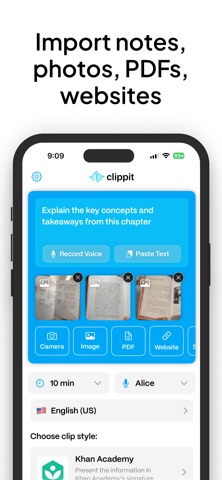
- Intelligent Content Import: Easily import PDFs, articles, notes, screenshots, and links. Clippit’s smart content recognition pulls out the text and gets it ready for audio.
- 2-Speaker Conversation Style: Turn dry text into a dynamic two-speaker conversation. Choose from a variety of voice styles inspired by popular podcasters and adjust the duration of each episode.
- Topic Generation: Not sure where to start? Use AI-powered suggestions to generate engaging audio content on any topic, from class subjects to industry trends.
- Customizable Playback: Listen your way, change playback speed, skip forward or back 15 seconds, and pick up right where you left off.
GO PRO
Unlock the full power of Clippit with Clippit Pro:
- Unlimited text-to-audio generations from unlimited sources
- 2-speaker podcast clips
- 10+ high-quality voice options
Need help? Contact us at hi@clippit.fm
Terms of Use: https://mep.sh/clipslm/terms