

Clock In & Out Hours Tracker
Clock In & Out Hours Tracker is made and published by Jasmine Rakesh Patel. AppBrain is an independent app data site and isn't affiliated with Jasmine Rakesh Patel. The app name, icon, screenshots and description belong to Jasmine Rakesh Patel and are shown as published on the App Store.
AppBrain's verdict
EstablishedWell rated- Rating on App Store
- 4.49
- 1,315 ratings
- Last updated
- November 19, 2025
- Size
- 101.1 MB
Users rate it well: 4.5 stars from 1,315 ratings.
User feedback
Ratings and reviews on the App StoreComments on Clock In & Out Hours Tracker for iOS
We don't have enough comments to show example comments. Please check back later.
Store listing
By Jasmine Rakesh Patel, from the App Store


Description by Jasmine Rakesh Patel Written by the developer, not by AppBrain. Click to read.
Meet Work Hours Tracker: Timesheet—the ultimate app for accurately logging your hours, pay, and overtime. Whether you punch in for an hourly job, track multiple shifts, or just need a handy timecard solution, we’ve got you covered.
Effortless Tracking & Scheduling
- Precision Timers: Track your hours down to the second—no more guessing how much overtime you’ve racked up.
- Smart Pause & Resume: Clock in, pause for a break, then clock back in with a tap. Perfect for lunch breaks, quick errands, or unexpected interruptions.
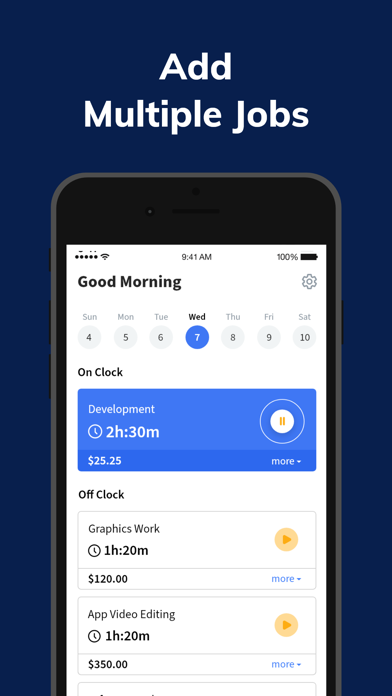
Flexible Worklog & Scheduling: Update your schedule or shift details anytime, anywhere. Great for freelancers, gig workers, or anyone juggling multiple jobs.
Overtime, Payroll & More:
- Overtime Calculation: Keep tabs on extra hours effortlessly—know when you hit your limit.
- Payroll Insights: Track how much you’re earning on each shift for accurate paychecks.
- Timecard Organization: Everything in one place—no more paper timesheets or scattered spreadsheets.
Visualize Your Progress:
- Daily, Weekly, or Monthly View: Quickly see your total hours, pay, or overtime to plan ahead.
- Detailed Worklog: Filter by job or shift to get a clear overview of your productivity and earnings.
- Custom Notifications: Set reminders so you’ll never forget to punch in, clock out, or review timesheets.
Why You’ll Love It:
- User-Friendly Interface: No steep learning curve—jump right in and start tracking.
- Built for Everyone: Ideal for hourly employees, contractors, freelancers, and business owners.
- Cut the Stress: Automatic calculations mean fewer mistakes and more peace of mind.
Who Benefits?
- Hourly Employees wanting accurate timesheets for payroll.
- Shift Workers balancing multiple schedules or variable hours.
- Freelancers & Contractors needing a reliable job tracker to bill clients accurately.
- Managers & Entrepreneurs eager to streamline team schedules and track labor costs.
Breaks, Pauses & Beyond:
Life doesn’t stop just because you’re on the clock. Incorporate breaks, lunch pauses, or quick off-the-job tasks into your daily timesheet with ease.
Stay Organized, Stay Efficient:
- Integrated Worklog & Schedule: Manage multiple shifts, jobs, or timecard entries without hassle.
- Fast Editing: Need to fix a late punch or adjust a clock-out time? Do it instantly—no complicated steps.
- Personalized Notes: Add memos about each shift or task. Perfect for tracking tips, project details, or other important info.
Ready to Simplify Your Workday?
Work Hours Tracker: Timesheet makes sure you never lose track of valuable hours again. With the calculator-like precision of our timers and the convenience of on-the-go scheduling, it’s your all-in-one solution.
Download now to see why so many people are making the switch from outdated spreadsheets to a modern, streamlined approach. Start managing your shifts, pay, overtime, and schedule effortlessly—every day.
Note: Some features may vary by device. For more information, visit our support page or check the in-app FAQ.
Privacy Policy: https://hourstracker-faq.gosukuza.com/main/articles/1616132094033
Terms of Use: https://hourstracker-faq.gosukuza.com/main/articles/1616132094266
Safety and technology
Found in the app by AppBrain- Price
- Free
- App size
- 101.1 MB
- Content rating
- Everyone
Technologies used by Clock In & Out Hours Tracker
Releases
Updates seen on the App Store- Version
- 10.0.2
- Launched
- April 2019
No changelog data
Alternatives
Similar apps and more from Jasmine Rakesh PatelAlternatives to Clock In & Out Hours Tracker





Also available on Google Play

Rankings
App Store top chartsApp Store Rankings for Clock In & Out Hours Tracker
About the app and developer
About Clock In & Out Hours Tracker
Clock In & Out Hours Tracker is a business app developed by Jasmine Rakesh Patel.
User Ratings
Clock In & Out Hours Tracker is rated 4.49 out of 5 stars. The rating is based on 1.3 thousand ratings.
App Information
Clock In & Out Hours Tracker is freely available from the App Store. The app size is 101.07 MB. The latest version available is 10.0.2. The last update was on November 19, 2025.
Technical Requirements
The app has a content rating of Everyone. The app has been available on the App Store since April 2019.
Developer information for Jasmine Rakesh Patel
Address:
Frequently asked questions about Clock In & Out Hours Tracker
Is Clock In & Out Hours Tracker free?
Yes. Clock In & Out Hours Tracker is free on the App Store.
Is Clock In & Out Hours Tracker still available?
Yes. Clock In & Out Hours Tracker is on the App Store, and the last update we saw was on November 19, 2025.
How large is Clock In & Out Hours Tracker?
Clock In & Out Hours Tracker is 101.07 MB.
Is Clock In & Out Hours Tracker suitable for children?
App Store rates the content of Clock In & Out Hours Tracker as suitable for everyone.
How do people rate Clock In & Out Hours Tracker?
Clock In & Out Hours Tracker scores 4.49 out of 5 stars, from 1,315 ratings on the App Store.
Who made Clock In & Out Hours Tracker?
Clock In & Out Hours Tracker was developed by Jasmine Rakesh Patel. It is listed in the business category on the App Store.
What are the best alternatives to Clock In & Out Hours Tracker?
People looking at Clock In & Out Hours Tracker also look at these business apps: Clock In: Shift Hours Tracker, Faxify: Send Fax from Phone, Hours - Tracker & Time Clock, Time Squared: Hours Tracker, Work Hours & Pay Calculator.