

Clock quiz, What time?
Clock quiz, What time? is made and published by hideo nakamura. AppBrain is an independent app data site and isn't affiliated with hideo nakamura. The app name, icon, screenshots and description belong to hideo nakamura and are shown as published on the App Store.
AppBrain's verdict
- Last updated
- July 3, 2025
Rankings
App Store top chartsApp Store Rankings for Clock quiz, What time?
Competitors
Similar apps and more from hideo nakamuraMore from hideo nakamura




Releases
Updates seen on the App Store- Version
- 1.6.01
- Launched
- April 2025
No changelog data
User feedback
Ratings and reviews on the App StoreComments on Clock quiz, What time? for iOS
We don't have enough comments to show example comments. Please check back later.
Technology
Found in the app by AppBrain- Price
- $1.99
- App size
- 1.23 MB
- Content rating
- Everyone
Technologies used by Clock quiz, What time?
About the app and developer
About Clock quiz, What time?
Clock quiz, What time? is a games app developed by hideo nakamura.
User Ratings
The app has no ratings yet.
App Information
Clock quiz, What time? costs $1.99. The app size is 1.23 MB. The latest version available is 1.6.01. The last update was on July 3, 2025.
Technical Requirements
The app has a content rating of Everyone. The app has been available on the App Store since April 2025.
Developer information for hideo nakamura
Address:
Frequently asked questions about Clock quiz, What time?
Is Clock quiz, What time? free?
No. Clock quiz, What time? costs $1.99 on the App Store.
Is Clock quiz, What time? still available?
Yes. Clock quiz, What time? is on the App Store, and the last update we saw was on July 3, 2025.
How large is Clock quiz, What time??
Clock quiz, What time? is 1.23 MB.
Is Clock quiz, What time? suitable for children?
App Store rates the content of Clock quiz, What time? as suitable for everyone.
Who made Clock quiz, What time??
Clock quiz, What time? was developed by hideo nakamura. It is listed in the games category on the App Store.
Store listing
By hideo nakamura, from the App Store



Description by hideo nakamura Written by the developer, not by AppBrain. Click to read.
You can play with your kids,study with your kids,play like a puzzle game.
It's a simple game, but it's difficult to get a high score.
Wouldn't you like to know your limits?
How to play
---
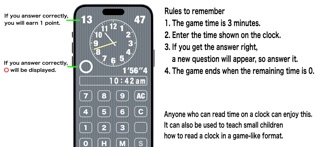
Read the time and enter your answer using the numeric keypad.
If you get the answer right, a new question will be asked.
When the timer reaches 0, the game ends and your high score will be displayed.
Touch the clock on the screen before the game starts to display a menu.
You can change the game settings.
You can choose from 4 types of games.
・Questions are asked randomly in Game 1.
・Game 2 starts at 8am
Questions are asked approximately every 15 minutes.
In baseball terms, it's like knowing the course but not known pitching...
That's the mode. However, you can roughly predict the ball, so you can play without stress.
・Game 3 is Game 2 with a time limit per question.
New questions will be asked after the time limit has passed.
・Game 4 is a completely patterned game.
It starts at 8am and the time changes every 15 minutes.
Everything is decided, so you don't even need to look at the screen.
But sometimes you get it wrong, so you need to check it regularly...
That's the mode.
Everything is planned out, and there are no coincidences in the game, but it's interesting for some reason...
That's the mode.
Even though it's a quiz game, it's natural to get one question right every two seconds...
If you're good at it, you might be able to get one question right every second.
In my opinion, the theoretical high score is a maximum of 180 points...
The initial setting is Game 2.
----
You can set whether or not to have a second hand.
If you prefer a speedy game, select no second hand.
----
You can set whether or not to have operation sounds.
----
We have also prepared a "Hiragana" mode so that small children can play together.
In "Hiragana" mode,
the clock time changes when you enter the time.
You can choose to display the game screen in
Hiragana or Kanji.
----
If you touch AC three times on the screen before starting the game, a high score reset menu will appear.
High scores are set for each game mode.
You can reset the high score for the game mode you are currently playing.
----
General knowledge and things that you do every day are often wrong if you ask them over and over again in a timed manner.
We made a game out of that.
It may look like an educational game or a game to prevent dementia, but even for adults, it is quite difficult to seriously aim for a high score.
How many questions can you answer in 3 minutes?
Give it a try!