

Clock Talk - Alarm & Timer
Clock Talk - Alarm & Timer is made and published by 晓飞 何. AppBrain is an independent app data site and isn't affiliated with 晓飞 何. The app name, icon, screenshots and description belong to 晓飞 何 and are shown as published on the App Store.
AppBrain's verdict
- Rating on App Store
- 5.00
- 2 ratings
- Last updated
- July 21, 2026
It doesn't have enough ratings yet to judge what users think.
Rankings
App Store top chartsApp Store Rankings for Clock Talk - Alarm & Timer
Competitors
Similar apps and more from 晓飞 何More from 晓飞 何


Releases
Updates seen on the App Store- Version
- 2.4
- Launched
- May 2025
No changelog data
User feedback
Ratings and reviews on the App StoreComments on Clock Talk - Alarm & Timer for iOS
We don't have enough comments to show example comments. Please check back later.
Technology
Found in the app by AppBrain- Price
- Free
- App size
- 42.7 MB
- Content rating
- Everyone
Technologies used by Clock Talk - Alarm & Timer
About the app and developer
About Clock Talk - Alarm & Timer
Clock Talk - Alarm & Timer is an utilities app developed by 晓飞 何.
User Ratings
Clock Talk - Alarm & Timer is rated 5.00 out of 5 stars. The rating is based on 2 ratings.
App Information
Clock Talk - Alarm & Timer is freely available from the App Store. The app size is 42.65 MB. The latest version available is 2.4. The last update was on July 21, 2026.
Technical Requirements
The app has a content rating of Everyone. The app has been available on the App Store since May 2025.
Developer information for 晓飞 何
Address:
Frequently asked questions about Clock Talk - Alarm & Timer
Is Clock Talk - Alarm & Timer free?
Yes. Clock Talk - Alarm & Timer is free on the App Store.
Is Clock Talk - Alarm & Timer still available?
Yes. Clock Talk - Alarm & Timer is on the App Store, and the last update we saw was on July 21, 2026.
How large is Clock Talk - Alarm & Timer?
Clock Talk - Alarm & Timer is 42.65 MB.
Is Clock Talk - Alarm & Timer suitable for children?
App Store rates the content of Clock Talk - Alarm & Timer as suitable for everyone.
How do people rate Clock Talk - Alarm & Timer?
Clock Talk - Alarm & Timer scores 5.00 out of 5 stars, from 2 ratings on the App Store.
Who made Clock Talk - Alarm & Timer?
Clock Talk - Alarm & Timer was developed by 晓飞 何. It is listed in the utilities category on the App Store.
Store listing
By 晓飞 何, from the App Store





Description by 晓飞 何 Written by the developer, not by AppBrain. Click to read.
===== Key Features =====
- Feature-rich Alarm: Supports snooze, multiple repeat modes, and customizable ringtones, icons, and names, making every morning special.
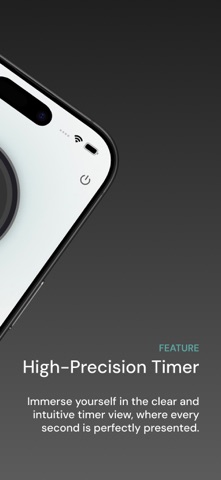
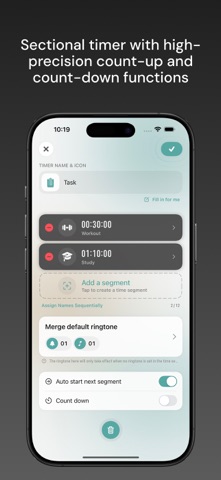
- Flexible Timer: Segment-based timing with both count-up and countdown options. Customize each segment’s duration, icon, name, and alert tone, with convenient controls like pause and skip for better productivity.
- Beautiful Clock Faces: Multiple stylish clock displays for clear and elegant timekeeping.
- Handy Widget: Check your next alarm right from your home screen without opening the app—time management made effortless.
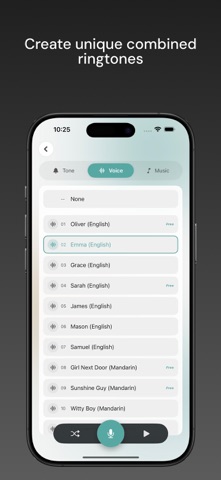
- Personalized Ringtones: Choose from short beeps, voice announcements, or long music tones. Mix and match sounds or even record your own voice for a unique alert experience.
- Multiple Themes: Various color schemes to match your personal style.
===== Premium Subscription Service =====
Non-Renewing Subscription:
- 1-Month License (Non-Renewing)
- 3-Month License (Non-Renewing)
- 6-Month License (Non-Renewing)
- 12-Month License (Non-Renewing)
- Lifetime license (One-time purchase for lifetime use)
Please refer to the subscription page within the App for the specific subscription prices.
Subscriptions are charged through your Apple account.
Auto-renewing subscriptions will automatically renew upon expiration. You can stop the subscription at any time, but please make sure to turn off auto-renewal at least 24 hours before the end of the subscription period.
Non-auto-renewing subscriptions will not auto-renew upon expiration. Purchasing multiple non-auto-renewing subscriptions will automatically stack the expiration time.
The lifetime subscription allows you to use the premium edition for life with just one purchase.
To cancel your subscription, go to 「Settings」 > 「Your Account」 > 「Subscriptions」 > 「Clock Talk」, and then cancel the subscription.
===== Related Links =====
End User License Agreement
https://trifond.github.io/clocktalk/eula/zh.html
Privacy Policy
https://trifond.github.io/clocktalk/privacypolicy/zh.html
Support & Help
https://trifond.github.io/clocktalk/support/zh.html
===== Contact Information =====
Email:trifond@outlook.com