

Clock Worksheet Maker
Clock Worksheet Maker is made and published by Fumihiro Kawasaki. AppBrain is an independent app data site and isn't affiliated with Fumihiro Kawasaki. The app name, icon, screenshots and description belong to Fumihiro Kawasaki and are shown as published on the App Store.
AppBrain's verdict
- Last updated
- July 30, 2026
Rankings
App Store top chartsApp Store Rankings for Clock Worksheet Maker
Competitors
Similar apps and more from Fumihiro KawasakiAlternatives to Clock Worksheet Maker


More from Fumihiro Kawasaki


Releases
Updates seen on the App Store- Version
- 1.0.9
- Launched
- January 2026
No changelog data
User feedback
Ratings and reviews on the App StoreComments on Clock Worksheet Maker for iOS
We don't have enough comments to show example comments. Please check back later.
Technology
Found in the app by AppBrain- Price
- Free
- App size
- 7.76 MB
- Content rating
- Everyone
Technologies used by Clock Worksheet Maker
About the app and developer
About Clock Worksheet Maker
Clock Worksheet Maker is an education app developed by Fumihiro Kawasaki.
User Ratings
The app has no ratings yet.
App Information
Clock Worksheet Maker is freely available from the App Store. The app size is 7.76 MB. The latest version available is 1.0.9. The last update was on July 30, 2026.
Technical Requirements
The app has a content rating of Everyone. The app has been available on the App Store since January 2026.
Developer information for Fumihiro Kawasaki
Address:
Store listing
By Fumihiro Kawasaki, from the App Store


Description by Fumihiro Kawasaki Written by the developer, not by AppBrain. Click to read.
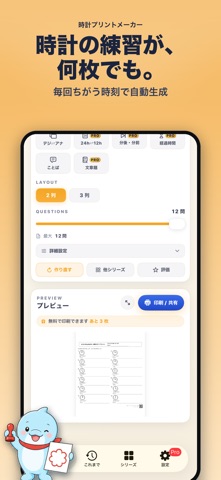
Reading clocks is a foundational skill that connects math with everyday life. This app offers a wide range of problem formats so learners can build up gradually from beginner to advanced. With just a few taps, you can generate a worksheet and save or print it as a PDF.
■ Main Features (10 problem types)
• Analog clock reading (on the hour / 5-minute / 1-minute steps)
• Time Words — pick the natural Japanese expression (e.g. "o'clock", "half past")
• Match analog and digital clocks
• Digital → Analog (draw the hands yourself)
• 24-hour ⇄ 12-hour conversion
• Time ±N minutes (before / after)
• Find the elapsed time
• Time word problems (departures, arrivals, durations)
• Both question sheet and answer sheet output
• Freely adjust problem count, columns, and problem type
• Export, print, and share as PDF
■ For Teachers and Parents
• Create homework worksheets quickly
• Adjust difficulty to the learner's level
• Practice repeatedly beyond what printed drills offer
• Prepare flexible materials for tutoring and special education
The app is designed with these needs in mind. Each worksheet is regenerated freshly, so you can produce variations of the same format as often as you need — ideal for repeated practice.
■ Try Before You Subscribe
You can print or save up to 3 worksheets for free. Check the actual output quality first, then decide whether to upgrade to Pro.
■ Unlocked with Pro
• Unlimited printing and PDF export
• Advanced problem types (elapsed time, ±N minutes, 24h⇄12h, word problems)
• Answer sheet output
• School / class name printed in the header (great for classroom handouts)
• Unlimited history with reprint
• No ads
Choose between monthly and yearly subscriptions. Perfect for tutoring centers, classrooms, and ongoing home learning.
■ Note
This app is a learning support tool. Please use it under the guidance of a parent or teacher according to the learner's level.
Terms of Use:
https://lineocean.com/clockworksheetmaker/
Privacy Policy:
https://lineocean.com/clockworksheetmaker/