

Clockist: Desk Clock & Days
Clockist: Desk Clock & Days is made and published by 丹 刘. AppBrain is an independent app data site and isn't affiliated with 丹 刘. The app name, icon, screenshots and description belong to 丹 刘 and are shown as published on the App Store.
AppBrain's verdict
- Rating on App Store
- 5.00
- 1 ratings
- Last updated
- September 28, 2026
It doesn't have enough ratings yet to judge what users think.
Rankings
App Store top chartsApp Store Rankings for Clockist: Desk Clock & Days
Competitors
Similar apps and more from 丹 刘More from 丹 刘


Releases
Updates seen on the App Store- Version
- 2.0.0
- Launched
- December 2024
No changelog data
User feedback
Ratings and reviews on the App StoreComments on Clockist: Desk Clock & Days for iOS
We don't have enough comments to show example comments. Please check back later.
Technology
Found in the app by AppBrain- Price
- Free
- App size
- 33.4 MB
- Content rating
- Everyone
Technologies used by Clockist: Desk Clock & Days
About the app and developer
About Clockist: Desk Clock & Days
Clockist: Desk Clock & Days is an utilities app developed by 丹 刘.
User Ratings
Clockist: Desk Clock & Days is rated 5.00 out of 5 stars. The rating is based on one rating ratings.
App Information
Clockist: Desk Clock & Days is freely available from the App Store. The app size is 33.40 MB. The latest version available is 2.0.0. The last update was on September 28, 2026.
Technical Requirements
The app has a content rating of Everyone. The app has been available on the App Store since December 2024.
Developer information for 丹 刘
Address:
Store listing
By 丹 刘, from the App Store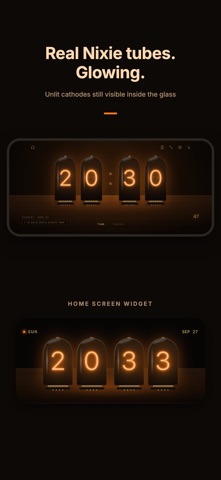




Description by 丹 刘 Written by the developer, not by AppBrain. Click to read.
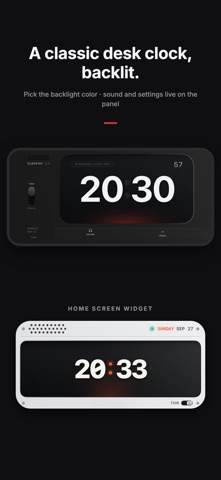
Clockist has six clocks, each a tribute to a real piece of design: the split-flap airport board, the cold-cathode Nixie tube, the German minimalist desk clock, e-ink paper, a titanium instrument dial and Liquid Glass. Swipe left or right for a different clock. The screen stays on.
SIX CLOCKS
• Mechanical Flip — Solari-style cards that really flip every minute (free)
• Paper — big numerals with an ink-on-paper feel (free)
• Nixie Tube — unlit cathodes still visible inside the glass, in amber, ice, jade or rose
• Classic Desk Clock — a nod to German industrial design, with selectable backlight; sound and settings live on the panel
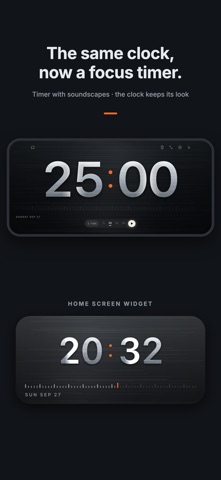
• Titanium — brushed, blasted, weave or guilloché finish
• Liquid Glass — six flowing colors
Every clock works in landscape and portrait, with a 24-hour option, seconds and a mechanical tick.
DAYS: COUNT DOWN OR UP
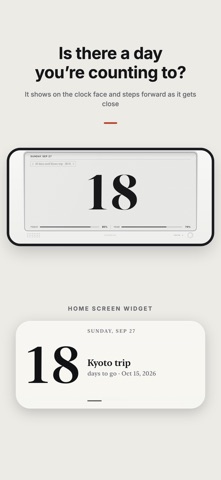
• Count down to a day, or count up from one
• Birthdays and anniversaries repeat every year and count to the next one
• Days within 30 days, anniversaries and every 100th day show up on the clock face for a while
• Show the count in large numerals in place of the time
• Get a reminder at 9 AM on the day, or add it to Calendar
• Days back up to iCloud and restore on a new phone
FOCUS TIMER
The same clock becomes a focus timer: 15, 25, 45 or 60 minutes, same look. Add rain, ocean waves, night forest, campfire, café, library, brown noise or a mechanical tick.
HOME & LOCK SCREEN WIDGETS
• A Home Screen widget for every clock, with its own appearance, Nixie color or titanium finish
• Paper Calendar: the month and the time together
• Days widgets in small, medium and large (and extra large on iPad); the large one lists all your days; four styles
• Lock Screen clock and Days
CLOCKIST PRO
Free: the Mechanical Flip and Paper clocks with their widgets, the focus timer with every soundscape, and up to 3 days.
Pro unlocks all six clocks, every Liquid Glass color, all Pro Home and Lock Screen widgets, and unlimited days.
Pro is available as a monthly or yearly subscription or a one-time purchase. Subscriptions renew automatically unless cancelled at least 24 hours before the end of the period; manage them in your Apple ID settings.
Privacy Policy: https://tobefun.cn/en/privacy-policy/
Terms of Use: https://tobefun.cn/en/term-of-use/