


AppBrain's verdict
- Rating on App Store
- 4.00
- 4 ratings
- Last updated
- October 18, 2026
- Size
- 129.2 MB
It doesn't have enough ratings yet to judge what users think.
User feedback
Ratings and reviews on the App StoreComments on CloudDrive2 - Cloud Manager for iOS
We don't have enough comments to show example comments. Please check back later.
Store listing
By 坦 喻, from the App StoreDescription by 坦 喻 Written by the developer, not by AppBrain. Click to read.
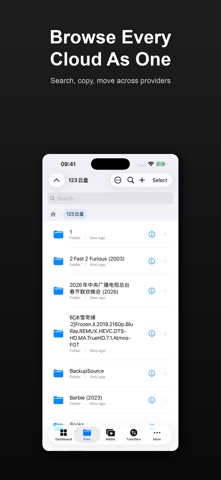
UNIFIED CLOUD MANAGEMENT
Connect all your cloud accounts in one place: Google Drive, OneDrive, Aliyun Drive, Baidu Pan, 115, S3, WebDAV, and more. Browse, search, copy, move, rename, and organize files across clouds with a clean, intuitive interface. On iPad, a Finder-style Columns view and a file inspector panel make large libraries easy to navigate.
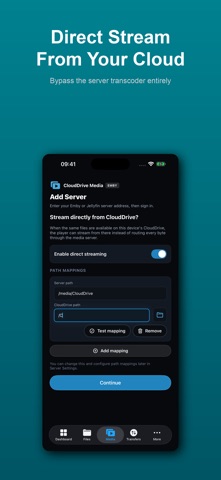
EMBY & JELLYFIN CLIENT WITH DIRECT STREAM
Connect your own Emby or Jellyfin servers and browse your libraries with posters, cast, and Continue Watching. When your CloudDrive can reach the same file, Direct Stream plays it straight from the cloud — bypassing the server transcoder for full-quality playback of formats servers can't transcode, while your watch history stays in sync.
AI SUBTITLE TRANSLATION
Generate translated subtitles for any video: CloudDrive2 translates the existing subtitle track (including PGS bitmap subtitles via on-device OCR) or falls back to speech recognition when there is none. Uses Apple's on-device translation models — free and private — or your own API. Generated subtitles are saved next to the video, ready to reuse on all your devices.
POWERFUL MEDIA PLAYER
Built-in video player with hardware-accelerated decoding supports H.264, H.265/HEVC, AV1, HDR10, HDR10+, and Dolby Vision — including true Dolby Vision playback of Profile 7 Blu-ray content. Stream directly from the cloud without downloading. Picture-in-Picture, per-track audio/subtitle delay, subtitle styling, and HDR subtitle brightness control included.
BLU-RAY ISO PLAYBACK WITH DISC MENUS
Play Blu-ray ISO images directly from your cloud storage — now with native disc menu navigation: scene selection, colored shortcut keys, in-menu audio/subtitle setup, even 2D+3D combo discs. Disc menus cover HDMV discs; BD-J (Java) discs play the main feature directly.
MULTICHANNEL & DOLBY ATMOS
Dolby Atmos (Dolby Digital Plus) bitstreams to your AVR over HDMI. TrueHD, DTS-HD Master Audio and DTS decode in full and reach multichannel USB DACs, HDMI adapters and AirPlay 2 as 5.1 or 7.1 — never folded to stereo. AirPods Pro/Max get head-tracked spatial audio instead.
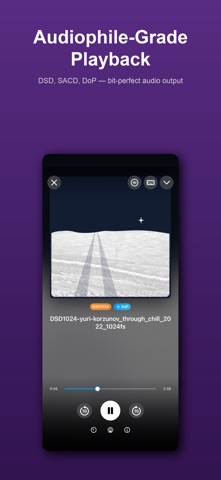
AUDIOPHILE-GRADE DSD & SACD
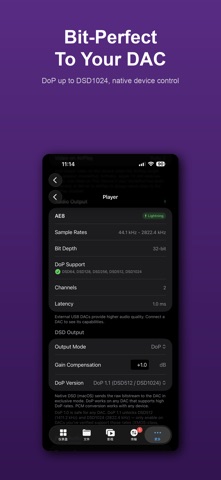
DSD files (.dsf, .dff) and SACD ISO images stream straight from the cloud — including multichannel DSD in true 5.1. DoP output feeds compatible DACs bit-perfectly, and background playback keeps the music going.
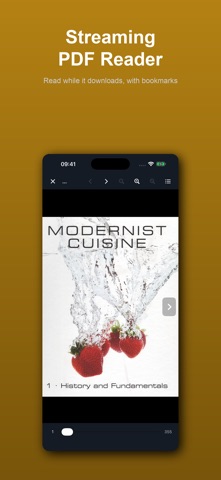
PDF READER
Read PDFs streamed from the cloud — no full download needed. Zoom, page thumbnails, bookmarks, and reading-position memory.
MOVIE LIBRARY METADATA
Reads your local .nfo files and poster/fanart/logo artwork (Plex/Jellyfin/Emby naming) for rich movie info — no online scraping, your library stays private.
CROSS-CLOUD TRANSFERS
Copy or move files between cloud providers. Transfer manager with pause, resume, retry, throttling, and concurrency control. Upload folders recursively.
BACKUP & SYNC
Automated backup tasks with scheduling, plus photo library backup.
FILES APP INTEGRATION
Full File Provider extension — access your cloud files from the iOS/iPadOS Files app and any app using the document picker. CloudDrive2 can also act as an external player for other apps via the clouddrive:// URL scheme.
SECURITY
Two-factor authentication, encrypted folders, and session monitoring. A built-in WebDAV server shares your cloud files with your other devices, and API tokens grant scoped, expiring access.
ADVANCED FEATURES
• Disk cache with configurable eviction
• Multiple view modes: list, grid, gallery, columns
• Open in third-party players (Infuse, VLC, nPlayer)
• Dark and light themes
Some advanced playback features (Emby/Jellyfin client, AI subtitles, Blu-ray disc playback, DSD/SACD) require the optional App Pro upgrade, available as an in-app purchase.
Terms of Use (EULA): https://www.apple.com/legal/internet-services/itunes/dev/stdeula/
Safety and technology
Found in the app by AppBrain- Price
- Free
- App size
- 129.2 MB
- Content rating
- Everyone
Technologies used by CloudDrive2 - Cloud Manager
Releases
Updates seen on the App Store- Version
- 1.1.3
- Launched
- August 2026
No changelog data
Alternatives
Similar apps and more from 坦 喻Alternatives to CloudDrive2 - Cloud Manager


Also available on Google Play

Rankings
App Store top chartsApp Store Rankings for CloudDrive2 - Cloud Manager
About the app and developer
About CloudDrive2 - Cloud Manager
CloudDrive2 - Cloud Manager is an utilities app developed by 坦 喻.
What is the rating of CloudDrive2 - Cloud Manager?
CloudDrive2 - Cloud Manager is rated 4.00 out of 5 stars, based on 4 ratings.
Is CloudDrive2 - Cloud Manager free?
CloudDrive2 - Cloud Manager is free. The app size is 129.17 MB. The latest version available is 1.1.3. The last update was on October 18, 2026.
What are the requirements for CloudDrive2 - Cloud Manager?
The app has a content rating of Everyone. The app has been available on the App Store since August 2026.
CloudDrive2 - Cloud Manager is made and published by 坦 喻. AppBrain is an independent app data site and isn't affiliated with 坦 喻. The app name, icon, screenshots and description belong to 坦 喻 and are shown as published on the App Store.
Developer information for 坦 喻
Address: