





AppBrain's verdict
- Rating on App Store
- 3.33
- 6 ratings
- Last updated
- November 12, 2026
- Size
- 94.0 MB
It doesn't have enough ratings yet to judge what users think.
Share Cloudflow Music – NAS Player
User feedback
Ratings and reviews on the App StoreComments on Cloudflow Music – NAS Player for iOS
We don't have enough comments to show example comments. Please check back later.
Store listing
By pan yuan, from the App StoreDescription by pan yuan Written by the developer, not by AppBrain. Click to read.
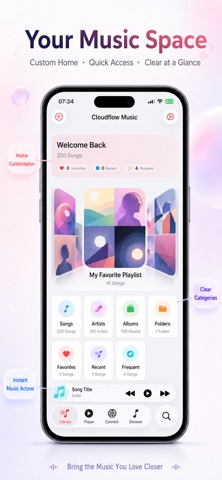
Bring music from your cloud drives, NAS, and personal servers into one library. Stream your collection, download it for offline listening, and organize it your way on iPhone, iPad, and Apple Watch.
CONNECT YOUR MUSIC
• Connect Apple Music, Baidu Cloud, OneDrive, iCloud, WebDAV, and local files.
• Support for Navidrome, Subsonic, Synology Audio Station, Emby, Jellyfin, fnOS, and Songloft.
• Access compatible NAS devices, Nextcloud, and cloud drives through WebDAV services or third-party gateways.
• Switch between connections and manage each library separately.
Some sources require an account, subscription, or configured server. Available features vary by source.
BACKGROUND SYNC
• Sync supported music libraries while using other apps.
• Save progress and resume interrupted syncs without starting over.
• Browse large libraries with improved loading and pagination.
Background availability and scheduling are managed by iOS.
MAKE IT YOURS
• Customize your home screen layout.
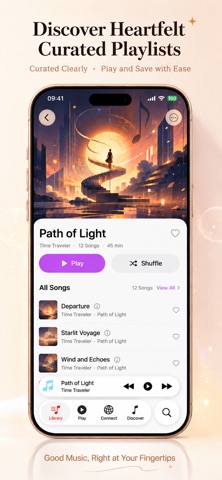
• Create smart lists using folders, artists, albums, tags, or keywords.
• Pin favorite lists for quick access.
• Browse artists, albums, folders, and playlists in list or grid view.
ORGANIZE YOUR COLLECTION
• Use AI-assisted tagging to organize music by genre, era, and more.
• Rediscover your collection through tags and listening history.
• Explore recent favorites and listening statistics.
• Find collaborations more easily with improved artist grouping.
ENJOY THE MUSIC
• Frosted-glass interface with light and dark appearances.
• Album artwork and custom artist and album covers.
• Background playback, Lock Screen controls, and queue management.
• Equalizer and audio effects to tailor your sound.
Audio effects and some playback features vary by source and playback method.
PLAYLISTS & SEARCH
• Create playlists and import M3U files with library matching.
• Search by song, album, artist, tag, or filename.
• Filter by formats such as FLAC, MP3, and AAC.
• Search songs, albums, and artists on your Subsonic server.
• Browse folders and include subfolders when needed.
LISTEN OFFLINE
• Batch downloads and playback caching.
• Manage cache storage and reduce repeated loading.
• Take downloaded music on commutes and trips.
Download and caching availability depends on the source and its restrictions.
CARPLAY & AUTOMATION
• Browse and control playback with CarPlay.
• Use Siri and Shortcuts for playback automation.
• Stream to compatible devices with AirPlay.
APPLE WATCH & WIDGETS
• View the current song, queue, and progress on Apple Watch.
• Sync music to your watch for offline listening.
• Control playback and mark favorites from Home Screen widgets.
AUDIOBOOKS
• Connect Audiobookshelf to browse and sync your audiobook library.
• Background sync and resume support help keep your collection up to date.
NO ADS. JUST MUSIC.
Enjoy your own collection without advertising interruptions.
Privacy Policy:
https://docs.qq.com/doc/DUGdIb0dYSFJpWEx3
Terms of Use:
https://docs.qq.com/doc/DUFFzY1hkT0pIQm15
Safety and technology
Found in the app by AppBrain- Price
- Free
- App size
- 94.0 MB
- Content rating
- Everyone
Technologies used by Cloudflow Music – NAS Player
Releases
Updates seen on the App Store- Version
- 1.21
- Launched
- April 2026
No changelog data
Rankings
App Store top chartsApp Store Rankings for Cloudflow Music – NAS Player
About the app and developer
About Cloudflow Music – NAS Player
Cloudflow Music – NAS Player is a music app developed by pan yuan.
What is the rating of Cloudflow Music – NAS Player?
Cloudflow Music – NAS Player is rated 3.33 out of 5 stars, based on 6 ratings.
Is Cloudflow Music – NAS Player free?
Cloudflow Music – NAS Player is free. The app size is 94.01 MB. The latest version available is 1.21. The last update was on November 12, 2026.
What are the requirements for Cloudflow Music – NAS Player?
The app has a content rating of Everyone. The app has been available on the App Store since April 2026.
Cloudflow Music – NAS Player is made and published by pan yuan. AppBrain is an independent app data site and isn't affiliated with pan yuan. The app name, icon, screenshots and description belong to pan yuan and are shown as published on the App Store.
Developer information for pan yuan
Address:
Frequently asked questions about Cloudflow Music – NAS Player
Is Cloudflow Music – NAS Player free?
Yes. Cloudflow Music – NAS Player is free on the App Store.
Is Cloudflow Music – NAS Player still available?
Yes. Cloudflow Music – NAS Player is on the App Store, and the last update we saw was on November 12, 2026.
How large is Cloudflow Music – NAS Player?
Cloudflow Music – NAS Player is 94.01 MB.
Is Cloudflow Music – NAS Player suitable for children?
App Store rates the content of Cloudflow Music – NAS Player as suitable for everyone.
How do people rate Cloudflow Music – NAS Player?
Cloudflow Music – NAS Player scores 3.33 out of 5 stars, from 6 ratings on the App Store.
Who made Cloudflow Music – NAS Player?
Cloudflow Music – NAS Player was developed by pan yuan. It is listed in the music category on the App Store.
Subscribe now to get full and unlimited access to AppBrain Intelligence. You'll have access to:
- App Intelligence dashboard (performance timeline, competitor comparison, country rankings, insight cards)
- Detailed ranking data per app
- Full timeline per developer
- Device market shares data per country
- Unlimited keyword tracking
- AI assistant access via MCP (Claude, Cursor or any MCP client)
AppBrain is an app data site, we track rankings, ratings, installs for all apps and games on Google Play and the App Store. AppBrain doesn't host app files or APKs, all install links go directly to the official store. All trademarks are owned by their respective owners.
More apps
App statistics
About AppBrain