

Cluero: Visual Clue Board
Cluero: Visual Clue Board is made and published by 在京 王. AppBrain is an independent app data site and isn't affiliated with 在京 王. The app name, icon, screenshots and description belong to 在京 王 and are shown as published on the App Store.
AppBrain's verdict
- Rating on App Store
- 5.00
- 1 ratings
- Last updated
- April 30, 2026
- Size
- 274.0 MB
It doesn't have enough ratings yet to judge what users think.
User feedback
Ratings and reviews on the App StoreComments on Cluero: Visual Clue Board for iOS
We don't have enough comments to show example comments. Please check back later.
Store listing
By 在京 王, from the App Store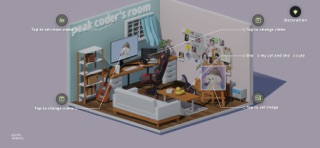



Description by 在京 王 Written by the developer, not by AppBrain. Click to read.
Cluero is a visual note-taking app built around a detective-style clue board. Instead of saving your thoughts in plain lists, folders, or timelines, you can collect photos, notes, videos, memories, and ideas on a board, then arrange and connect them like clues in an investigation.
Build your own clue wall
Every idea can become part of the story. Add Polaroid-style photos, notes, postcards, wanted posters, envelopes, push pins, red strings, and magic newspapers to create a visual board that feels personal, playful, and alive.
Use Cluero to:
· Create visual notes and idea boards
· Organize photos, videos, memories, and stories
· Connect related thoughts with red strings
· Build a detective-style clue wall
· Collect inspiration for writing, planning, journaling, or creative projects
· Arrange clues freely instead of using rigid folders
· Turn scattered ideas into a clear visual structure
More than a note app
Traditional note apps are good for storing information. Cluero is designed for seeing connections.
A single photo, sentence, video, or memory may feel small on its own. But when you place it beside another clue, connect it with a red string, or rearrange it on your board, new patterns can appear.
Cluero gives you a space to think visually, organize freely, and explore your life, ideas, and stories from a different angle.
Visual elements you can combine
· Polaroid photos and postcards for images and memories
· Tips and notes for thoughts, observations, and ideas
· Wanted posters for people, characters, goals, or key subjects
· Envelopes for events, themes, and hidden clues
· Magic newspapers for text and embedded video content
· Push pins and red strings for connecting clues
Everything is visual, draggable, and rearrangeable. You are not just editing a note. You are building your own investigation board.
Great for many uses
Cluero can be used as a visual journal, mood board, story board, memory wall, detective board, inspiration board, or creative planning space.
It is useful for:
· Personal journaling
· Photo and video memories
· Creative writing
· Story and character planning
· Travel memories
· Mood boards and inspiration boards
· Relationship maps
· Life events and personal projects
· Visual brainstorming
Local storage and privacy
Cluero focuses on personal, private note-taking. Your boards, notes, photos, videos, and clue elements are stored locally, making it suitable for private memories, personal ideas, and creative drafts.
Free features
· Create new Cluero notes
· Edit, delete, and manage notes
· Use basic tools such as Polaroids, notes, and push pins
· Build personal clue boards
· Local storage for privacy
Some free tools have usage limits.
Cluero Pro
Subscribe to Cluero Pro or purchase the lifetime version to unlock more creative freedom:
· Includes all free features
· Unlimited use of all tool elements
· Customize decorative room elements
· Unlock advanced tools, including video magic newspapers
· Build richer and more complete clue boards
Subscription information
Cluero offers auto-renewing subscription options:
· Annual subscription: billed yearly and includes all premium features
· Lifetime version: one-time purchase for permanent access
Subscriptions renew automatically after the trial period unless canceled. You can manage or cancel your subscription at any time in your account settings.
Legal information
Privacy Policy:
https://peakcoder.com/cluero-privacy/
Terms of Use / EULA:
https://www.apple.com/legal/internet-services/itunes/dev/stdeula/
Safety and technology
Found in the app by AppBrain- Price
- Free
- App size
- 274.0 MB
- Content rating
- Everyone
Technologies used by Cluero: Visual Clue Board
Releases
Updates seen on the App Store- Version
- 1.0.2
- Launched
- February 2026
No changelog data
Alternatives
Similar apps and more from 在京 王More from 在京 王




Rankings
App Store top chartsApp Store Rankings for Cluero: Visual Clue Board
About the app and developer
About Cluero: Visual Clue Board
Cluero: Visual Clue Board is an utilities app developed by 在京 王.
User Ratings
Cluero: Visual Clue Board is rated 5.00 out of 5 stars. The rating is based on one rating ratings.
App Information
Cluero: Visual Clue Board is freely available from the App Store. The app size is 274.00 MB. The latest version available is 1.0.2. The last update was on April 30, 2026.
Technical Requirements
The app has a content rating of Everyone. The app has been available on the App Store since February 2026.
Developer information for 在京 王
Address:
Frequently asked questions about Cluero: Visual Clue Board
Is Cluero: Visual Clue Board free?
Yes. Cluero: Visual Clue Board is free on the App Store.
Is Cluero: Visual Clue Board still available?
Yes. Cluero: Visual Clue Board is on the App Store, and the last update we saw was on April 30, 2026.
How large is Cluero: Visual Clue Board?
Cluero: Visual Clue Board is 274.00 MB.
Is Cluero: Visual Clue Board suitable for children?
App Store rates the content of Cluero: Visual Clue Board as suitable for everyone.
How do people rate Cluero: Visual Clue Board?
Cluero: Visual Clue Board has one rating of 5.00 stars on the App Store.
Who made Cluero: Visual Clue Board?
Cluero: Visual Clue Board was developed by 在京 王. It is listed in the utilities category on the App Store.