

Coach Clock: Class Timer
Coach Clock: Class Timer is made and published by Quoc Nguyen. AppBrain is an independent app data site and isn't affiliated with Quoc Nguyen. The app name, icon, screenshots and description belong to Quoc Nguyen and are shown as published on the App Store.
AppBrain's verdict
- Last updated
- July 7, 2026
- Size
- 15.2 MB
User feedback
Ratings and reviews on the App StoreComments on Coach Clock: Class Timer for iOS
We don't have enough comments to show example comments. Please check back later.
Store listing
By Quoc Nguyen, from the App Store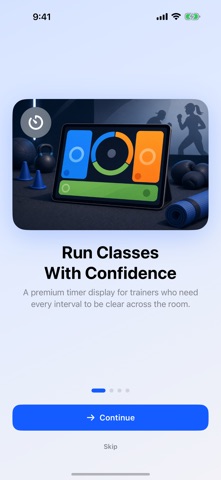





Description by Quoc Nguyen Written by the developer, not by AppBrain. Click to read.
KEY FEATURES
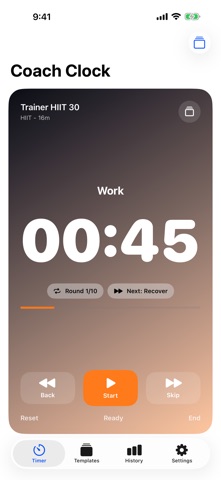
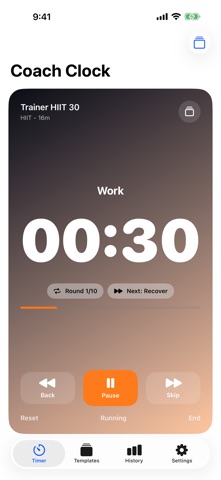
- Class-ready timer display: huge countdown, current interval, next interval, round count, elapsed time, and remaining time.
- Professional presets: HIIT, Tabata, EMOM, AMRAP, boxing rounds, run/walk intervals, mobility flows, and gym rest timers.
- Custom template builder: warmups, work blocks, rests, rounds, cooldowns, names, colors, and cue settings.
- Trainer workflow: duplicate templates, favorite your go-to sessions, and (with Pro) share timer files with clients or other coaches.
- iPad stage mode: high-contrast timer layouts designed to be seen across a room.
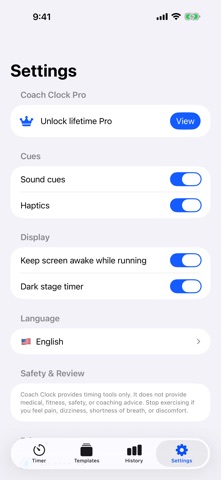
- Audio and haptic cues: countdowns, bells, phase changes, and quiet mode options.
- Local-first: no account required, and your templates stay on device unless you choose to share them.
FREE VS PRO
Free: every timer format, all presets, the big display, local class history, and up to 3 custom templates. The free version is supported by ads.
Coach Clock Pro (one-time purchase, no subscription): removes ads and unlocks unlimited saved templates, template sharing with import/export, premium display tools, advanced cues, and full class history.
WHY COACH CLOCK
Generic interval timers can be powerful but slow to set up. Coach Clock is built around the live coaching moment: choose a template, start the class, glance at what is next, and keep the session moving.
SAFE FITNESS NOTE
Coach Clock provides timing tools only. It does not provide medical, fitness, safety, or coaching advice. You choose the exercises, intensity, and suitability of every session. Consult a qualified professional before starting or changing an exercise routine, especially if you have a medical condition, injury, are pregnant, or are new to exercise.
Support, Privacy Policy, and Terms of Use:
https://nemostation90.github.io/app-support/apps/coach-clock/
Safety and technology
Found in the app by AppBrain- Price
- Free
- App size
- 15.2 MB
- Content rating
- Everyone
Technologies used by Coach Clock: Class Timer
Releases
Updates seen on the App Store- Version
- 1.1
- Launched
- June 2026
No changelog data
Alternatives
Similar apps and more from Quoc NguyenMore from Quoc Nguyen


Rankings
App Store top chartsApp Store Rankings for Coach Clock: Class Timer
About the app and developer
About Coach Clock: Class Timer
Coach Clock: Class Timer is a health & fitness app developed by Quoc Nguyen.
What is the rating of Coach Clock: Class Timer?
Coach Clock: Class Timer has no ratings yet.
Is Coach Clock: Class Timer free?
Coach Clock: Class Timer is free. The app size is 15.15 MB. The latest version available is 1.1. The last update was on July 7, 2026.
What are the requirements for Coach Clock: Class Timer?
The app has a content rating of Everyone. The app has been available on the App Store since June 2026.
Developer information for Quoc Nguyen
Address:
Frequently asked questions about Coach Clock: Class Timer
Is Coach Clock: Class Timer free?
Yes. Coach Clock: Class Timer is free on the App Store.
Is Coach Clock: Class Timer still available?
Yes. Coach Clock: Class Timer is on the App Store, and the last update we saw was on July 7, 2026.
How large is Coach Clock: Class Timer?
Coach Clock: Class Timer is 15.15 MB.
Is Coach Clock: Class Timer suitable for children?
App Store rates the content of Coach Clock: Class Timer as suitable for everyone.
Who made Coach Clock: Class Timer?
Coach Clock: Class Timer was developed by Quoc Nguyen. It is listed in the health & fitness category on the App Store.