

Code Analyzer is made and published by 卿 徐. AppBrain is an independent app data site and isn't affiliated with 卿 徐. The app name, icon, screenshots and description belong to 卿 徐 and are shown as published on the App Store.
AppBrain's verdict
Established- Rating on App Store
- 4.52
- 71 ratings
- Last updated
- September 16, 2026
It doesn't have enough ratings yet to judge what users think.
Rankings
App Store top chartsApp Store Rankings for Code Analyzer
Competitors
Similar apps and more from 卿 徐Alternatives to Code Analyzer




Releases
Updates seen on the App Store- Version
- 1.17
- Launched
- November 2018
No changelog data
User feedback
Ratings and reviews on the App StoreComments on Code Analyzer for iOS
We don't have enough comments to show example comments. Please check back later.
Technology
Found in the app by AppBrain- Price
- Free
- App size
- 23.0 MB
- Content rating
- Everyone
Technologies used by Code Analyzer
About the app and developer
About Code Analyzer
Code Analyzer is an overall app developed by 卿 徐.
What is the rating of Code Analyzer?
Code Analyzer is rated 4.52 out of 5 stars, based on 71 ratings.
Is Code Analyzer free?
Code Analyzer is free. The app size is 23.02 MB. The latest version available is 1.17. The last update was on September 16, 2026.
What are the requirements for Code Analyzer?
The app has a content rating of Everyone. The app has been available on the App Store since November 2018.
Developer information for 卿 徐
Address:
Frequently asked questions about Code Analyzer
Is Code Analyzer free?
Yes. Code Analyzer is free on the App Store.
Is Code Analyzer still available?
Yes. Code Analyzer is on the App Store, and the last update we saw was on September 16, 2026.
How large is Code Analyzer?
Code Analyzer is 23.02 MB.
Is Code Analyzer suitable for children?
App Store rates the content of Code Analyzer as suitable for everyone.
How do people rate Code Analyzer?
Code Analyzer scores 4.52 out of 5 stars, from 71 ratings on the App Store.
Who made Code Analyzer?
Code Analyzer was developed by 卿 徐. It is listed in the overall category on the App Store.
What are the best alternatives to Code Analyzer?
People looking at Code Analyzer also look at these overall apps: Ads Report for Admob, Secure Terminal, Poless VPN, SNMP Network Monitor, Java Recipes.
Store listing
By 卿 徐, from the App Store


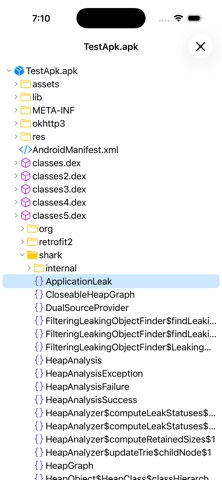
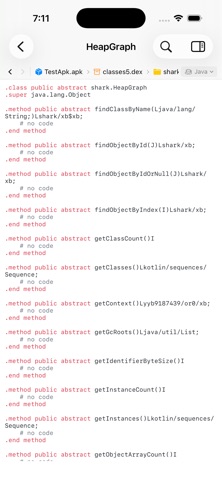

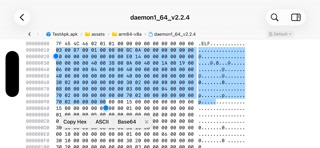
Description by 卿 徐 Written by the developer, not by AppBrain. Click to read.
Code Analyzer turns opaque software into a workspace you can navigate.
Analyze APK, JAR, and JMOD archives, inspect Mach-O and ELF binaries and font files, and move naturally from package structure to readable code, functions, symbols, assembly, and raw bytes. Code Analyzer combines an APK analyzer, JAR/JMOD decompiler, native disassembler, font glyph viewer, bytecode viewer, and hex viewer in one focused iPhone and iPad workspace. There is no command-line setup and nothing to upload.
PACKAGE AND BYTECODE ANALYSIS
• Open APK packages and browse files, compiled classes, decoded resources, and manifest data
• Decompile supported class files from JAR and JMOD archives into readable high-level output
• Fall back to low-level bytecode automatically when a higher-level result is unavailable
• Follow nested ZIP, APK, and JAR containers in place without manually unpacking them
NATIVE BINARY ANALYSIS
• Inspect Mach-O universal binaries, dynamic libraries, application bundles, and frameworks
• Explore ELF executables and shared libraries across multiple CPU architectures
• Browse architecture slices, headers, segments, sections, symbols, and discovered functions
• Explore ELF and Mach-O machine code in a continuous, architecture-aware disassembly view
• Jump directly to discovered functions and symbols, including useful results from stripped binaries
FIND THE SIGNAL
• Open TrueType, OpenType, and font collections in a searchable glyph viewer with metadata and outline inspection
• Use Quick Open to find files, classes, methods, resources, and symbols with responsive fuzzy matching
• Filter Project Explorer by filename to find files quickly
• Search raw data as text or hex and step through every match
• Jump to decimal or hexadecimal offsets without losing context
• Copy any byte selection as hex, text, or Base64
• Keep syntax highlighting and symbol outlines beside the content you are reading
ANALYZE ON THE GO
• Native SwiftUI interface adapted for iPhone and iPad
• Responsive background processing for large, multi-part files
• Runs entirely offline, so your files stay on your device
Built for developers, security professionals, and students who need clear answers from software they are authorized to inspect.