

Codex Switcher
Codex Switcher is made and published by Marcel Kwiatkowski. AppBrain is an independent app data site and isn't affiliated with Marcel Kwiatkowski. The app name, icon, screenshots and description belong to Marcel Kwiatkowski and are shown as published on the App Store.
AppBrain's verdict
- Last updated
- May 31, 2026
Rankings
App Store top chartsApp Store Rankings for Codex Switcher
Competitors
Similar apps and more from Marcel KwiatkowskiMore from Marcel Kwiatkowski

Releases
Updates seen on the App Store- Version
- 1.0
- Launched
- May 2026
No changelog data
User feedback
Ratings and reviews on the App StoreComments on Codex Switcher for iOS
We don't have enough comments to show example comments. Please check back later.
Technology
Found in the app by AppBrain- Price
- $9.99
- App size
- 5.08 MB
- Content rating
- Everyone
Technologies used by Codex Switcher
About the app and developer
About Codex Switcher
Codex Switcher is an overall app developed by Marcel Kwiatkowski.
User Ratings
The app has no ratings yet.
App Information
Codex Switcher costs $9.99. The app size is 5.08 MB. The latest version available is 1.0. The last update was on May 31, 2026.
Technical Requirements
The app has a content rating of Everyone. The app has been available on the App Store since May 2026.
Developer information for Marcel Kwiatkowski
Address:
Frequently asked questions about Codex Switcher
Is Codex Switcher free?
No. Codex Switcher costs $9.99 on the App Store.
Is Codex Switcher still available?
Yes. Codex Switcher is on the App Store, and the last update we saw was on May 31, 2026.
How large is Codex Switcher?
Codex Switcher is 5.08 MB.
Is Codex Switcher suitable for children?
App Store rates the content of Codex Switcher as suitable for everyone.
Who made Codex Switcher?
Codex Switcher was developed by Marcel Kwiatkowski. It is listed in the overall category on the App Store.
Store listing
By Marcel Kwiatkowski, from the App Store
Description by Marcel Kwiatkowski Written by the developer, not by AppBrain. Click to read.
Use the iPhone app to browse your synced accounts, check which accounts have room left, organize your list, and get helpful widgets and notifications. Pair it with the Mac app for full desktop account switching.
What you can do on iPhone:
• View your synced Codex account library
• Search accounts by name, email hint, or account identifier
• Sort by name, date added, last login, rate limit, or custom order
• Pin favorite accounts and keep them easy to find
• Rename accounts, choose icons, and remove accounts you no longer use
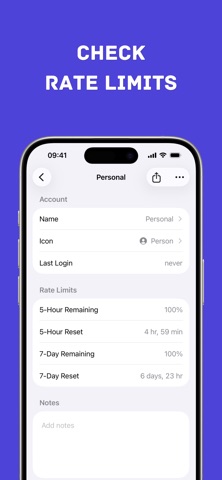
• Open account details with last login, availability, and rate-limit data
• Refresh live rate limits when the needed credentials are available
• See cached rate-limit data when live refresh is not available
• Import .cxa account archives from Files or share flows
• Export or share .cxa archives when the account snapshot exists on your device
• Use Home Screen quick actions for your top accounts
• Add Home Screen and Lock Screen widgets for Codex rate limits
• Get notifications when 5-hour or 7-day limits reset
• Use Background App Refresh to keep accounts updated over time
• Access support links from inside the app
The iPhone app is made for everyday visibility. You can quickly check your remaining 5-hour and 7-day Codex limits, see which accounts are available, and keep your account list organized without opening your Mac.
Apple Watch support is included for quick account viewing on your wrist. Browse synced accounts, search and sort, view rate limits, rename accounts, choose icons, remove accounts, refresh limits, and use complications for rate-limit status or opening the app.
Good to know:
Actual Codex account switching is handled by the Mac app. The iPhone app does not directly change the Codex folder on your Mac. It gives you a synced companion experience for account management, rate-limit viewing, widgets, notifications, and archive import or export.
Some accounts may appear before their full saved account data has finished syncing through iCloud Keychain. In that case, you can still see the account information, but export or live refresh may not be available until sync completes.
Live rate limits are available for supported ChatGPT-backed accounts. API-key accounts can be organized and synced, but they may not show live usage limits.
Codex Switcher is an independent tool for Codex users who want a cleaner way to manage accounts and keep rate limits visible across Mac, iPhone, and Apple Watch.