

Cofra: Personal Expenses
Cofra: Personal Expenses is made and published by Hai Nguyen. AppBrain is an independent app data site and isn't affiliated with Hai Nguyen. The app name, icon, screenshots and description belong to Hai Nguyen and are shown as published on the App Store.
AppBrain's verdict
- Last updated
- September 24, 2026
Rankings
App Store top chartsApp Store Rankings for Cofra: Personal Expenses
Competitors
Similar apps and more from Hai NguyenAlternatives to Cofra: Personal Expenses


Releases
Updates seen on the App Store- Version
- 1.4.0
- Launched
- August 2026
No changelog data
User feedback
Ratings and reviews on the App StoreComments on Cofra: Personal Expenses for iOS
We don't have enough comments to show example comments. Please check back later.
Technology
Found in the app by AppBrain- Price
- Free
- App size
- 13.7 MB
- Content rating
- Everyone
Technologies used by Cofra: Personal Expenses
About the app and developer
About Cofra: Personal Expenses
Cofra: Personal Expenses is a finance app developed by Hai Nguyen.
User Ratings
The app has no ratings yet.
App Information
Cofra: Personal Expenses is freely available from the App Store. The app size is 13.69 MB. The latest version available is 1.4.0. The last update was on September 24, 2026.
Technical Requirements
The app has a content rating of Everyone. The app has been available on the App Store since August 2026.
Developer information for Hai Nguyen
Address:
Store listing
By Hai Nguyen, from the App Store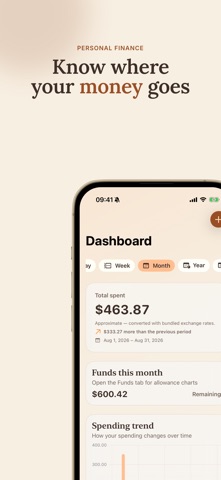
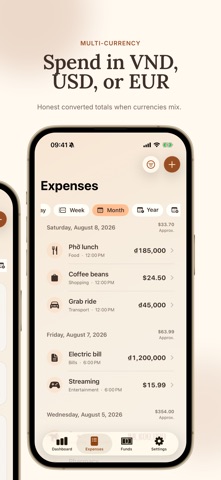

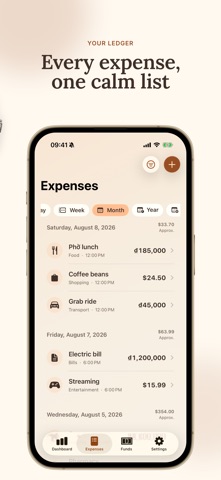


Description by Hai Nguyen Written by the developer, not by AppBrain. Click to read.
Built for people who want a clear ledger—not a bloated finance suite. Add an expense in seconds, pick a currency from a searchable catalog, organize it with one category, optionally assign it to a monthly fund, and see where your money goes by day, week, month, year, or a custom range.
WHAT YOU CAN DO
• Record positive amounts in validated ISO 4217 currencies with an optional note, one category, and a date/time
• Choose currency from a searchable picker with suggestions and A–Z browsing
• Set a default entry currency for new expenses; changing it never rewrites stored history
• Search locally by note, category name, or fund name
• Filter Expenses by amount, currency, category, fund, and date range
• Browse a newest-first expense list grouped by day
• Review Dashboard totals, spending trends, and category breakdowns
• See native totals in each stored currency; mixed periods stack separate amounts instead of a converted grand total
• Filter Dashboard and Expenses independently
• Create monthly spending funds and track category defaults
• Create, rename, re-icon, archive, restore, and manage your categories
• Export your ledger—or only the visible Expenses search and filter results—to a local UTF-8 CSV file through the system share sheet
• Add an expense from Home Screen widgets, Control Center, or Shortcuts
• Lock the app with Face ID or passcode
• Choose System, Light, or Dark appearance on each device
• Use the app in English or Vietnamese
PRIVATE BY DESIGN
Expenses, categories, and funds sync through your private iCloud (CloudKit) database. Appearance, language, and default entry currency preferences stay local to each device. Search runs on this device. CSV export is written locally and shared through the system share sheet. There are no Cofra accounts and no shared ledgers.
DESIGNED FOR iPHONE AND iPAD
A modern SwiftUI experience with adaptive layouts for compact and regular widths. Home Screen widgets include Small, Medium, Large, and Extra Large on iPad.
REQUIREMENTS
Requires iOS / iPadOS 26.0 or later. Entry currencies follow a validated ISO 4217 catalog. When a period includes more than one currency, Cofra shows separate native totals rather than a converted combined sum.
Cofra keeps the scope intentionally small so the core loop stays fast and trustworthy.