

ColatPlayer2 : FLAC / Folder
ColatPlayer2 : FLAC / Folder is made and published by Yoshimune Kitta. AppBrain is an independent app data site and isn't affiliated with Yoshimune Kitta. The app name, icon, screenshots and description belong to Yoshimune Kitta and are shown as published on the App Store.
AppBrain's verdict
Established- Rating on App Store
- 4.67
- 3 ratings
- Last updated
- September 6, 2026
It doesn't have enough ratings yet to judge what users think.
Rankings
App Store top chartsApp Store Rankings for ColatPlayer2 : FLAC / Folder
Competitors
Similar apps and more from Yoshimune KittaAlternatives to ColatPlayer2 : FLAC / Folder




Releases
Updates seen on the App Store- Version
- 8.0.1
- Launched
- April 2014
No changelog data
User feedback
Ratings and reviews on the App StoreComments on ColatPlayer2 : FLAC / Folder for iOS
We don't have enough comments to show example comments. Please check back later.
Technology
Found in the app by AppBrain- Price
- Free
- App size
- 182.2 MB
- Content rating
- Everyone
Technologies used by ColatPlayer2 : FLAC / Folder
About the app and developer
About ColatPlayer2 : FLAC / Folder
ColatPlayer2 : FLAC / Folder is a music app developed by Yoshimune Kitta.
User Ratings
ColatPlayer2 : FLAC / Folder is rated 4.67 out of 5 stars. The rating is based on 3 ratings.
App Information
ColatPlayer2 : FLAC / Folder is freely available from the App Store. The app size is 182.21 MB. The latest version available is 8.0.1. The last update was on September 6, 2026.
Technical Requirements
The app has a content rating of Everyone. The app has been available on the App Store since April 2014.
Developer information for Yoshimune Kitta
Address:
Store listing
By Yoshimune Kitta, from the App Store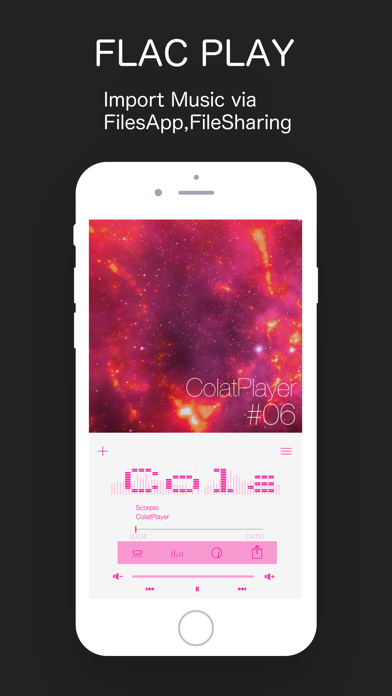


Description by Yoshimune Kitta Written by the developer, not by AppBrain. Click to read.
straight from folders. Stack an equalizer (EQ), reverb (concert effect)
and effect pads on top, and a song you know becomes something to play with.
■ New in 8.0
STEM MIXER (new)
Split a track into vocal, drums, bass and the rest — and mix it your own way.
• Effects on each lane. 46 in all
• Drop the vocal, swap the bass for a synth, chop just the drums on the beat
• One XY pad moves two knobs at once. LPF / HPF / BPF draw their curve over the analyzer
• A spectrum, level meter and waveform for every lane
• PRESET — name what you built and call it back from the list
• Try it for 60 minutes. Another 60 becomes available 12 hours later
Requires iPhone 14 Pro / iPhone 15 or later, or an iPad with 8 GB of memory or more (M1 and later Pro/Air, iPad mini 7). Separating a track is heavy work, so it is not available on earlier devices. Everything else in the app works as before.
■ New in 7.2
[Managing Songs]
1- Copy files directly within ColatPlayer - no Files app needed.
2- Link folders from other apps and play their songs directly, without copying.
3- Organize your songs right inside the app - no Files app needed.
■ New in 7.0
- FX Pads
Chop the track with eight pads. ROLL, REVERSE, BRAKE, TRANS and more.
Four banks (BEAT / TONE / LOOP / SAMPLE), 32 effects in total.
Everything locks to the beat (BPM) automatically.
- XY Filter
Sweep low-pass (LPF) and high-pass (HPF) with your finger.
The filter curve is drawn over a live spectrum analyzer, so you can
see the band you are touching.
- Speed and Key
0.5x to 2.0x, continuously.
With KEY on the pitch stays put (master tempo).
With KEY off it behaves like changing a turntable's speed.
- Resume where you left off
Close the app completely and it picks up the same track and position.
- Gapless playback
No silence between tracks.
- Level meter
Choose how it looks. Input gain and a limiter are included.
■ Supported files
FLAC / ALAC / AAC / MP3 / AIFF / WAV
Hi-Res up to 96kHz / 24-bit. No conversion needed.
Three ways to get files in:
- Finder (iTunes) on a Mac
- The Files app on your iPhone
- AirDrop or Share from another app
Folders stay folders. Make one per album and it lines up that way.
■ Finding a track
Pick the one song you want out of many, fast.
By artist, album, playlist or title. Swipe to move through them.
Build the moment with stars and the queue.
■ Make it yours
Choose a wallpaper, or use a photo from your own library.
Pick the clock typeface.
An old iPhone you no longer carry makes a fine desktop player on a stand.
■ Additional effects (In-App Purchase, one-time)
- Efx PEQ
A 3-band parametric equalizer (EQ).
Turn gain, Q and frequency, and hear the change as you make it.
Includes a stereo spectrum analyzer with peak hold, and a level meter.
Earphones and genres differ. Tune it to your taste.
- Efx DSP
Bring the live show back.
Eight rooms - GEKIJO, LIVEHOUSE, THATER, CLUB, HALL, ARENA, STADIUM,
DOME - in two flavours each, sixteen presets in all.
Adjust reverb amount, delay time and decay time.
Put the air of that night back around the music.
- Efx FX-Pad
The FX pads and XY filter described above.
All one-time purchases. One Apple ID covers your other devices.
Changed phones? Tap Restore Purchase.
You can try each one in demo mode before buying.
■ Good for you if
- You want FLAC and Hi-Res played as-is, no conversion
- You want an equalizer to shape the sound
- You like watching a spectrum analyzer and level meters
- You want to play with effects on songs you already know
- You listen offline, without using data
```