

CollagePhotoApp Collage Maker
CollagePhotoApp Collage Maker is made and published by Vinay Bichave. AppBrain is an independent app data site and isn't affiliated with Vinay Bichave. The app name, icon, screenshots and description belong to Vinay Bichave and are shown as published on the App Store.
AppBrain's verdict
- Last updated
- September 10, 2026
Rankings
App Store top chartsApp Store Rankings for CollagePhotoApp Collage Maker
Competitors
Similar apps and more from Vinay BichaveMore from Vinay Bichave


Also available on Google Play

Releases
Updates seen on the App Store- Version
- CollagePhotoApp Collage Maker New Digital & Camera Frames
- Launched
- March 2026
No changelog data
User feedback
Ratings and reviews on the App StoreComments on CollagePhotoApp Collage Maker for iOS
We don't have enough comments to show example comments. Please check back later.
Technology
Found in the app by AppBrain- Price
- Free
- App size
- 84.3 MB
- Content rating
- Everyone
Technologies used by CollagePhotoApp Collage Maker
About the app and developer
About CollagePhotoApp Collage Maker
CollagePhotoApp Collage Maker is a photo & video app developed by Vinay Bichave.
What is the rating of CollagePhotoApp Collage Maker?
CollagePhotoApp Collage Maker has no ratings yet.
Is CollagePhotoApp Collage Maker free?
CollagePhotoApp Collage Maker is free. The app size is 84.25 MB. The latest version available is CollagePhotoApp Collage Maker New Digital & Camera Frames. The last update was on September 10, 2026.
What are the requirements for CollagePhotoApp Collage Maker?
The app has a content rating of Everyone. The app has been available on the App Store since March 2026.
Developer information for Vinay Bichave
Address:
Frequently asked questions about CollagePhotoApp Collage Maker
Is CollagePhotoApp Collage Maker free?
Yes. CollagePhotoApp Collage Maker is free on the App Store.
Is CollagePhotoApp Collage Maker still available?
Yes. CollagePhotoApp Collage Maker is on the App Store, and the last update we saw was on September 10, 2026.
How large is CollagePhotoApp Collage Maker?
CollagePhotoApp Collage Maker is 84.25 MB.
Is CollagePhotoApp Collage Maker suitable for children?
App Store rates the content of CollagePhotoApp Collage Maker as suitable for everyone.
Who made CollagePhotoApp Collage Maker?
CollagePhotoApp Collage Maker was developed by Vinay Bichave. It is listed in the photo & video category on the App Store.
Store listing
By Vinay Bichave, from the App Store




Description by Vinay Bichave Written by the developer, not by AppBrain. Click to read.
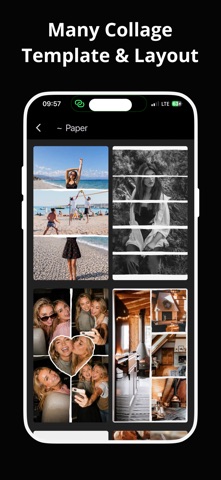
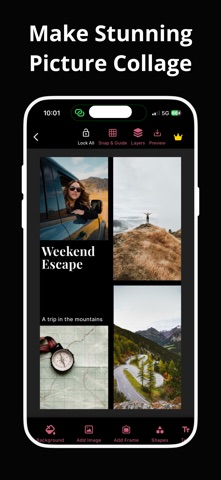
CollagePhotoApp is your photo collage maker to create beautiful image collages with grid layouts, canvas collage, photo montage, multi photo frames and more.
Get hundreds of layouts and templates, grid types, foto collage, edit images, text, 70+ fonts , 45+ shapes, variety of 76+ backgrounds, 50+ filters, emojis, drawing, spacing and change canvas aspect ratio for all types of social media posts.
CollagePhotoApp is the perfect pic collage app for making photo collage from photos and sharing them on social media using 70+ photos on a single collage for making wedding photo collage, family, birthday, celebration, love and more types of picture collages.
• Ready To Post Templates & Grids
Get hundreds of stunning looking templates. Put 2 pictures in one frame, make 3 photo collage, 9 photo collage or more, just add photos & let your creativity make amazing collage.
• Humanout for one-tap cutout
Choose a photo and get the human out and remove the background using Humanout. Adjust photo using eraser and custom-cut feature and add border color to highlight it.
• See Letters
Letters and symbols to put images in it. Leave them blank and they turn into a window to show photos below them even if an element is between them. Use See Sentence to show photos in sentences
• Advanced Image Editor
Easily crop photos, use photo adjustments like exposure, brightness, contrast, highlights, B&W etc., replace pictures, flip, rotate, change opacity, curve corners.
• Beautiful Frames
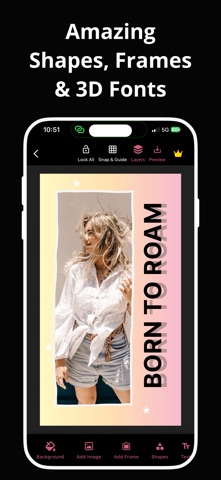
Use 22+ different types of digital frames including Music Players, Cameras, Mobiles, Browser Windows and Incoming Calls. Adjust heigh, width of frame, tilt them and make them look 3D, add colored shadow and create polaroid collage.
• Continuous Text
Drag finger across canvas, curve it and see the text you inputted on the canvas in continuous way
• Bubble Text
Make chat bubble type text with color, font style and more
• Text Customization Options
Select from 70+ fonts, give amazing styling to text including bold, italic, 43+ solid colors and 43+ multiflow colors, change border color, border width, add background to text, spacing with line height, letter spacing & word spacing.
• Photostrip
Feel like in a photo booth use photo strips. Make vertical or horizontal, adjust gaps, add color, date and caption them
• Shapes
Use 45+ amazing shapes including classic triangle, rectangle and even heart and option to put images in them. Adjust opacity, change color of shape, give 3D using tilt and add border.
• Drawing
Draw your creativity directly on the collage, use single color, multi flow and even neon colors, adjust stroke width, change the shape of brush, from line to circle the possibilities are endless.
• Support For All Social Media Platforms
Get support to multiple aspect ratios including 9:16, 3:4, 1:1, 5:4, 4:3 and 16:9. Change the ratio and your photos and elements reflows to that size and doesn’t get cropped
TRIAL AND SUBSCRIPTION TERMS:
Start CollagePhotoApp with an awesome free 3-day free trial with Unlock Content and get access to all features including templates, grids, multi flow, fonts, text-styles, HD Exports etc. After the trial is over you will be charged an annual subscription fee; if you had opted for the weekly plan then a weekly subscription fee will be charged to you lacking any free trial. CollagePhotoApp Unlock Content will automatically renew unless auto-renew is turned off at least 24 hours before the end of the current billing cycle. You can head over to Settings > iTunes > Account & App Store > Apple ID > Subscriptions to manage your subscription & turn auto-renew off. Your iTunes Account will be charged when the purchase is confirmed
Privacy Policy & Terms: https://collagephotoapp.com/privacy-policy & https://collagephotoapp.com/terms
Share your ideas & give feedback us at vsbdevs@gmail.com