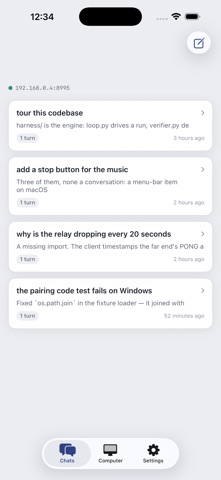
Collie Remote is made and published by Daming Wu. AppBrain is an independent app data site and isn't affiliated with Daming Wu. The app name, icon, screenshots and description belong to Daming Wu and are shown as published on the App Store.
AppBrain's verdict
- Last updated
- August 13, 2026
Rankings
App Store top chartsApp Store Rankings for Collie Remote
This app is not ranked
Competitors
Similar apps and more from Daming WuAlternatives to Collie Remote
More from Daming Wu
Releases
Updates seen on the App Store- Version
- 1.0
- Launched
- August 2026
No changelog data
User feedback
Ratings and reviews on the App StoreComments on Collie Remote for iOS
We don't have enough comments to show example comments. Please check back later.
Technology
Found in the app by AppBrain- Price
- Free
- App size
- 1.54 MB
- Content rating
- Everyone
Technologies used by Collie Remote
About the app and developer
About Collie Remote
Collie Remote is an overall app developed by Daming Wu.
What is the rating of Collie Remote?
Collie Remote has no ratings yet.
Is Collie Remote free?
Collie Remote is free. The app size is 1.54 MB. The latest version available is 1.0. The last update was on August 13, 2026.
What are the requirements for Collie Remote?
The app has a content rating of Everyone. The app has been available on the App Store since August 2026.
Developer information for Daming Wu
Address:
Store listing
By Daming Wu, from the App StoreScreenshots by Daming Wu, from the the App Store listing
Description by Daming Wu Written by the developer, not by AppBrain. Click to read.
Collie Remote is the companion app for Collie, the coding agent that runs on your own computer.
Collie writes a reproduction, runs it, and only calls a job done when an assertion it executed has passed. This app lets you watch that happen, and start it, from wherever you are.
• See what your machine is working on — the reproduction, the edits, the verdict.
• Start a run from your phone; the work happens on your computer.
• Redirect a run that is going the wrong way instead of waiting for it to finish.
• Tell the computer what to do in plain words — open an app, lock the screen, play something.
• Read the code it changed, so you can judge the change rather than take it on trust.
• Send a photo of the thing that is broken.
HOW IT CONNECTS
There is no Collie account and no Collie cloud. The app talks to Collie running on your own machine — either directly over your network, or through an end-to-end encrypted relay when you are away from it. Pairing is one scan plus a number you confirm on the computer itself, so nothing gets in without someone at the keyboard agreeing.
You need Collie on your Mac or PC first: https://collie.run
Open source: https://github.com/colliehq/collie
Collie writes a reproduction, runs it, and only calls a job done when an assertion it executed has passed. This app lets you watch that happen, and start it, from wherever you are.
• See what your machine is working on — the reproduction, the edits, the verdict.
• Start a run from your phone; the work happens on your computer.
• Redirect a run that is going the wrong way instead of waiting for it to finish.
• Tell the computer what to do in plain words — open an app, lock the screen, play something.
• Read the code it changed, so you can judge the change rather than take it on trust.
• Send a photo of the thing that is broken.
HOW IT CONNECTS
There is no Collie account and no Collie cloud. The app talks to Collie running on your own machine — either directly over your network, or through an end-to-end encrypted relay when you are away from it. Pairing is one scan plus a number you confirm on the computer itself, so nothing gets in without someone at the keyboard agreeing.
You need Collie on your Mac or PC first: https://collie.run
Open source: https://github.com/colliehq/collie