

Color Meter: Pixel Picker
Color Meter: Pixel Picker is made and published by Jordan Hipwell. AppBrain is an independent app data site and isn't affiliated with Jordan Hipwell. The app name, icon, screenshots and description belong to Jordan Hipwell and are shown as published on the App Store.
AppBrain's verdict
- Rating on App Store
- 4.33
- 3 ratings
- Last updated
- October 8, 2026
It doesn't have enough ratings yet to judge what users think.
Rankings
App Store top chartsApp Store Rankings for Color Meter: Pixel Picker
Competitors
Similar apps and more from Jordan HipwellMore from Jordan Hipwell


Releases
Updates seen on the App Store- Version
- 1.1
- Launched
- May 2026
No changelog data
User feedback
Ratings and reviews on the App StoreComments on Color Meter: Pixel Picker for iOS
We don't have enough comments to show example comments. Please check back later.
Technology
Found in the app by AppBrain- Price
- Free
- App size
- 6.96 MB
- Content rating
- Everyone
Technologies used by Color Meter: Pixel Picker
About the app and developer
About Color Meter: Pixel Picker
Color Meter: Pixel Picker is an utilities app developed by Jordan Hipwell.
User Ratings
Color Meter: Pixel Picker is rated 4.33 out of 5 stars. The rating is based on 3 ratings.
App Information
Color Meter: Pixel Picker is freely available from the App Store. The app size is 6.96 MB. The latest version available is 1.1. The last update was on October 8, 2026.
Technical Requirements
The app has a content rating of Everyone. The app has been available on the App Store since May 2026.
Developer information for Jordan Hipwell
Address:
Store listing
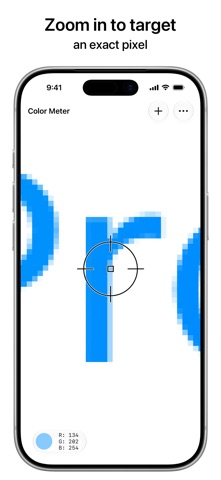
By Jordan Hipwell, from the App Store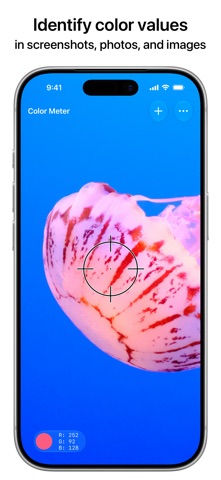




Description by Jordan Hipwell Written by the developer, not by AppBrain. Click to read.
How to Use
• From anywhere: Take a screenshot, tap the Share button, and choose Color Meter
• From any app: Drag and drop an image directly into Color Meter or onto the app icon
• In the app: Add a photo from Photos, Files, Camera, or Clipboard
• In another app like Photos: Share an image and choose Color Meter in the share sheet
Features
• Zoom in and pan around to pinpoint specific pixel color values
• Increase the aperture size to average the color values of sampled pixels
• Choose a color space from Native Values (including EDR and EDR Linear), P3, sRGB, BT.2020, Adobe RGB, or L*a*b*
• Display RGB color values in Decimal, Hexadecimal, Percentage, or Float
• Share the color value as text or an image
• Drag and drop the sampled color into another app
And More
• Beautiful Liquid Glass design
• Available for iPhone and iPad
• Customizable toolbar, menu bar, keyboard shortcuts, and multiple windows on iPad
• Supports HDR photos and wide colors
• Full accessibility support
• No ads, no tracking, no subscriptions
Color Meter is a simple and focused tool for picking colors from images. It intentionally does not include functionality such as generating color palettes, saving favorite colors, etc.
Color Meter Pro is an available in-app purchase that allows you to sample colors without any limits or interruptions. Purchase once to unlock on all your devices forever.
If you’ve used Digital Color Meter on the Mac, you’ll feel right at home in this app. Made for designers, developers, and anyone else who will find it useful. If you appreciate the app, please leave a kind review!