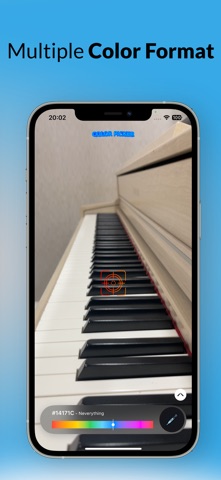
Color Picker: Eye Dropper Cam is a graphics & design app developed by Hoang Le.
What is the rating of Color Picker: Eye Dropper Cam?
Color Picker: Eye Dropper Cam has no ratings yet.
Is Color Picker: Eye Dropper Cam free?
Color Picker: Eye Dropper Cam is free. The app size is 19.29 MB. The latest version available is 3.4. The last update was on August 14, 2026.
What are the requirements for Color Picker: Eye Dropper Cam?
The app has a content rating of Everyone. The app has been available on the App Store since April 2025.
Description by Hoang Le(from the App Store)
Instantly detects colors from the real world and gives you precise RGB, HEX, CMY, and HSV values — live on screen.
Designed for speed and accuracy, this app helps artists, designers, and creatives capture exact colors from anything they see — objects, fabrics, walls, screens, or nature — faster and more reliably than traditional color picker tools.
KEY FEATURES OF THE COLOR PICKER APP:
Real-Time Color Detection - Point your camera at any object and instantly view its exact color in RGB and HEX formats. This color picker camera tool helps you grab colors from your environment with stunning accuracy.
Accurate RGB & HEX Output - Get instant RGB values and HEX color codes for any detected color. Whether you're designing a website, editing images, or choosing paint, you’ll always have the right code at your fingertips.
Multiple Color Formats Supported - Explore and export your colors in several formats: RGB Values – Red, Green, Blue HEX Codes – Ideal for digital/web use CMY – Cyan, Magenta, Yellow for print HSV/HSB – Hue, Saturation, Brightness
Color Picker for Artists & Designers - This app isn't just a tool — it's a companion for creativity. It’s the ideal color picker for artists, illustrators, and UI/UX designers who want precise and flexible control over colors.
Color Harmony & Palette Generator - Automatically view complementary, analogous, and triadic colors based on your selection. Build color palettes that are visually stunning and balanced for any creative purpose - from branding and art to home design.
Save and Organize Your Colors - Save your favorite colors with a tap. Name them, categorize them, and build your own custom color library. Easily return to colors that inspire you and organize them into palettes for different projects.
Share Colors Anywhere - Found the perfect color? Share it with your team, friends, or social media followers with one tap. Export RGB and HEX codes, or share palette screenshots directly from the app.
User-Friendly Interface - The clean, modern interface is designed for speed and ease of use. No complicated steps — just open the app, point your camera, and pick your color.
WHY CHOOSE THIS COLOR PICKER APP?
The Best Color Picker Camera Tool - Detect colors instantly using your device’s live camera feed. It’s like an eyedropper tool for the real world.
Designed for Real-World Use - Scan colors from nature, fabrics, art, digital displays, or anything around you. It’s perfect for everyday color inspiration.
Ideal for Professional & Hobby Creatives - Whether you're a developer working with HEX color codes, a painter choosing tones, or a hobbyist looking to explore color theory — this app fits in your workflow.
Lightweight, Fast & Accurate - No unnecessary features or bloat. Just a fast, precise color picker that works when you need it.
Ongoing Updates - We listen to feedback and continuously improve the app based on your needs. Expect new features, optimizations, and UI enhancements over time.
USE CASES:
- Color matching for branding, print, and fashion - Extract colors from photos and camera feed - Get RGB and HEX color codes for web design - Pick real-world colors for your art projects - Match wall paints and fabrics with ease
Download Color Picker: Camera Eye Dropper today and bring the full spectrum of color into your creative toolkit. Pick colors with precision and unlock new inspiration with every scan.
Terms of Use (EULA): https://www.apple.com/legal/internet-services/itunes/dev/stdeula/
Each subscription will automatically renew 3 days before the expiration date for
the same time period. Subscriptions can be cancelled at any time before the renewal.