

ColorModelApp
ColorModelApp is made and published by Kota Shimizu. AppBrain is an independent app data site and isn't affiliated with Kota Shimizu. The app name, icon, screenshots and description belong to Kota Shimizu and are shown as published on the App Store.
AppBrain's verdict
- Last updated
- May 12, 2026
Rankings
App Store top chartsApp Store Rankings for ColorModelApp
Competitors
Similar apps and more from Kota ShimizuAlternatives to ColorModelApp

Releases
Updates seen on the App Store- Version
- 1.0
- Launched
- May 2026
No changelog data
User feedback
Ratings and reviews on the App StoreComments on ColorModelApp for iOS
We don't have enough comments to show example comments. Please check back later.
Technology
Found in the app by AppBrain- Price
- Free
- App size
- 7.78 MB
- Content rating
- Everyone
Technologies used by ColorModelApp
About the app and developer
About ColorModelApp
ColorModelApp is a graphics & design app developed by Kota Shimizu.
User Ratings
The app has no ratings yet.
App Information
ColorModelApp is freely available from the App Store. The app size is 7.78 MB. The latest version available is 1.0. The last update was on May 12, 2026.
Technical Requirements
The app has a content rating of Everyone. The app has been available on the App Store since May 2026.
Developer information for Kota Shimizu
Address:
Frequently asked questions about ColorModelApp
Is ColorModelApp free?
Yes. ColorModelApp is free on the App Store.
Is ColorModelApp still available?
Yes. ColorModelApp is on the App Store, and the last update we saw was on May 12, 2026.
How large is ColorModelApp?
ColorModelApp is 7.78 MB.
Is ColorModelApp suitable for children?
App Store rates the content of ColorModelApp as suitable for everyone.
Who made ColorModelApp?
ColorModelApp was developed by Kota Shimizu. It is listed in the graphics & design category on the App Store.
What are the best alternatives to ColorModelApp?
People looking at ColorModelApp also look at these graphics & design apps: MotionBook - Draw & Animate.
Store listing
By Kota Shimizu, from the App Store




Description by Kota Shimizu Written by the developer, not by AppBrain. Click to read.
Create colors intuitively using RGB, CMYK, or HSV sliders, and save them instantly.
You can also pick colors directly from the live camera feed or from photos stored on your device.
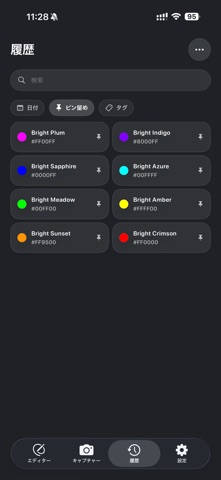
All saved colors are automatically timestamped and can be organized using pins and tags.
Group related colors by project or theme and access them anytime with ease.
Tap any color in the list or grid view to instantly copy its color code.
With Universal Clipboard support, copied colors can be shared seamlessly across your Apple devices, including iPad.
The copied color is reflected directly in the Editor view, allowing you to preview it in full screen.
Palette Snap also supports haptic feedback and the new Liquid Glass design introduced in iOS 26.
Features:
• RGB / CMYK / HSV color sliders
• Live camera and photo color sampling
• Automatic color history with timestamps
• Pin and tag-based organization
• One-tap color code copy
• Universal Clipboard support
• Haptic feedback
• Liquid Glass design (iOS 26+)
Note: Palette Snap requires iOS 26 or later.