Colory Tally Counter is made and published by
Hikari Mano.
AppBrain is an independent app data site and isn't affiliated with Hikari Mano.
The app name, icon, screenshots and description belong to Hikari Mano and are shown as
published on the App Store.
About Colory Tally Counter
Colory Tally Counter is an utilities app developed by Hikari Mano.
User Ratings
The app has no ratings yet.
App Information
Colory Tally Counter is freely available from the App Store. The app size is 31.72 MB. The latest version available is 1.1.5. The last update was on September 2, 2026.
Technical Requirements
The app has a content rating of Everyone. The app has been available on the App Store since May 2024.
Description by Hikari Mano(from the App Store)
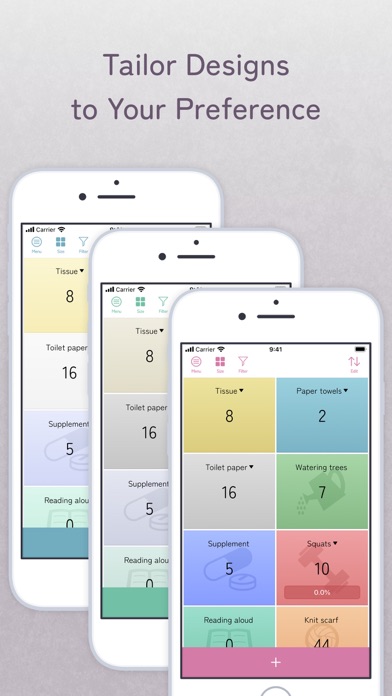
Colory Tally Counter is a versatile tally counter app that lets you add a splash of color and style to your counting tasks with 44 different colors and 41 unique icons.
MAIN FEATURES - Easy Counting: Tap to count up (default +1), swipe left to count down (default -1), and long press to open the menu. - Adjustable Sizes: Display many counters with small size, or prioritize usability with large size. - Widgets: With the Pro version, add widgets to your home screen. On iOS 17.4 and above, count directly with +/- buttons on the home screen. Below iOS 17.4, see the counter values with colors and icons. - Detailed View: Customize counters with a preview. If you access detailed views frequently, enable the +/- button for quick access. Widgets also allow individual counter access. - Auto-Record: Each counter automatically logs counts with date and time. Ideal for tracking medication, feedings, and more. View detailed records to track changes easily. Pro version displays records by day, week, month, or year, and allows notes for each record. - Countdown Mode: Set individual counters to countdown mode (default target value is 0). Name displays with a “▼” when in countdown mode. Tap to count down, swipe left to count up. - Tagging: Use tags to filter and organize counters. Register tags beforehand for different use cases. - Sorting: Tap the edit button in the upper right of the home screen to sort counters via drag and drop or to delete counters. - Shortcuts: Long press the + button on the home screen to instantly create a counter with default settings. - Counter Menu: Long press a counter to access: - Detailed view - Record view - Decrease count (increase in countdown mode) - Edit value - Reset counter - Delete counter
SETTINGS - Vibration on/off for counts - Screen sleep on/off - Sound effects on/off for counting - Change sound effects for count up/down - Change theme color (Pro only) - Change icon display position - +/- button mode on/off
RECOMMENDED USES - Count items like beads, screws, or parts - Track scores or wins in games and sports - Record household chores like cleaning or shopping - Track consumables like tissues, toilet paper, or foil - Record practice sessions for reading or writing - Track knitting rows - Log workout reps - Record medication or supplement intake - Track water, caffeine, or alcohol intake - Log baby feedings or diaper changes - Manage plants with watering, fertilizing, or pruning records
PRO VERSION - No ads - Widget functionality - Add notes to records - Display records segmented by time - Change theme colors
Upgrade to the Pro version with a one-time lifetime purchase and enjoy all premium features forever.
== Fonts == Zen Maru Gothic Licensed under SIL Open Font License 1.1 (http://scripts.sil.org/OFL) Copyright 2021 The Zen Maru Gothic Project Authors (https://github.com/googlefonts/zen-marugothic)
Each subscription will automatically renew 3 days before the expiration date for
the same time period. Subscriptions can be cancelled at any time before the renewal.