

ComHome Pro is made and published by 俊茂 潘. AppBrain is an independent app data site and isn't affiliated with 俊茂 潘. The app name, icon, screenshots and description belong to 俊茂 潘 and are shown as published on the App Store.
AppBrain's verdict
- Last updated
- March 31, 2026
Rankings
App Store top chartsApp Store Rankings for ComHome Pro
Competitors
Similar apps and more from 俊茂 潘More from 俊茂 潘

Releases
Updates seen on the App Store- Version
- 1.0.0
- Launched
- March 2026
No changelog data
User feedback
Ratings and reviews on the App StoreComments on ComHome Pro for iOS
We don't have enough comments to show example comments. Please check back later.
Technology
Found in the app by AppBrain- Price
- Free
- App size
- 36.1 MB
- Content rating
- Low
Technologies used by ComHome Pro
About the app and developer
About ComHome Pro
ComHome Pro is a graphics & design app developed by 俊茂 潘.
User Ratings
The app has no ratings yet.
App Information
ComHome Pro is freely available from the App Store. The app size is 36.10 MB. The latest version available is 1.0.0. The last update was on March 31, 2026.
Technical Requirements
The app has a content rating of Low Maturity. The app has been available on the App Store since March 2026.
Developer information for 俊茂 潘
Address:
Store listing
By 俊茂 潘, from the App Store



Description by 俊茂 潘 Written by the developer, not by AppBrain. Click to read.
See Furniture in Your Room Before You Buy
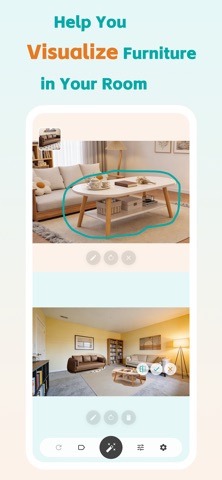
Comhome Pro helps you visualize furniture in your own room using a simple photo — powered by your own AI API key.
Upload a picture of your space, place furniture inside it, and instantly see how it looks before making a purchase. No subscription fees, no usage limits — just bring your own AI key and start designing.
Whether you're redecorating, planning a new layout, or comparing furniture options, Comhome Pro makes it easy to preview furniture in your room realistically.
How It Works
Set Up Your AI Key – Enter your own OpenAI/Claude API key once. Your key, your control.
Upload Your Room – Take or select a photo of your space.
Select Furniture – Choose furniture from any image.
Place & Preview – Drag, drop, and generate a realistic preview instantly using your AI provider.
Key Features
• Bring Your Own AI Key
Use your own Gemini, OpenAI, or compatible API key. Pay only for what you use, with no middleman markups.
• Realistic Furniture Preview
See how furniture looks in your actual room with natural lighting and shadows.
• Drag & Drop Placement
Move, rotate, and scale furniture freely to match your space.
• Try Before You Buy
Preview furniture in your room before purchasing or rearranging.
• Save & Share
Save your room designs and share them with friends or family.
• Privacy First
Your images and API keys are processed locally or via your own AI account. We never store your API credentials or images on our servers.
• Secure & Transparent
Your API key stays on your device. No account required beyond your AI provider.
Supported AI Providers
• Google Gemini
• OpenAI
• VolcEngine Ark
• Qwen
• xAI Grok
• Novita Seedream
• Novita Flux 2
• Fireworks AI
• Replicate
Who Is It For?
Comhome Pro is perfect for:
• Power users who already have AI API access and want full control
• Homeowners planning new furniture
• Renters redesigning their rooms
• Interior design lovers
• Anyone who wants to see furniture in their room without subscription fees
Stop Guessing, Start Visualizing
You bring the AI, we bring the design tools.
Download Comhome Pro today and see furniture in your room instantly — on your terms.