

Comic Art - Cartoon Effects
Comic Art - Cartoon Effects is made and published by TAIKI HIRATA. AppBrain is an independent app data site and isn't affiliated with TAIKI HIRATA. The app name, icon, screenshots and description belong to TAIKI HIRATA and are shown as published on the App Store.
AppBrain's verdict
Established- Rating on App Store
- 5.00
- 3 ratings
- Last updated
- April 21, 2023
It doesn't have enough ratings yet to judge what users think.
Rankings
App Store top chartsApp Store Rankings for Comic Art - Cartoon Effects
Competitors
Similar apps and more from TAIKI HIRATAAlternatives to Comic Art - Cartoon Effects






More from TAIKI HIRATA




Releases
Updates seen on the App Store- Version
- 2.3
- Launched
- October 2014
No changelog data
User feedback
Ratings and reviews on the App StoreComments on Comic Art - Cartoon Effects for iOS
We don't have enough comments to show example comments. Please check back later.
Technology
Found in the app by AppBrain- Price
- Free
- App size
- 5.98 MB
- Content rating
- Everyone
Technologies used by Comic Art - Cartoon Effects
About the app and developer
About Comic Art - Cartoon Effects
Comic Art - Cartoon Effects is a photo & video app developed by TAIKI HIRATA.
What is the rating of Comic Art - Cartoon Effects?
Comic Art - Cartoon Effects is rated 5.00 out of 5 stars, based on 3 ratings.
Is Comic Art - Cartoon Effects free?
Comic Art - Cartoon Effects is free. The app size is 5.98 MB. The latest version available is 2.3. The last update was on April 21, 2023.
What are the requirements for Comic Art - Cartoon Effects?
The app has a content rating of Everyone. The app has been available on the App Store since October 2014.
Developer information for TAIKI HIRATA
Address:
Frequently asked questions about Comic Art - Cartoon Effects
Is Comic Art - Cartoon Effects free?
Yes. Comic Art - Cartoon Effects is free on the App Store.
Is Comic Art - Cartoon Effects still available?
Yes. Comic Art - Cartoon Effects is on the App Store, and the last update we saw was on April 21, 2023.
How large is Comic Art - Cartoon Effects?
Comic Art - Cartoon Effects is 5.98 MB.
Is Comic Art - Cartoon Effects suitable for children?
App Store rates the content of Comic Art - Cartoon Effects as suitable for everyone.
How do people rate Comic Art - Cartoon Effects?
Comic Art - Cartoon Effects scores 5.00 out of 5 stars, from 3 ratings on the App Store.
Who made Comic Art - Cartoon Effects?
Comic Art - Cartoon Effects was developed by TAIKI HIRATA. It is listed in the photo & video category on the App Store.
What are the best alternatives to Comic Art - Cartoon Effects?
People looking at Comic Art - Cartoon Effects also look at these photo & video apps: Art Filter Camera, Tooncam-Toon pic,sketch maker, Handwriting Camera, Cartoon Creative Camera, Comic Sketch Camera.
Store listing
By TAIKI HIRATA, from the App Store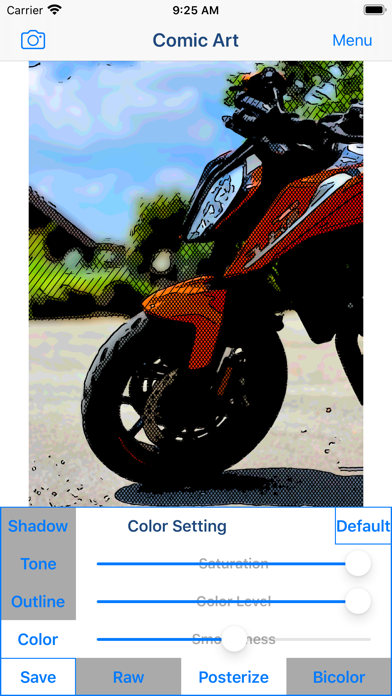

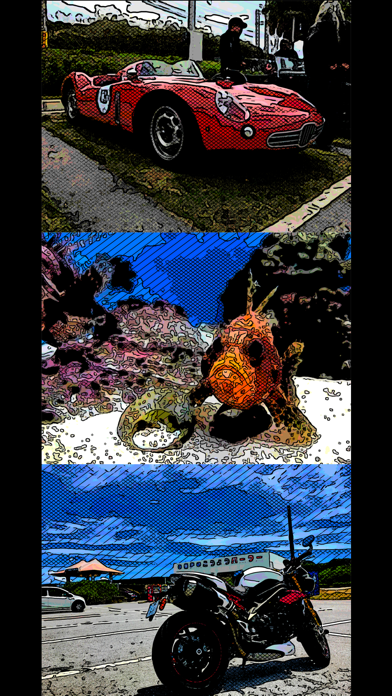


Description by TAIKI HIRATA Written by the developer, not by AppBrain. Click to read.
You will be able to create "Comic style illustration", "Cartoon style illustration" and "Graphic novel tone style illustration" from your photo and illustration by using Art Photo Editor app "Comic Art".
If you enjoyed by this App, I'm glad.
■List of adjustable items
1. Shadow setting
You can edit the solid fill in the dark areas of the image.
The items that can be adjusted are as follows.
(1) Shadow Area
(2) Shadow Depth
You can adjust the solid density of the image.
The darkness of the darkest part of the photo is constant, and you can adjust the solidness of the middle part from full black to no solid.
2. Tone setting
You can edit the tone applied to the image.
You can set the following 3 types of tones.
(1) Mesh Tone 1
Adds a mesh tone to the image.
The items that can be adjusted are as follows.
・Two type of Tone Area
・Mesh Spacing
(2) Mesh Tone 2
*To save the image with this tone, you need to purchase the Add-on.
Adds a mesh tone to the image.
Unlike Mesh Tone 1, no tone is applied to the brightest part of the image.
The items that can be adjusted are as follows.
・Two type of Tone Area
・Mesh Spacing
(3) Dot Tone
*To save the image with this tone, you need to purchase the Add-on.
Adds a dot tone to the image.
The items that can be adjusted are as follows.
・Tone Area
・Dot Size
3. Outline setting
You can edit the outline of the image.
You can set the following 3 types of outline.
(1) Type 1
The items that can be adjusted are as follows.
・Outline Strength
・Outline Width
(2) Type 2
*To save the image with this outline, you need to purchase the Add-on.
It has a finer outline than Type 1.
The items that can be adjusted are as follows.
・Outline Strength
・Outline Width
(3) Type 3
*To save the image with this outline, you need to purchase the Add-on.
It is a outline that looks like ink is bleeding.
The items that can be adjusted are as follows.
・Outline Strength
4. Color setting
You can edit the color of the image.
You can set the following 3 types of color.
(1) Raw
Use the original photo color as is.
The items that can be adjusted are as follows.
・Saturation
(2) Posterize
*To save the image with this color, you need to purchase the Add-on.
Create an image with the number of colors reduced from the original photo.
The items that can be adjusted are as follows.
・Saturation
・Color Level
・Smoothness
(3) Bicolors
*To save the image with this color, you need to purchase the Add-on.
Creates a two-color image.
The items that can be adjusted are as follows.
・Hue
・Color Level
・Smoothness
■ How to edit and process images
1. From the "Camera" button on the upper left of the screen, select the photo or image you want to process or edit. You can select the acquisition destination of the photo/image from the camera and camera roll (photo album).
2. When the selected image is displayed on the screen, adjust the desired image quality by operating the various setting buttons and editing/processing sliders from the "Shadow", "Tone", "Outline" and "Color" buttons.
3. After adjusting the image quality to your liking, click the "Save" button and the currently displayed image will be saved in the "Camera Roll".
*A full screen advertisement will be displayed when the save is complete. You can hide this ad by purchasing the Add-on.
■About in-app advertising
In the app, a banner ad is displayed at the bottom of the photo editing screen, and a full ad is displayed when the image is saved.
These ads can be hidden by purchasing the Add-on.