

Comic Life 3
Comic Life 3 is made and published by plasq LLC. AppBrain is an independent app data site and isn't affiliated with plasq LLC. The app name, icon, screenshots and description belong to plasq LLC and are shown as published on the App Store.
AppBrain's verdict
EstablishedWell rated- Best rank
- #65
- Top Paid, Germany
- Rating on App Store
- 4.30
- 240 ratings
- Last updated
- February 23, 2024
Users rate it well: 4.3 stars from 240 ratings. Its best ranking is #65 in Top Paid, Photo & Video in Germany.
Rankings
App Store top charts- Highest rank
- #65
- Chart
- Top Paid
- Photo & Video
- Country
- Germany
App Store Rankings for Comic Life 3
Top rankings
| Rank | Country | Category | List |
|---|---|---|---|
| 65 | Germany | Photo & Video | Top Paid |
Ranking history in Germany
Competitors
Similar apps and more from plasq LLCAlternatives to Comic Life 3






More from plasq LLC




Releases
Updates seen on the App Store- Version
- 3.5.15
- Launched
- September 2014
No changelog data
User feedback
Ratings and reviews on the App StoreComments on Comic Life 3 for iOS
We don't have enough comments to show example comments. Please check back later.
Technology
Found in the app by AppBrain- Price
- $4.99
- App size
- 97.0 MB
- Content rating
- Everyone
Technologies used by Comic Life 3
About the app and developer
About Comic Life 3
Comic Life 3 is a photo & video app developed by plasq LLC.
What is the rating of Comic Life 3?
Comic Life 3 is rated 4.30 out of 5 stars, based on 240 ratings.
Is Comic Life 3 free?
Comic Life 3 costs $4.99. The app size is 96.96 MB. The latest version available is 3.5.15. The last update was on February 23, 2024.
What are the requirements for Comic Life 3?
The app has a content rating of Everyone. The app has been available on the App Store since September 2014.
Developer information for plasq LLC
Address:
Frequently asked questions about Comic Life 3
Is Comic Life 3 free?
No. Comic Life 3 costs $4.99 on the App Store.
Is Comic Life 3 still available?
Yes. Comic Life 3 is on the App Store, and the last update we saw was on February 23, 2024.
How large is Comic Life 3?
Comic Life 3 is 96.96 MB.
Is Comic Life 3 suitable for children?
App Store rates the content of Comic Life 3 as suitable for everyone.
How do people rate Comic Life 3?
Comic Life 3 scores 4.30 out of 5 stars, from 240 ratings on the App Store.
Who made Comic Life 3?
Comic Life 3 was developed by plasq LLC. It is listed in the photo & video category on the App Store.
What are the best alternatives to Comic Life 3?
People looking at Comic Life 3 also look at these photo & video apps: ThingLink, ComicBook!, Comic Caption Meme Maker, Pop Dot Comics, Inkwork.
Store listing
By plasq LLC, from the App Store


Description by plasq LLC Written by the developer, not by AppBrain. Click to read.
"Of the comic book apps I’ve used, Comic Life, [...], has the most features and works best on an iPad because of the bigger screen... I love the way the app allows you to edit tiny details, from the shape and style of word bubbles to the size and placement of each story cell." - Kit Eaton, The New York Times
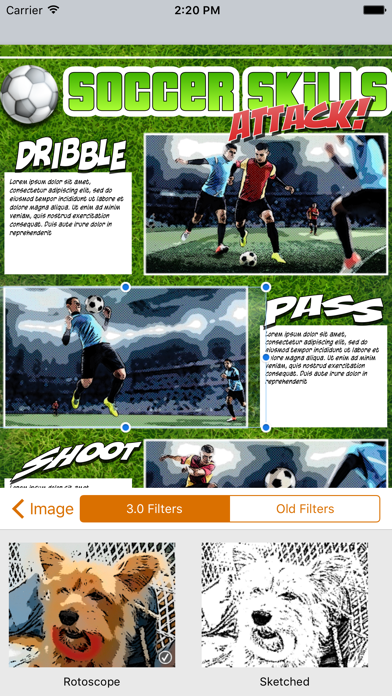
- Introducing an integrated Script Editor*, next generation image filters and built in Instant Alpha tool.
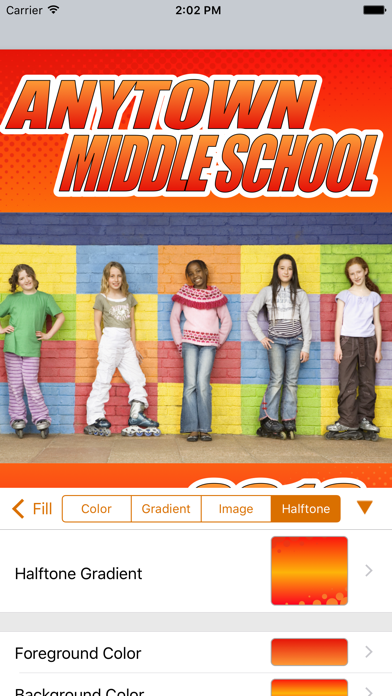
- New graphics features include speedlines, halftones, updated stroke options and more!
- Dozens of fully customizable templates.
- Everything you need at your fingertips: speech balloons, photo filters, comic lettering, templates, shapes, shadows and effects.
Download Comic Life 3 to create dynamic comics with your photos.
Packed with fonts, templates, balloons, captions, and lettering art, Comic Life is a fun, powerful and easy-to-use app that makes creating comics easier than ever. And now you can build your comics anywhere you like!
Easily go from taking photos to creating full comics all on one device with full page templates and panel layouts. Create original stories with the integrated Script Editor then drag and drop your words to the comic page when you're done.
Bring in photos from your photo library or access web photos via Flickr integration, and the app’s powerful editing and design tools to get exactly the look you want.
When your work of art is complete, use the integrated reader to review pages on your device. Or share with your friends and family. Choose from Facebook, Twitter, email or open your comic in another app as a PDF.
New Tools and Features in Comic Life 3
Script Editor* that recognizes elements as you type
17 Advanced parametric image filters
Dozens of full templates with hundreds of panel layout options.
Instant Alpha tool built in so you can knock out image backgrounds
Speedlines, halftones, and textures
Fully customizable fill and borders for balloons, lettering, captions, panels and shapes
New balloon variety slider for even more customization
Customizable gradient builder
Draw shapes
Over 60 font options
Load photos directly from photo library
Integrated camera feature to instantly add photos to your comic
Supports multi-page comics
Using Comic Life you can:
- Read your comics with the integrated e-reader.
- Create photo comics in the full featured comic editor.
- Share your comics on Facebook, Twitter, via Mail, AirDrop and iTunes File Share.
- Transfer your comics to Mac or Windows and keep working with Comic Life 3 on your desktop or laptop.
- Send your comics to a printer on your wireless network.
- Choose from full page layouts including panels, titles and captions along with complimentary styles for a high end look.
- Drag and Drop elements anywhere in your comic page.
- Easily add photos from your library with the Place Photo button in panels.
- Curve and place balloon tails precisely with advanced tail controls.
- Resize and rotate images, clip them in panels along with balloons, captions, and lettering.
- Create multilayered color gradients to design the perfect style for lettering, captions or background.
- Use smart shapes to add common shapes and the free form shape drawing tool to create any line or shape you can imagine.
- Work without worry of losing your creation as documents are automatically saved whenever a change is made.
* This feature is available on iPad only