Download Android Apps and Games
AppBrain
  • Apps
  • Apps being viewed right now Trending apps today Most popular apps All-time most downloaded apps Top rated apps
  • Intelligence ▾
    Intelligence overview → Track any Android app or your whole market
    Track & analyze
    Keyword Tracker & OptimizerTrack & improve Play rankings App Performance ReportOne-off PDF for any app StatisticsFree Android & Play market stats
    Promote your app
    Featured Apps App Links
  • Intelligence
  • Pricing
  • Dashboard
  • Sign up
  • Log in
Last updated on: 2026-08-20
App Store Apps > Utilities > ComicFlow - CBR & CBZ to PDF
ComicFlow - CBR & CBZ to PDF icon

ComicFlow - CBR & CBZ to PDF

3.2
Navid Gooranourimi
4.67
6 reviews
$2.99

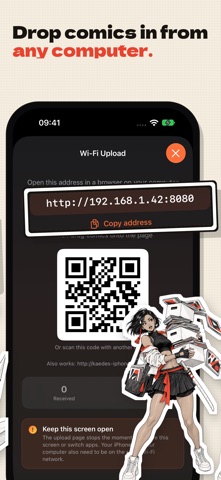
ComicFlow - CBR & CBZ to PDF Screenshot 1 of 10
ComicFlow - CBR & CBZ to PDF Screenshot 2 of 10
ComicFlow - CBR & CBZ to PDF Screenshot 3 of 10
ComicFlow - CBR & CBZ to PDF Screenshot 4 of 10
ComicFlow - CBR & CBZ to PDF Screenshot 5 of 10
ComicFlow - CBR & CBZ to PDF Screenshot 6 of 10
ComicFlow - CBR & CBZ to PDF Screenshot 7 of 10
ComicFlow - CBR & CBZ to PDF Screenshot 8 of 10
ComicFlow - CBR & CBZ to PDF Screenshot 9 of 10
ComicFlow - CBR & CBZ to PDF Screenshot 10 of 10
Download from the App Store

About ComicFlow - CBR & CBZ to PDF

ComicFlow - CBR & CBZ to PDF is an overall app developed by Navid Gooranourimi.

Download Statistics

User Ratings

ComicFlow - CBR & CBZ to PDF is rated 4.67 out of 5 stars. The rating is based on 6 ratings.

App Information

ComicFlow - CBR & CBZ to PDF costs $2.99 to download. The APK download size is 7.35 MB. The latest version available is 3.2. The last update was on August 8, 2026.

Technical Requirements

The app has a content rating of Everyone. The app has been available on Google Play January 2026.

Description
ComicFlow converts CBR and CBZ comic archives to PDF, reads them directly, and organizes your collection — 100% offline and private. No ads, no account, no subscription.

CONVERT CBR/CBZ TO PDF
Convert comic book archives to PDF with one tap. ComicFlow extracts every page from your CBR, CBZ, RAR, and ZIP files and builds a clean, correctly ordered PDF in seconds.

- Three quality settings: Low for sharing, Medium for everyday reading, High for collectors
- Batch conversion: queue multiple files and watch per-file progress

CBZ EXPORT — FREE FOR EVERYONE
Turn any comic into a standard CBZ that opens natively on Kobo, Boox, PocketBook, KOReader, and practically every comic reader app. No re-encoding, no quality loss. Included in the base app — no purchase needed.

READ COMICS DIRECTLY — NO CONVERSION NEEDED
Open CBR, CBZ, and PDF files instantly in the built-in reader, optimized for high-resolution comic pages.

- Double-tap or pinch to zoom into artwork
- Tap zones for one-handed page turns
- Reading position saved automatically for every file
- Bookmark pages and jump back anytime

ORGANIZE YOUR COLLECTION
- Custom collections for series or genres
- 5-star ratings, personal notes, and tags
- Reading status: unread, reading, completed
- Instant search; filter by publisher, year, genre, rating, or status
- ComicInfo.xml metadata read automatically

FLEXIBLE READING MODES
- Single page, double-page spread, or vertical scroll for webtoons
- Right-to-left page order for manga
- Thumbnail grid for quick navigation
- Full iPad keyboard control: arrow keys, Space, T for thumbnails, B for bookmarks, and more

iCLOUD SYNC
Reading progress, bookmarks, ratings, and notes sync across your Apple devices. Optional, no account needed — and it never uploads your comic files.

COMICFLOW PRO — OPTIONAL, ONE-TIME UPGRADE
The base app is complete and stays that way. Pro is a single in-app purchase — pay once, keep it forever, no subscription — that adds:

- Face ID-locked collections: keep private comics behind Face ID, Touch ID, or your passcode
- Reader presets: save your manga, western, and webtoon setups and switch in one tap
- EPUB export for e-readers: fixed-layout EPUB3 tuned for Kobo, Boox, reMarkable, and PocketBook, with a .kepub option for Kobo
- E-ink image optimization: auto-crop, contrast and sharpening tuned per device, grayscale palettes, double-page splitting for manga, webtoon strip splitting

An honest note on Kindle: Kindle devices don't open sideloaded EPUB files. ComicFlow's EPUB export works together with the free Calibre desktop app to get comics onto a Kindle — the app explains the exact steps instead of pretending it's one tap.

100% OFFLINE AND PRIVATE
No internet required. No account. No tracking. No ads. Your comics stay on your device, and your reading habits are nobody's business but yours.

FAIR PRICING
You pay for the app once and get the full converter, reader, and library. Pro is optional and also a one-time purchase. Nothing renews, expires, or nags you.

SUPPORTED FORMATS
CBR, CBZ, RAR, ZIP, and PDF — opened from the Files app, email, cloud storage, or any sharing app.

IN 18 LANGUAGES
English, German, Spanish, French, Italian, Japanese, Korean, Portuguese (Brazil), Simplified Chinese, Traditional Chinese, Turkish, Polish, Dutch, Indonesian, Thai, Vietnamese, Ukrainian, and Swedish.
Show more Show less

More data about ComicFlow - CBR & CBZ to PDF

Price $2.99
Rating 4.67 based on 6 ratings
Ranking Highly ranked
Version 3.2
App download size 7.35 MB
Suitable for Everyone

More from Navid Gooranourimi

Farsib Weekly icon Farsib Weekly
Navid Gooranourimi
4.7
Free
64 ratings
Wallora - AI Painting Art icon Wallora - AI Painting Art
Navid Gooranourimi
0.0
Free
Negink - AI Tattoo Design icon Negink - AI Tattoo Design
Navid Gooranourimi
0.0
Free
Timeflip - Clock Challenge icon Timeflip - Clock Challenge
Navid Gooranourimi
0.0
Free
Mino - PDF Compressor & Merger icon Mino - PDF Compressor & Merger
Navid Gooranourimi
0.0
$2.99
DiceCraft: Board Game Roller icon DiceCraft: Board Game Roller
Navid Gooranourimi
0.0
$0.99
Nava - Sleep & Focus Sounds icon Nava - Sleep & Focus Sounds
Navid Gooranourimi
0.0
$2.99

Changelog of ComicFlow - CBR & CBZ to PDF

No changelog data

Developer information for Navid Gooranourimi

Navid Gooranourimi

Address:

Share ComicFlow - CBR & CBZ to PDF

Comments on ComicFlow - CBR & CBZ to PDF for iOS

We don't have enough comments to show example comments. Please check back later.

App Store Rankings for ComicFlow - CBR & CBZ to PDF

Top rankings

Rank Country Category List
33 Mexico Utilities Top Paid

Ranking history in Mexico

AppBrain offers valuable information about your app and those of your competitors. Join AppBrain for free and claim this app to view more ranking data, view history etc.
I'm the developer of this app

Technologies used by ComicFlow - CBR & CBZ to PDF

More hot apps 🔥

Back to top
AppBrain Intelligence premium content

Subscribe now to get full and unlimited access to AppBrain Intelligence. You'll have access to:

  • App Intelligence dashboard (performance timeline, competitor comparison, country rankings, insight cards)
  • Detailed ranking data per app
  • Full timeline per developer
  • Device market shares data per country
  • Unlimited keyword tracking
1 Month

$75/mo
(billed every month)

SAVE 0%
Subscribe
3 Months

$65/mo
($195 billed every 3 months)

SAVE 13%
Subscribe
1 Year

$57.50/mo
($690 billed every year)

SAVE 23%
Subscribe
Each subscription will automatically renew 3 days before the expiration date for the same time period. Subscriptions can be cancelled at any time before the renewal.

AppBrain is a directory focused on discovering great apps and games. We give statistics, rankings and search options that Google Play and the App Store don't have. All trademarks are owned by their respective owners. AppBrain doesn't offer APKs or binaries, and always lets users install the official version from Google Play or the App Store.

More apps

  • Top Android apps being viewed
  • Sparks eSIM Android App
  • Interesting Facts - Fun Facts
  • Hustle PH

Android Statistics

  • Android statistics
  • Google Play Developer stats
  • Trending Android Apps
  • Top popular Apps
  • Buy the best Android phone

About AppBrain

  • Contact
  • Privacy
  • Documentation
  • DMCA takedowns
  • Articles
  • Blog
  • How to improve the earnings of your ad units
© 2010-2026 - AppBrain