

Compass Navigator & Travel
Compass Navigator & Travel is made and published by KIET NGUYEN TAN. AppBrain is an independent app data site and isn't affiliated with KIET NGUYEN TAN. The app name, icon, screenshots and description belong to KIET NGUYEN TAN and are shown as published on the App Store.
AppBrain's verdict
- Last updated
- October 29, 2026
Rankings
App Store top chartsApp Store Rankings for Compass Navigator & Travel
Competitors
Similar apps and more from KIET NGUYEN TAN


Releases
Updates seen on the App Store- Version
- 1.0.1
- Launched
- October 2026
No changelog data
User feedback
Ratings and reviews on the App StoreComments on Compass Navigator & Travel for iOS
We don't have enough comments to show example comments. Please check back later.
Technology
Found in the app by AppBrain- Price
- Free
- App size
- 8.34 MB
- Content rating
- Everyone
Technologies used by Compass Navigator & Travel
About the app and developer
About Compass Navigator & Travel
Compass Navigator & Travel is a navigation app developed by KIET NGUYEN TAN.
User Ratings
The app has no ratings yet.
App Information
Compass Navigator & Travel is freely available from the App Store. The app size is 8.34 MB. The latest version available is 1.0.1. The last update was on October 29, 2026.
Technical Requirements
The app has a content rating of Everyone. The app has been available on the App Store since October 2026.
Developer information for KIET NGUYEN TAN
Address:
Frequently asked questions about Compass Navigator & Travel
Is Compass Navigator & Travel free?
Yes. Compass Navigator & Travel is free on the App Store.
Is Compass Navigator & Travel still available?
Yes. Compass Navigator & Travel is on the App Store, and the last update we saw was on October 29, 2026.
How large is Compass Navigator & Travel?
Compass Navigator & Travel is 8.34 MB.
Is Compass Navigator & Travel suitable for children?
App Store rates the content of Compass Navigator & Travel as suitable for everyone.
Who made Compass Navigator & Travel?
Compass Navigator & Travel was developed by KIET NGUYEN TAN. It is listed in the navigation category on the App Store.
What are the best alternatives to Compass Navigator & Travel?
People looking at Compass Navigator & Travel also look at these navigation apps: Darbak Taxi, Delivery & Tow, Ride SMART Flex, OBD Fusion, SeaPeople: Boat Tracker, London Cab Egypt.
Store listing
By KIET NGUYEN TAN, from the App Store


Description by KIET NGUYEN TAN Written by the developer, not by AppBrain. Click to read.
Phone compasses can drift near magnets and metal, so we added guided recalibration, an adjustable heading offset and a live GPS status. The 3D compass stays clear and easy to read, even when you hold your phone upright.
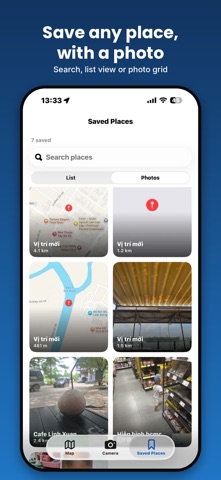
SAVE ANY PLACE
- GPS camera stamps coordinates, date, time and address right on the photo
- Import a photo from your library and read its GPS location
- Long-press the map to drop a pin anywhere and save it with a map snapshot
- Search your saved places, browse as a list or photo grid, see how far each one is
FIND IT AGAIN
- Pick a saved place and follow a dashed line and live distance to it
- Your walked path is drawn as a red trail
- AR compass view with a pointer showing which way to walk
- Optional reminders for places you saved a while ago
BIG LIVE COMPASS ON THE MAP
- A large compass centered on your location with heading, direction name, latitude, longitude and GPS signal status
- Standard, satellite and hybrid maps with zoom controls
- The map follows you and returns to you after you pan away
30 COMPASS STYLES AND A 3D COMPASS
- Choose from 30 needle and dial designs with a live preview
- A metal-style 3D compass that tilts with your phone, in Obsidian, Brass and Topo themes, with a big direction name
COMPASS QUESTIONS, ANSWERED
"Why does my compass point the wrong way?"
Magnets, magnetic phone cases, car dashboards and steel structures can throw a phone compass off. When the signal is unreliable, an animated figure-8 guide shows how to recalibrate, and it disappears once the compass is steady.
"It's a few degrees off compared to another compass."
Use the heading offset (±30°) in Tools to line it up with a trusted reference. It stays saved, and you can reset it any time.
"Is my GPS good enough to trust?"
The map shows a live GPS status (Excellent, Good, Poor or Fail) next to your coordinates, so you know when to wait for a better fix.
HANDY TRAVEL TOOLS
- Bubble level
- Altitude and air pressure (on devices with a barometer)
- Coordinates in decimal, DMS, DDM, UTM and Plus Code, with copy and share
- Sun and moon: sunrise, sunset, moon phase and direction
- Qibla direction
- Night mode (red display), keep screen on, heading calibration offset, meters or feet
Notes: the compass needs a device with a magnetometer. Keep the phone away from magnets and metal. Location is used only while the app is open.