

Compasswork Geometry
Compasswork Geometry is made and published by Slmon Mahlmann. AppBrain is an independent app data site and isn't affiliated with Slmon Mahlmann. The app name, icon, screenshots and description belong to Slmon Mahlmann and are shown as published on the App Store.
AppBrain's verdict
- Best rank
- #107
- New Apps, Belgium
- Last updated
- November 3, 2026
Rankings
App Store top charts- Highest rank
- #107
- Chart
- New Apps
- Entertainment
- Country
- Belgium
App Store Rankings for Compasswork Geometry
Top rankings
| Rank | Country | Category | List |
|---|---|---|---|
| 107 | Belgium | Entertainment | New Apps |
| 107 | Belgium | Finance | New Apps |
| 107 | Belgium | Food & Drink | New Apps |
| 107 | Belgium | Games | New Apps |
| 107 | Belgium | Action Games | New Apps |
| 107 | Belgium | Adventure Games | New Apps |
| 107 | Belgium | Board Games | New Apps |
| 107 | Belgium | Casino Games | New Apps |
| 107 | Belgium | Music Games | New Apps |
| 107 | Belgium | Puzzle Games | New Apps |
Ranking history in Belgium
Competitors
Similar apps and more from Slmon MahlmannMore from Slmon Mahlmann


Releases
Updates seen on the App Store- Version
- 1.0.1
- Launched
- November 2026
No changelog data
User feedback
Ratings and reviews on the App StoreComments on Compasswork Geometry for iOS
We don't have enough comments to show example comments. Please check back later.
Technology
Found in the app by AppBrain- Price
- Free
- App size
- 2.13 MB
- Content rating
- Everyone
Technologies used by Compasswork Geometry
About the app and developer
About Compasswork Geometry
Compasswork Geometry is an education app developed by Slmon Mahlmann.
What is the rating of Compasswork Geometry?
Compasswork Geometry has no ratings yet.
Is Compasswork Geometry free?
Compasswork Geometry is free. The app size is 2.13 MB. The latest version available is 1.0.1. The last update was on November 3, 2026.
What are the requirements for Compasswork Geometry?
The app has a content rating of Everyone. The app has been available on the App Store since November 2026.
Developer information for Slmon Mahlmann
Address:
Store listing
By Slmon Mahlmann, from the App Store


Description by Slmon Mahlmann Written by the developer, not by AppBrain. Click to read.
CONSTRUCT LIKE ON PAPER
• Compass: set the point, open it to a radius or take a length, turn the handle to draw an arc – or type the radius
• Set square with millimetre and degree scales, 20 cm ruler
• Points snap to intersections and endpoints, lengths to whole millimetres, angles to whole degrees
• Apple Pencil draws, fingers pan and zoom, palm rejection keeps your hand out of the way
• Labels, text, colours, highlighter, eraser and undo
• Insert pictures, for example a task from the textbook
CONSTRUCTION DESCRIPTION AND PLAYBACK
• Compasswork works out from the drawing what was constructed and writes the steps as instructions
• Playback: the construction is redrawn step by step – compass and set square move visibly
• Have the steps read aloud and print them as a gap-fill text – great for language support
LAB
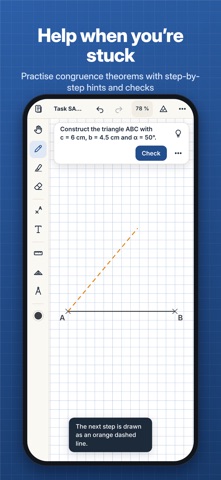
• Congruence theorems SSS, SAS, ASA and SSA with your own or random values, sketch and automatic check
• Basic constructions: perpendicular bisector, angle bisector, perpendicular from a point, perpendicular, parallel, circumcircle, incircle and Thales circle
• Step-by-step help: a hint, the next step, a ghost image, the solution
• Solids and nets: cube, cuboid, prisms, pyramids, tetrahedron, octahedron, cylinder, cone and sphere – rotate, fold, surface area and volume
• All 11 nets of a cube and the quiz "Is this a cube net?"
FOR THE CLASSROOM
• Share tasks as QR codes: students scan with the camera and start on their own sheet straight away
• Results come back as QR codes, and the teacher sees an overview of the whole class
• PDF export at original size, with grid and construction description if you like
• Nets with glue tabs to print and build
• Video of the playback for explainer videos and learning platforms
• Folders and a backup of all sheets
FREE AND FULL VERSION
Free: all drawing tools, pictures, text and colours, playback with short descriptions, three sheets, and opening and checking QR tasks.
The full version is a one-time in-app purchase, no subscription, shareable with Family Sharing. It unlocks unlimited sheets, the written-out description, the lab, PDF and video export, and creating QR tasks and collecting submissions.
PRIVACY
No ads, no account, no tracking. All sheets stay on your device.