

Compress PDF: Document Scanner
Compress PDF: Document Scanner is made and published by Chaman Sharma. AppBrain is an independent app data site and isn't affiliated with Chaman Sharma. The app name, icon, screenshots and description belong to Chaman Sharma and are shown as published on the App Store.
AppBrain's verdict
- Last updated
- October 6, 2026
Rankings
App Store top chartsApp Store Rankings for Compress PDF: Document Scanner
Competitors
Similar apps and more from Chaman SharmaAlternatives to Compress PDF: Document Scanner


More from Chaman Sharma

Releases
Updates seen on the App Store- Version
- 1.0.4
- Launched
- September 2026
No changelog data
User feedback
Ratings and reviews on the App StoreComments on Compress PDF: Document Scanner for iOS
We don't have enough comments to show example comments. Please check back later.
Technology
Found in the app by AppBrain- Price
- Free
- App size
- 33.9 MB
- Content rating
- Everyone
Technologies used by Compress PDF: Document Scanner
About the app and developer
About Compress PDF: Document Scanner
Compress PDF: Document Scanner is a productivity app developed by Chaman Sharma.
User Ratings
The app has no ratings yet.
App Information
Compress PDF: Document Scanner is freely available from the App Store. The app size is 33.85 MB. The latest version available is 1.0.4. The last update was on October 6, 2026.
Technical Requirements
The app has a content rating of Everyone. The app has been available on the App Store since September 2026.
Developer information for Chaman Sharma
Address:
Store listing
By Chaman Sharma, from the App Store




Description by Chaman Sharma Written by the developer, not by AppBrain. Click to read.
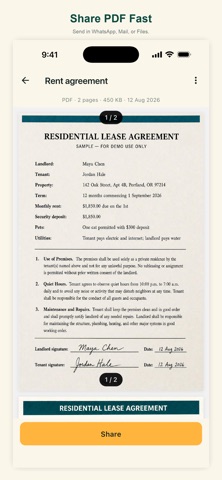
Point the camera at a page. Offline Scanner detects the edges, straightens the scan, and saves a sharp PDF you can send in WhatsApp, Mail, or Files. Add more pages to the same document, recrop anything that is off, and keep everything on your iPhone and iPad.
WHAT YOU CAN DO
• Scan with the camera — automatic edge detect and crop
• Import from Photos or Files (images and PDFs)
• Stack up to 30 pages in one document
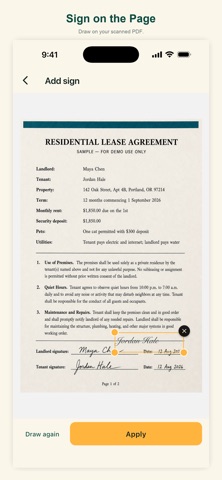
• Recrop, filters, and add a signature
• Save as PDF, JPG, PNG, or DOCX (extracted text you can edit)
• Share from the app — scans are not uploaded by us
PRIVACY
No login. Documents are never sent to our servers. Camera and photo access are used only to capture or import pages. Optional ads help keep the app free. You can remove them with a one-time purchase. The app may send anonymous usage analytics. Your scans are never uploaded.
Remove ads is a one-time purchase on your Apple ID. It is not a subscription. Restore it from Settings if you reinstall.
Questions: hello@reetinfotech.com