





AppBrain's verdict
- Rating on App Store
- 4.50
- 14 ratings
- Last updated
- August 24, 2026
- Size
- 36.3 MB
It doesn't have enough ratings yet to judge what users think.
User feedback
Ratings and reviews on the App StoreComments on Compress Video: Resize, Shrink for iOS
We don't have enough comments to show example comments. Please check back later.
Store listing
By Daniil Kabachuk, from the App StoreDescription by Daniil Kabachuk Written by the developer, not by AppBrain. Click to read.
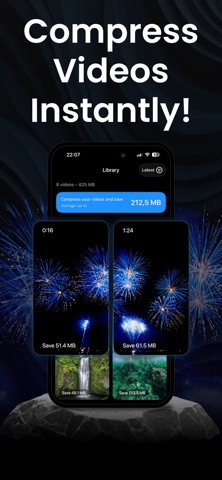
Up to 60% smaller. No watermarks. No uploads. No ads. Everything stays on your device.
Send 4K videos via iMessage, WhatsApp, Telegram, or email — no more "file too large."
WHY COMPRESS VIDEO?
- Save iPhone Storage — reclaim gigabytes by compressing 4K, slow-mo, and high-fps videos
- Keeps Your Timeline — compressed videos keep the original date, location, and album, so your camera roll stays in perfect order
- Replace in One Tap — swap the original for the compressed version and watch the gigabytes come back
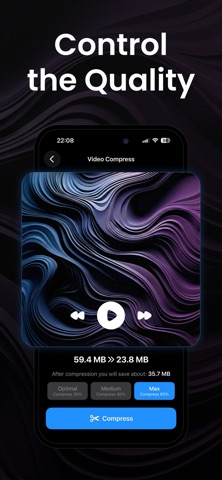
- Quality You Control — pick Best quality, Balanced or Smallest, and see the predicted file size for each before you compress
- Resize Resolution — keep the original, or downscale to 1080p, 720p, or 480p
- Convert Formats — MOV to MP4 and back in one tap, H.264 or HEVC
- Lightning Fast — hardware-accelerated compression in seconds, not minutes
- No Watermarks — your videos stay yours
- 100% Private — videos never leave your device
- Works Offline — no internet required
PERFECT FOR:
- Fixing "Storage Almost Full" alerts without deleting memories
- Sending videos via iMessage, WhatsApp, Telegram, Signal, or email
- Faster uploads to Instagram, TikTok, and YouTube
- Backing up more to iCloud, Google Drive, or Dropbox
- Compressing iCloud videos — originals download automatically when needed
- Archiving memories without filling your phone
HOW IT WORKS:
1. Select a video from your library
2. Pick Best quality, Balanced or Smallest — each shows its predicted size
3. Tap Compress — then keep both, or replace the original
REAL RESULTS:
- 415 MB → 175 MB (~58% smaller)
- 200 MB → 120 MB (~40% smaller)
- 100 MB → 80 MB (~20% smaller)
GOOD TO KNOW:
Best quality is tuned so the difference is invisible at normal viewing.
Balanced and Smallest trade some detail for bigger savings — and each level
shows its predicted size before you compress, so you always choose.
PRIVACY FIRST:
All processing happens locally on your iPhone using Apple's native video frameworks. No cloud. No servers. Your videos never leave your device.
SUPPORTED FORMATS:
.mp4, .mov, .m4v — H.264 and HEVC, with resolution options from original down to 480p. Works with all iPhone video types.
PRO SUBSCRIPTION:
Compress Video offers auto-renewing weekly and yearly subscriptions for unlimited compression. Prices are shown in the app and may vary by region. Payment is charged to your Apple ID at purchase confirmation. Subscriptions renew automatically unless cancelled at least 24 hours before the end of the current period. Manage or cancel anytime in Settings → Apple ID → Subscriptions. Any unused portion of a free trial is forfeited when you purchase.
Privacy Policy: https://compressor-ai.web.app/privacy.html
Terms of Use: https://compressor-ai.web.app/terms.html
Download Compress Video and reclaim your storage today.
Safety and technology
Found in the app by AppBrain- Price
- Free
- App size
- 36.3 MB
- Content rating
- Everyone
Technologies used by Compress Video: Resize, Shrink
Releases
Updates seen on the App Store- Version
- 1.8.0
- Launched
- January 2026
No changelog data
Alternatives
Similar apps and more from Daniil KabachukAlternatives to Compress Video: Resize, Shrink


More from Daniil Kabachuk


Rankings
App Store top chartsApp Store Rankings for Compress Video: Resize, Shrink
About the app and developer
About Compress Video: Resize, Shrink
Compress Video: Resize, Shrink is a photo & video app developed by Daniil Kabachuk.
User Ratings
Compress Video: Resize, Shrink is rated 4.50 out of 5 stars. The rating is based on 14 ratings.
App Information
Compress Video: Resize, Shrink is freely available from the App Store. The app size is 36.33 MB. The latest version available is 1.8.0. The last update was on August 24, 2026.
Technical Requirements
The app has a content rating of Everyone. The app has been available on the App Store since January 2026.
Compress Video: Resize, Shrink is made and published by Daniil Kabachuk. AppBrain is an independent app data site and isn't affiliated with Daniil Kabachuk. The app name, icon, screenshots and description belong to Daniil Kabachuk and are shown as published on the App Store.
Developer information for Daniil Kabachuk
Address: