




AppBrain's verdict
- Last updated
- July 17, 2026
- Size
- 62.2 MB
User feedback
Ratings and reviews on the App StoreComments on Compresso - Video Image PDF for iOS
We don't have enough comments to show example comments. Please check back later.
Store listing
By KIn Wa Lin, from the App StoreDescription by KIn Wa Lin Written by the developer, not by AppBrain. Click to read.
Whether you need to shrink a huge photo to an exact size, turn a video into a GIF, convert iPhone HEIC photos to JPG, or merge PDFs, Compresso does it all with a blazing-fast native engine and uncompromising quality.
VIDEO TOOLS
- Video to GIF: Turn any moment into a shareable GIF. Pick a clip (up to 5 seconds), choose the quality, and see the estimated size instantly.
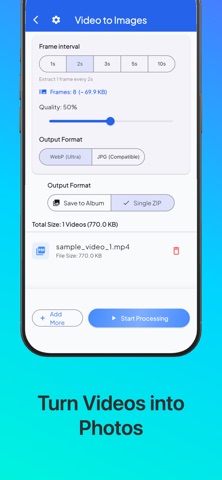
- Video to Images: Extract frames from a video as photos - one every second, or every few seconds - then save them to your album or a ZIP.
SMART IMAGE COMPRESSION
- Compress to a target size: Fit photos exactly under 100 KB, 200 KB, 500 KB, or 1 MB - perfect for forms, job portals, and email limits.
- Compress by quality: Save up to 90% of storage space with WebP, JPG, or the original format.
- Custom sliders for Quality, Resolution Scale, and DPI, with a real-time size estimate.
CONVERT & RESIZE
- HEIC to JPG: Convert iPhone photos to JPG so they open everywhere - websites, PCs, and any device.
- Format Converter: Convert between WebP and JPG in a tap.
- Resize Image: Resize by exact pixels or by percentage, with an optional aspect-ratio lock.
POWERFUL PDF TOOLS
- PDF Compression: Shrink PDF file sizes dramatically.
- PDF to Images: Extract pages as high-quality WebP or JPG images.
- Images to PDF: Combine photos into a perfectly fitted PDF with no white borders.
- Combine PDFs: Merge multiple PDFs into one.
BATCH & ARCHIVE
- Images to ZIP / PDFs to ZIP: Package multiple files into a single ZIP for easy sharing.
- Fast, multi-core processing handles massive batches effortlessly.
SMART & PRIVATE
- 100% offline - no internet required, total privacy.
- Battery and thermal awareness protects your device during heavy jobs.
- 16 languages supported.
Download Compresso today and take full control of your images, PDFs, and videos. Make every file fit!
Safety and technology
Found in the app by AppBrain- Price
- Free
- App size
- 62.2 MB
- Content rating
- Everyone
Technologies used by Compresso - Video Image PDF
Releases
Updates seen on the App Store- Version
- 1.7.3
- Launched
- March 2026
No changelog data
Alternatives
Similar apps and more from KIn Wa LinMore from KIn Wa Lin


Also available on Google Play

Rankings
App Store top chartsApp Store Rankings for Compresso - Video Image PDF
About the app and developer
About Compresso - Video Image PDF
Compresso - Video Image PDF is an utilities app developed by KIn Wa Lin.
What is the rating of Compresso - Video Image PDF?
Compresso - Video Image PDF has no ratings yet.
Is Compresso - Video Image PDF free?
Compresso - Video Image PDF is free. The app size is 62.20 MB. The latest version available is 1.7.3. The last update was on July 17, 2026.
What are the requirements for Compresso - Video Image PDF?
The app has a content rating of Everyone. The app has been available on the App Store since March 2026.
Compresso - Video Image PDF is made and published by KIn Wa Lin. AppBrain is an independent app data site and isn't affiliated with KIn Wa Lin. The app name, icon, screenshots and description belong to KIn Wa Lin and are shown as published on the App Store.
Developer information for KIn Wa Lin
Address: