

Contacts - Phone Dialer
Contacts - Phone Dialer is made and published by Janvi Lathiya. AppBrain is an independent app data site and isn't affiliated with Janvi Lathiya. The app name, icon, screenshots and description belong to Janvi Lathiya and are shown as published on the App Store.
AppBrain's verdict
- Rating on App Store
- 5.00
- 2 ratings
- Last updated
- February 25, 2025
It doesn't have enough ratings yet to judge what users think.
Rankings
App Store top chartsApp Store Rankings for Contacts - Phone Dialer
Competitors
Similar apps and more from Janvi Lathiya


Releases
Updates seen on the App Store- Version
- 1.0
- Launched
- February 2025
No changelog data
User feedback
Ratings and reviews on the App StoreComments on Contacts - Phone Dialer for iOS
We don't have enough comments to show example comments. Please check back later.
Technology
Found in the app by AppBrain- Price
- Free
- App size
- 27.2 MB
- Content rating
- Everyone
Technologies used by Contacts - Phone Dialer
About the app and developer
About Contacts - Phone Dialer
Contacts - Phone Dialer is a productivity app developed by Janvi Lathiya.
What is the rating of Contacts - Phone Dialer?
Contacts - Phone Dialer is rated 5.00 out of 5 stars, based on 2 ratings.
Is Contacts - Phone Dialer free?
Contacts - Phone Dialer is free. The app size is 27.19 MB. The latest version available is 1.0. The last update was on February 25, 2025.
What are the requirements for Contacts - Phone Dialer?
The app has a content rating of Everyone. The app has been available on the App Store since February 2025.
Developer information for Janvi Lathiya
Address:
Frequently asked questions about Contacts - Phone Dialer
Is Contacts - Phone Dialer free?
Yes. Contacts - Phone Dialer is free on the App Store.
Is Contacts - Phone Dialer still available?
Yes. Contacts - Phone Dialer is on the App Store, and the last update we saw was on February 25, 2025.
How large is Contacts - Phone Dialer?
Contacts - Phone Dialer is 27.19 MB.
Is Contacts - Phone Dialer suitable for children?
App Store rates the content of Contacts - Phone Dialer as suitable for everyone.
How do people rate Contacts - Phone Dialer?
Contacts - Phone Dialer scores 5.00 out of 5 stars, from 2 ratings on the App Store.
Who made Contacts - Phone Dialer?
Contacts - Phone Dialer was developed by Janvi Lathiya. It is listed in the productivity category on the App Store.
What are the best alternatives to Contacts - Phone Dialer?
People looking at Contacts - Phone Dialer also look at these productivity apps: Perfect Dialer - Fast T9 Dial, Easy Caller ID, A2Z Groups, Contacts+ | Address Book, Contact.s Back Up.
Store listing
By Janvi Lathiya, from the App Store


Description by Janvi Lathiya Written by the developer, not by AppBrain. Click to read.
Your contact list is one of the most valuable assets on your phone. Whether it's for work, family, or friends, keeping your contacts safe, organized, and easy to access is essential. Introducing Contacts Backup - Caller ID, the ultimate solution for managing your contacts with ease and efficiency. With a simplify contact management, enhance communication, and protect your data.
Effortless Backup for Peace of Mind
One of the most crucial features is its ability to back up your entire contact list securely. Whether you're delete contact from phone, or just want to ensure you don’t lose your contacts, this app guarantees that all your contacts are safely backed up. With the touch of a button, you can instantly create a backup of your entire contact list and store it in the application, it’s easily recoverable at any time.
You can schedule automatic backups to happen daily, weekly, or monthly, depending on your preference.
Group Contact Management
When you want to organize contacts by family, friends, work, or any custom category you prefer, Contacts Backup - Caller ID allows you to group contacts together for easy access. Grouping contacts helps reduce clutter and makes it easier to send messages or make calls to multiple people at once.
With just a few taps, you can add or remove contacts from a group and even customize the names of the groups to suit your needs. This feature streamlines your contact management and makes communication quicker and more organized.
Find and Merge Duplicate Contacts
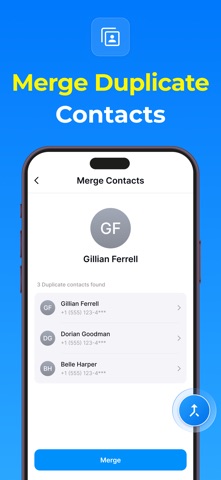
Have you ever found that your contact list has duplicates? Contacts Backup - Caller ID makes it easy to find duplicate contacts in your list and merge them with just a tap. The app automatically scans your entire contact list and highlights any duplicate entries, making it simple to clean up your contacts and avoid confusion.
Merging duplicates is effortless – all you need to do is confirm, and the app will combine the information into one contact entry. This ensures that you have the most accurate and up-to-date information for each contact without any repetition.
Edit, Delete, and Rename Contacts
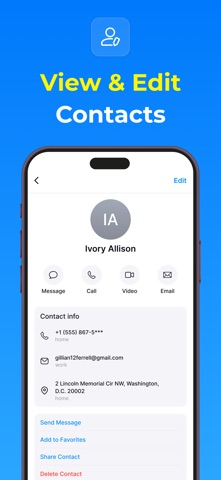
Managing your contact list also means occasionally making changes to your contacts. Contacts Backup - Caller ID provides all the tools you need to easily edit, delete, or rename your contacts as required. If a phone number has changed, a contact’s name has changed, or you simply need to update their details, this app allows you to make changes in just a few taps.
You can quickly edit phone numbers, email addresses, and other contact details. Additionally, if you ever need to remove a contact from your list, you can delete them with ease, ensuring your contact list stays clean and relevant.
Add Contacts to Your Favorites List
We all have those contacts that we reach out to most often—whether it’s your spouse, best friend, or colleague. With Contacts Backup - Caller ID, you can add your most important contacts to your favorites list, so they are always easy to find. By adding contacts to the favorites section, you can quickly call or message them without having to search through your entire contact list.
Quick Call and Message Features
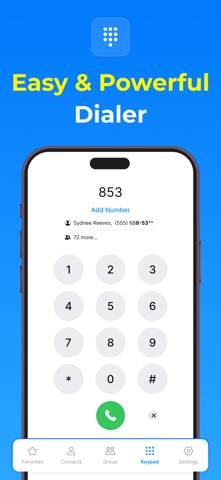
Communication should be fast and effortless. With Contacts Backup - Caller ID, making a call or sending a message has never been easier. The app features a streamlined interface that allows you to quickly search for and contact any person in your contact list. Simply tap on a contact’s name, and you’ll have the option to call, text, or even email them without navigating through multiple menus.
Privacy Policy - https://contactsphonedialer.blogspot.com/2025/02/privacy-policy.html
Terms & Conditions - https://contactsphonedialer.blogspot.com/2025/02/terms-conditions.html
EULA - https://contactsphonedialer.blogspot.com/2025/02/end-user-license-agreement-contacts.html