

ContentCam: Dual Camera Video
ContentCam: Dual Camera Video is made and published by Jimmy Yip. AppBrain is an independent app data site and isn't affiliated with Jimmy Yip. The app name, icon, screenshots and description belong to Jimmy Yip and are shown as published on the App Store.
AppBrain's verdict
- Rating on App Store
- 4.82
- 44 ratings
- Last updated
- October 27, 2026
- Size
- 6.37 MB
It doesn't have enough ratings yet to judge what users think.
User feedback
Ratings and reviews on the App StoreComments on ContentCam: Dual Camera Video for iOS
We don't have enough comments to show example comments. Please check back later.
Store listing
By Jimmy Yip, from the App Store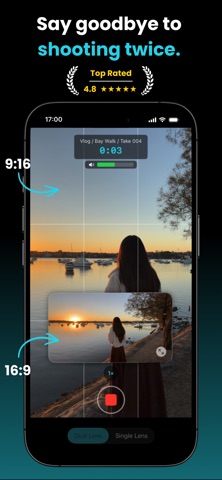




Description by Jimmy Yip Written by the developer, not by AppBrain. Click to read.
Get two separate files from a single tap, ready to post everywhere. No re-shooting, no cropping in post.
MANY WAYS TO RECORD
• Single Lens: one camera captures the full 4:3 sensor and crops both. Portrait keeps the full vertical view, landscape the full horizontal one. Neither is a crop of the other.
• Dual Lens: the wide and ultra-wide cameras record together. Two perspectives, in one take.
• Front/Back: the selfie and rear cameras record together. Your reaction and your scene, at the same time.
• Front Cam: flip to the selfie camera and keep recording both formats.
• Stock Cam: turn landscape off and shoot a single portrait file, like a normal camera.
PHOTO
• Shutter beside the record button: one press saves a 9:16 and a 16:9 photo of the same moment.
• Dual Lens and Front/Back fire both cameras at once, so your photos cover both angles too.
• Stills sit in the same take list as your clips, and save to Photos together.
VIDEO
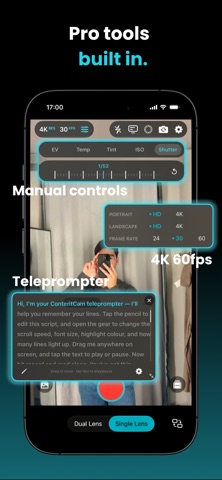
• Resolution and frame rate: HD or 4K, set independently for portrait and landscape, at 24, 30 or 60fps.
• Manual controls: exposure, white balance, ISO, shutter.
• Focus and exposure: tap to focus, or press and hold to lock both together.
• Teleprompter: scroll your script as you record. Adjustable speed, size, colour and mirror.
• Stabilisation and HDR: native-grade stabilisation on every lens and true 10-bit HDR when you want it.
• Timelapse: 0.5s to 30s intervals, 10x to 900x speedup.
• Guides: grid, level indicator, centre crosshair, and an audio meter that pulses red when clipping.
• Zoom: 0.5x, 1x and 2x buttons, pinch, or the dial.
WORKFLOW
• Projects, scenes, and takes: organise your shoots and have files named automatically. Review, trim, export, favourite, and share at any time.
• Recording folder: point a project at a folder on your iPhone, and new recordings move there the moment you stop filming.
• Review and trim: play both clips side by side with a synced scrubber, then trim to the frame.
• Storage estimator: see how long you can record before you start.
• Crash protection: an interrupted recording is recovered on next launch.
• Thermal monitoring: warnings and auto-stops before your device overheats.
Record both formats from a single lens in HD, free, no watermark, unlimited takes with no account.
PREMIUM UNLOCKS
→ Dual Lens mode - unlimited takes
→ Front & Back mode - unlimited takes
→ Photo mode
→ 4K portrait and landscape, independently
→ 60fps
→ Manual controls - exposure, white balance, ISO, shutter
→ Teleprompter
→ Timelapse
→ Trim in review
→ Unlimited projects
Zero tracking. Zero data collection. Totally private.
Built by Jimmy, solo developer who reads every feature request and bug report, and ships them.
Terms of Use (EULA): https://www.apple.com/legal/internet-services/itunes/dev/stdeula/
Safety and technology
Found in the app by AppBrain- Price
- Free
- App size
- 6.37 MB
- Content rating
- Everyone
Technologies used by ContentCam: Dual Camera Video
Releases
Updates seen on the App Store- Version
- 2.8
- Launched
- May 2026
No changelog data
Rankings
App Store top chartsApp Store Rankings for ContentCam: Dual Camera Video
About the app and developer
About ContentCam: Dual Camera Video
ContentCam: Dual Camera Video is a photo & video app developed by Jimmy Yip.
What is the rating of ContentCam: Dual Camera Video?
ContentCam: Dual Camera Video is rated 4.82 out of 5 stars, based on 44 ratings.
Is ContentCam: Dual Camera Video free?
ContentCam: Dual Camera Video is free. The app size is 6.37 MB. The latest version available is 2.8. The last update was on October 27, 2026.
What are the requirements for ContentCam: Dual Camera Video?
The app has a content rating of Everyone. The app has been available on the App Store since May 2026.
Developer information for Jimmy Yip
Address:
Frequently asked questions about ContentCam: Dual Camera Video
Is ContentCam: Dual Camera Video free?
Yes. ContentCam: Dual Camera Video is free on the App Store.
Is ContentCam: Dual Camera Video still available?
Yes. ContentCam: Dual Camera Video is on the App Store, and the last update we saw was on October 27, 2026.
How large is ContentCam: Dual Camera Video?
ContentCam: Dual Camera Video is 6.37 MB.
Is ContentCam: Dual Camera Video suitable for children?
App Store rates the content of ContentCam: Dual Camera Video as suitable for everyone.
How do people rate ContentCam: Dual Camera Video?
ContentCam: Dual Camera Video scores 4.82 out of 5 stars, from 44 ratings on the App Store.
Who made ContentCam: Dual Camera Video?
ContentCam: Dual Camera Video was developed by Jimmy Yip. It is listed in the photo & video category on the App Store.