

Control: Home Screen Widgets
Control: Home Screen Widgets is made and published by Alex Patrick Palacean. AppBrain is an independent app data site and isn't affiliated with Alex Patrick Palacean. The app name, icon, screenshots and description belong to Alex Patrick Palacean and are shown as published on the App Store.
AppBrain's verdict
- Rating on App Store
- 4.50
- 2 ratings
- Last updated
- October 10, 2026
It doesn't have enough ratings yet to judge what users think.
Rankings
App Store top chartsApp Store Rankings for Control: Home Screen Widgets
Competitors
Similar apps and more from Alex Patrick PalaceanAlternatives to Control: Home Screen Widgets


More from Alex Patrick Palacean


Releases
Updates seen on the App Store- Version
- 1.12
- Launched
- June 2026
No changelog data
User feedback
Ratings and reviews on the App StoreComments on Control: Home Screen Widgets for iOS
We don't have enough comments to show example comments. Please check back later.
Technology
Found in the app by AppBrain- Price
- Free
- App size
- 28.9 MB
- Content rating
- Everyone
Technologies used by Control: Home Screen Widgets
About the app and developer
About Control: Home Screen Widgets
Control: Home Screen Widgets is a productivity app developed by Alex Patrick Palacean.
User Ratings
Control: Home Screen Widgets is rated 4.50 out of 5 stars. The rating is based on 2 ratings.
App Information
Control: Home Screen Widgets is freely available from the App Store. The app size is 28.94 MB. The latest version available is 1.12. The last update was on October 10, 2026.
Technical Requirements
The app has a content rating of Everyone. The app has been available on the App Store since June 2026.
Developer information for Alex Patrick Palacean
Address:
Frequently asked questions about Control: Home Screen Widgets
Is Control: Home Screen Widgets free?
Yes. Control: Home Screen Widgets is free on the App Store.
Is Control: Home Screen Widgets still available?
Yes. Control: Home Screen Widgets is on the App Store, and the last update we saw was on October 10, 2026.
How large is Control: Home Screen Widgets?
Control: Home Screen Widgets is 28.94 MB.
Is Control: Home Screen Widgets suitable for children?
App Store rates the content of Control: Home Screen Widgets as suitable for everyone.
How do people rate Control: Home Screen Widgets?
Control: Home Screen Widgets scores 4.50 out of 5 stars, from 2 ratings on the App Store.
Who made Control: Home Screen Widgets?
Control: Home Screen Widgets was developed by Alex Patrick Palacean. It is listed in the productivity category on the App Store.
What are the best alternatives to Control: Home Screen Widgets?
People looking at Control: Home Screen Widgets also look at these productivity apps: Anchor: Daily Planner & Focus, ShiftTap - Schedule Planner, Pocket Goals: Save Up Easier, Blaze Calendar, Habit Tracker - Dayrise.
Store listing
By Alex Patrick Palacean, from the App Store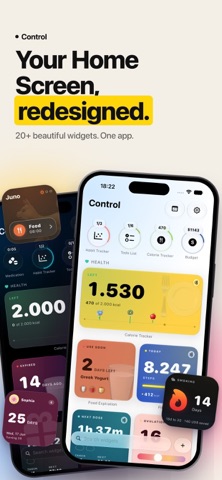




Description by Alex Patrick Palacean Written by the developer, not by AppBrain. Click to read.
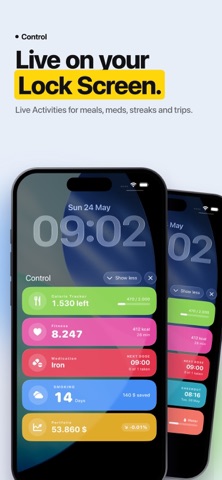
Control is a library of 20+ beautifully crafted iOS widgets - every tracker, planner, and reminder you actually use, gathered in one app. Habits, budget, fitness, medication, birthdays, travel, and much more, all glanceable from your Home Screen, Lock Screen, and Live Activities.
No more juggling ten single-purpose apps. No sign-ups, no dark patterns.
- TRACK EVERYTHING -
• Habits - daily routines, streaks, goals
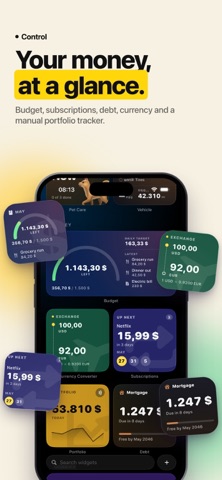
• Budget - spending, savings, monthly limits
• Subscriptions - see exactly what's recurring and when
• Portfolio - track your investments
• Debt - loans and credit cards, payoff progress
• Currency - live exchange rates between any two currencies
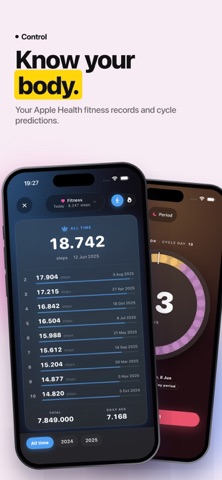
• Fitness - steps, workouts, calories burned via Apple Health
• Calories - daily intake, weight goals
• Period - cycle tracking with predictions
• Medication - dose reminders for every prescription
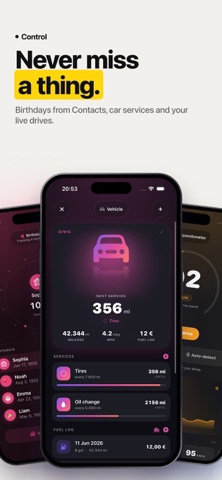
• Birthdays - pulled from Contacts, never forget another one
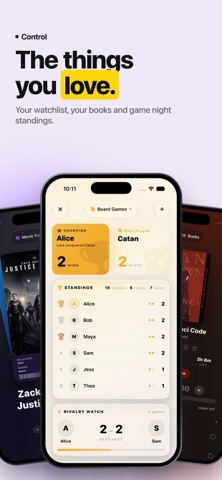
• Books - what you're reading, with auto-fetched covers
• Movies - your watchlist with poster art
• Pets - feeding, walks, vet visits
• Vehicle - mileage, services, fuel logs
• Hotel & Travel - live check-out countdowns and trip dashboards
• Past Trips - a souvenir of where you've been
• Food Expiration - what's in your fridge and when it spoils
• Game Tracker - leaderboards plus a multi-touch player picker
• Speedometer - live drive sessions
• Clipboard - quick-paste from history
• To-do - checklists that sync across devices
• Quit Tracker - sober days, money saved, life regained
- PRIVATE BY DEFAULT -
Everything is stored on your device and synced privately through your own iCloud account. No external servers. No tracking. No analytics SDKs. Your habits, finances, and reminders are yours.
Control is built for people who want their Home Screen to do something useful.
- Terms of Use (EULA): https://www.apple.com/legal/internet-services/itunes/dev/stdeula/