

Convert Image to PDF by PDFee
Convert Image to PDF by PDFee is made and published by Simon Jansen. AppBrain is an independent app data site and isn't affiliated with Simon Jansen. The app name, icon, screenshots and description belong to Simon Jansen and are shown as published on the App Store.
AppBrain's verdict
- Last updated
- October 14, 2026
- Size
- 2.14 MB
User feedback
Ratings and reviews on the App StoreComments on Convert Image to PDF by PDFee for iOS
We don't have enough comments to show example comments. Please check back later.
Store listing
By Simon Jansen, from the App Store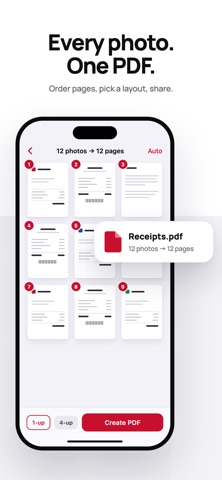


Description by Simon Jansen Written by the developer, not by AppBrain. Click to read.
order you want, and share one document — no account, no upload, no watermark.
CONVERT
• JPG, PNG, HEIC and screenshots into a single PDF
• Drag to reorder pages before you export
• 1, 2, 4 or 9 photos per page, with a live preview of the finished page
• Auto, Letter or A4 page size
• Choose the file size: Original, Email-ready, or Small
SCAN
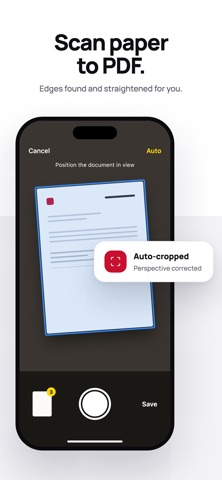
• Scan paper documents with automatic edge detection and perspective correction
• Multi-page scanning in one session
• Scans join the same flow as photos — reorder, lay out, export
SIGN
• Draw your signature once, place it where it belongs, and save a flat copy
• The signature is written into the page, not added as a removable annotation
MERGE AND COMPRESS
• Combine PDFs top to bottom in the order you arrange them
• Shrink an existing PDF to email size
EVERYTHING STAYS ON YOUR IPHONE
There is no account, no server and no analytics. Every PDF is made on your device
and nothing is ever uploaded. That is why the App Privacy label says "Data Not
Collected" — and why the app asks for no photo-library permission at all.
FREE AND PRO
Free covers unlimited PDFs of up to 10 pages, with no watermark and no ads. When a
job is bigger than the free limit, the app tells you before it does any work and
offers to split it into free PDFs or keep the first 10 pages — the paid option is
never the only way forward. Merging PDFs is free twice a week.
Pro unlocks long documents, 2/4/9-per-page layouts and unlimited merging:
$19.99/year, $4.99/month or $1.99/week. There is no free trial.
Payment is charged to your Apple Account at confirmation of purchase. Subscriptions
renew automatically unless auto-renew is turned off at least 24 hours before the end
of the current period. Your account is charged for renewal within 24 hours prior to
the end of the current period. You can manage and cancel subscriptions in your
Apple Account settings after purchase.
Privacy Policy: https://github.com/Katsuchiyo/appoutliers/blob/main/privacy-policy-imagetopdf
Terms of Use (EULA): https://www.apple.com/legal/internet-services/itunes/dev/stdeula/
Safety and technology
Found in the app by AppBrain- Price
- Free
- App size
- 2.14 MB
- Content rating
- Everyone
Technologies used by Convert Image to PDF by PDFee
Releases
Updates seen on the App Store- Version
- 1.8
- Launched
- August 2026
No changelog data
Alternatives
Similar apps and more from Simon JansenAlternatives to Convert Image to PDF by PDFee


More from Simon Jansen


Rankings
App Store top chartsApp Store Rankings for Convert Image to PDF by PDFee
About the app and developer
About Convert Image to PDF by PDFee
Convert Image to PDF by PDFee is a productivity app developed by Simon Jansen.
User Ratings
The app has no ratings yet.
App Information
Convert Image to PDF by PDFee is freely available from the App Store. The app size is 2.14 MB. The latest version available is 1.8. The last update was on October 14, 2026.
Technical Requirements
The app has a content rating of Everyone. The app has been available on the App Store since August 2026.
Developer information for Simon Jansen
Address:
Frequently asked questions about Convert Image to PDF by PDFee
Is Convert Image to PDF by PDFee free?
Yes. Convert Image to PDF by PDFee is free on the App Store.
Is Convert Image to PDF by PDFee still available?
Yes. Convert Image to PDF by PDFee is on the App Store, and the last update we saw was on October 14, 2026.
How large is Convert Image to PDF by PDFee?
Convert Image to PDF by PDFee is 2.14 MB.
Is Convert Image to PDF by PDFee suitable for children?
App Store rates the content of Convert Image to PDF by PDFee as suitable for everyone.
Who made Convert Image to PDF by PDFee?
Convert Image to PDF by PDFee was developed by Simon Jansen. It is listed in the productivity category on the App Store.
What are the best alternatives to Convert Image to PDF by PDFee?
People looking at Convert Image to PDF by PDFee also look at these productivity apps: JPG to PDF Converter - PDFPip, StitchPDF: Merge JPG to PDF, Offline AI Document Flattener, img-2-pdf, Bioteksa C.N..