

Convert Image to PDF: Scan2All
Convert Image to PDF: Scan2All is made and published by Andrii Hulak. AppBrain is an independent app data site and isn't affiliated with Andrii Hulak. The app name, icon, screenshots and description belong to Andrii Hulak and are shown as published on the App Store.
AppBrain's verdict
- Last updated
- December 26, 2025
Rankings
App Store top chartsApp Store Rankings for Convert Image to PDF: Scan2All
Competitors
Similar apps and more from Andrii Hulak









Releases
Updates seen on the App Store- Version
- 1.0.4
- Launched
- October 2024
No changelog data
User feedback
Ratings and reviews on the App StoreComments on Convert Image to PDF: Scan2All for iOS
We don't have enough comments to show example comments. Please check back later.
Technology
Found in the app by AppBrain- Price
- Free
- App size
- 148.2 MB
- Content rating
- High
Technologies used by Convert Image to PDF: Scan2All
About the app and developer
About Convert Image to PDF: Scan2All
Convert Image to PDF: Scan2All is an utilities app developed by Andrii Hulak.
User Ratings
The app has no ratings yet.
App Information
Convert Image to PDF: Scan2All is freely available from the App Store. The app size is 148.16 MB. The latest version available is 1.0.4. The last update was on December 26, 2025.
Technical Requirements
The app has a content rating of High Maturity. The app has been available on the App Store since October 2024.
Developer information for Andrii Hulak
Address:
Frequently asked questions about Convert Image to PDF: Scan2All
Is Convert Image to PDF: Scan2All free?
Yes. Convert Image to PDF: Scan2All is free on the App Store.
Is Convert Image to PDF: Scan2All still available?
Yes. Convert Image to PDF: Scan2All is on the App Store, and the last update we saw was on December 26, 2025.
How large is Convert Image to PDF: Scan2All?
Convert Image to PDF: Scan2All is 148.16 MB.
Is Convert Image to PDF: Scan2All suitable for children?
App Store gives Convert Image to PDF: Scan2All a high maturity rating. It is meant for adults.
Who made Convert Image to PDF: Scan2All?
Convert Image to PDF: Scan2All was developed by Andrii Hulak. It is listed in the utilities category on the App Store.
What are the best alternatives to Convert Image to PDF: Scan2All?
People looking at Convert Image to PDF: Scan2All also look at these utilities apps: Scan QR Code -, DAU., Photo to PDF Converter ., Blood Pressure:Checker&Monitor, Vöhk.
Store listing
By Andrii Hulak, from the App Store


Description by Andrii Hulak Written by the developer, not by AppBrain. Click to read.
Turn photos, pictures and scans in JPEG, PNG, HEIF, HEIC formats into high-quality PDFs in seconds with Convert Image to PDF. Scan documents, convert them, store them securely and share them in one seamless app.
Why use Convert Image to PDF?
- Convert any image/photo/JPEG into a PDF instantly.
- Use the built-in document scanner: unlimited scans and shares.
- Access private in-app storage for your documents.
- Get professional-quality PDFs with advanced processing: smart cropping, automatic border detection and shadow removal.
- Combine multiple pages into a single PDF with ease.
- Edit your scanned documents: modify, delete or reorder pages.
- Share with one tap via email, social media or cloud storage.
- Lightning-fast scans and secure local storage – ready whenever you are.
Main features at a glance
Image to PDF Conversion
- Select any photo from gallery take a picture or scan a document and convert it to PDF document in a few taps.
- Preserve high resolution, clear text and sharp results.
- Ideal for receipts, notes, images, forms or documents.
Document Scanner Machine
- Unlimited scans: no limits in Premium zone.
- Private in-app storage: your scans stay secure on your device.
- Smart processing: automatic edge detection, cropping and shadow removal for clean results.
- Multi-page PDFs: scan page after page, then compile into one document.
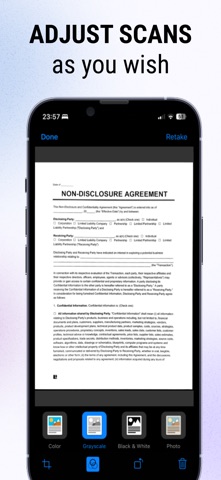
- Document editor: apply filters, enhance quality of scans before export.
- One-tap sharing: send your PDF via email, messaging apps or upload to cloud services.
Efficiency & Security
- Starts instantly: scan or pick images and convert right away.
- All data stays in-app unless you share it.
- Export to PDF and share without complicated steps or external tools.
Benefits of converting images to PDF
- Professional format: PDFs are universally accepted, easy to view and archive.
- Organization: Having scans and images in PDF format means you can keep everything locally in one place
- Accessibility: PDFs open across devices and platforms – phone, tablet, computer – without compatibility problems.
- Searchable & archive-ready: PDFs are ready for further processing (e.g., OCR apps, libraries) and long-term storage.
- Secure sharing: Instead of sending raw images (which may leak metadata), you share a clean PDF version with better control.
Who is this for?
- Students and professionals who need to scan notes, forms or receipts and bundle them into PDFs.
- Freelancers, contractors or anyone who wants to digitize paperwork.
- People who capture images of documents on their phone and want a fast, clean conversion to PDF.
- Users who want secure local storage of their scans and easy sharing without installing multiple apps.
____
Privacy Policy - https://convert-wordtopdf.com/privacy-policy/
Terms and Conditions - https://convert-wordtopdf.com/terms-conditions/
LICENSED APPLICATION END USER LICENSE AGREEMENT - https://www.apple.com/legal/internet-services/itunes/dev/stdeula/