



AppBrain's verdict
- Rating on App Store
- 4.88
- 17 ratings
- Last updated
- January 25, 2024
- Size
- 29.1 MB
It doesn't have enough ratings yet to judge what users think.
User feedback
Ratings and reviews on the App StoreComments on Convert to PDF Image Converter for iOS
We don't have enough comments to show example comments. Please check back later.
Store listing
By Mobile Ocean, from the App StoreDescription by Mobile Ocean Written by the developer, not by AppBrain. Click to read.
Do you want a simple, effective and elegant solution to convert your images into PDFs? Look no further! Here's PictoPDF - your solution to turn your photos into beautifully organized PDF documents.
Key Features:
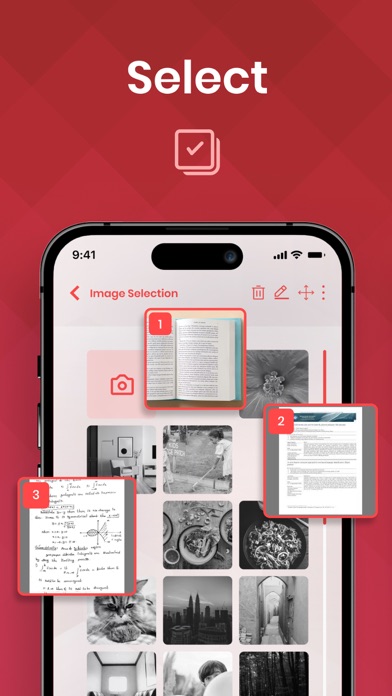
Effortless Photo-to-PDF Conversion: With PictoPDF, you can easily convert your favorite photos into PDFs directly from your iPhone or iPad. No more hassle, no more endless scrolling!
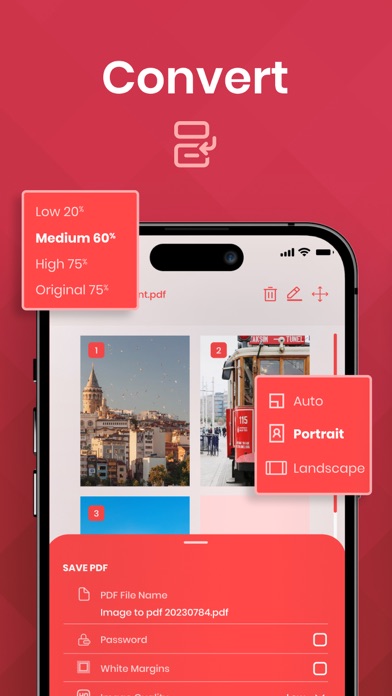
Customization at Your Fingertips: Tailor your PDF albums to perfection. Choose your preferred layout, set margins, select page orientation, and pick the perfect paper size. Your albums, your way!
Preview Before You Commit: Want to make sure everything looks just right? PictoPDF lets you preview your entire PDF photo album before you save, share, or print it. No surprises, only satisfaction!
Seamless Sharing: Share your cherished moments with friends and family effortlessly. Whether it's via email, SMS, or other platforms, PictoPDF makes sharing your memories a breeze.
Print with Ease: Need a physical copy? PictoPDF makes printing your PDF albums a cinch. Preserve your memories in both digital and tangible formats.
Why Choose PictoPDF?
Create PDF Photo Albums: PictoPDF empowers you to create beautifully organized PDF photo albums in minutes. Say goodbye to the chaos of scattered photos!
Effortless Printing: Need a hard copy of your memories? PictoPDF makes printing a breeze. Relive your moments in stunning detail on paper.
Easy Sharing: Share your PDF albums with loved ones without the hassle. PictoPDF supports various sharing options, ensuring your memories reach the right people.
Supported File Types:
PictoPDF seamlessly handles all major image file types, including PNG, JPEG, HEIF, and HEIC. No matter how you've stored your memories, PictoPDF has you covered!
Download PictoPDF today and experience the joy of turning your photos into beautifully organized PDF photo albums. It's the perfect way to relive your memories and share them with the world. Get started now and unlock a world of possibilities with PictoPDF!
Say goodbye to scattered photos and hello to beautifully organized PDF photo albums with PictoPDF. Download now and start preserving your memories like never before!
About Subscriptions and Terms of Use:
- For Unlimited Features of PictoPDF Photo to PDF: Image Converter, some Premium subscriptions are needed.
- Payment will be made from your iTunes account after you confirm the purchase.
- Subscriptions will auto-renew at the end of each term if it is not canceled 24 hours before the end of the purchasing term.
- The user can manage subscriptions. Auto-renew can be turned off from iTunes account settings.
- You can cancel your subscriptions by entering:http://support.apple.com/en-us/HT202039
- Privacy Policy: https://sites.google.com/view/pictopdfapp/privacy-policy
- Terms of Use: https://sites.google.com/view/pictopdfapp/terms-of-use
Safety and technology
Found in the app by AppBrain- Price
- Free
- App size
- 29.1 MB
- Content rating
- Everyone
Technologies used by Convert to PDF Image Converter
Releases
Updates seen on the App Store- Version
- 1.2
- Launched
- October 2023
No changelog data
Alternatives
Similar apps and more from Mobile OceanAlternatives to Convert to PDF Image Converter
 Form Extractor - Scan & Export


More from Mobile Ocean





Rankings
App Store top chartsApp Store Rankings for Convert to PDF Image Converter
About the app and developer
About Convert to PDF Image Converter
Convert to PDF Image Converter is a productivity app developed by Mobile Ocean.
What is the rating of Convert to PDF Image Converter?
Convert to PDF Image Converter is rated 4.88 out of 5 stars, based on 17 ratings.
Is Convert to PDF Image Converter free?
Convert to PDF Image Converter is free. The app size is 29.07 MB. The latest version available is 1.2. The last update was on January 25, 2024.
What are the requirements for Convert to PDF Image Converter?
The app has a content rating of Everyone. The app has been available on the App Store since October 2023.
Convert to PDF Image Converter is made and published by Mobile Ocean. AppBrain is an independent app data site and isn't affiliated with Mobile Ocean. The app name, icon, screenshots and description belong to Mobile Ocean and are shown as published on the App Store.
Developer information for Mobile Ocean
Address:
Frequently asked questions about Convert to PDF Image Converter
Is Convert to PDF Image Converter free?
Yes. Convert to PDF Image Converter is free on the App Store.
Is Convert to PDF Image Converter still available?
Yes. Convert to PDF Image Converter is on the App Store, and the last update we saw was on January 25, 2024.
How large is Convert to PDF Image Converter?
Convert to PDF Image Converter is 29.07 MB.
Is Convert to PDF Image Converter suitable for children?
App Store rates the content of Convert to PDF Image Converter as suitable for everyone.
How do people rate Convert to PDF Image Converter?
Convert to PDF Image Converter scores 4.88 out of 5 stars, from 17 ratings on the App Store.
Who made Convert to PDF Image Converter?
Convert to PDF Image Converter was developed by Mobile Ocean. It is listed in the productivity category on the App Store.
What are the best alternatives to Convert to PDF Image Converter?
People looking at Convert to PDF Image Converter also look at these productivity apps: OCR Text Scanner : IMG to TEXT, Form Extractor - Scan & Export, Photo to PDF Converter -, Owl VPN: Fast & Simple Proxy, Text Extractor: Image to Text.