

Convert to PDF - PDFOn
Convert to PDF - PDFOn is made and published by Soufiane Bouziane. AppBrain is an independent app data site and isn't affiliated with Soufiane Bouziane. The app name, icon, screenshots and description belong to Soufiane Bouziane and are shown as published on the App Store.
AppBrain's verdict
- Rating on App Store
- 2.00
- 1 ratings
- Last updated
- February 22, 2026
It doesn't have enough ratings yet to judge what users think.
Rankings
App Store top chartsApp Store Rankings for Convert to PDF - PDFOn
Competitors
Similar apps and more from Soufiane BouzianeMore from Soufiane Bouziane


Also available on Google Play

Releases
Updates seen on the App Store- Version
- 1.1.0
- Launched
- December 2025
No changelog data
User feedback
Ratings and reviews on the App StoreComments on Convert to PDF - PDFOn for iOS
We don't have enough comments to show example comments. Please check back later.
Technology
Found in the app by AppBrain- Price
- Free
- App size
- 50.7 MB
- Content rating
- Everyone
Technologies used by Convert to PDF - PDFOn
About the app and developer
About Convert to PDF - PDFOn
Convert to PDF - PDFOn is a productivity app developed by Soufiane Bouziane.
User Ratings
Convert to PDF - PDFOn is rated 2.00 out of 5 stars. The rating is based on one rating ratings.
App Information
Convert to PDF - PDFOn is freely available from the App Store. The app size is 50.73 MB. The latest version available is 1.1.0. The last update was on February 22, 2026.
Technical Requirements
The app has a content rating of Everyone. The app has been available on the App Store since December 2025.
Developer information for Soufiane Bouziane
Address:
Store listing
By Soufiane Bouziane, from the App Store
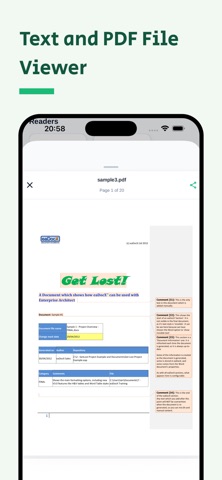
Description by Soufiane Bouziane Written by the developer, not by AppBrain. Click to read.
CONVERT OFFICE DOCUMENTS TO PDF
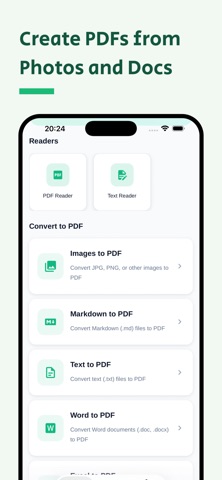
• Word to PDF: Convert DOC and DOCX files to PDF in seconds while preserving formatting, fonts, and layout.
• Excel to PDF: Export XLS and XLSX spreadsheets to professional, shareable PDF documents.
• PowerPoint to PDF: Convert PPT and PPTX presentations into PDFs for universal viewing.
IMAGE TO PDF CONVERTER
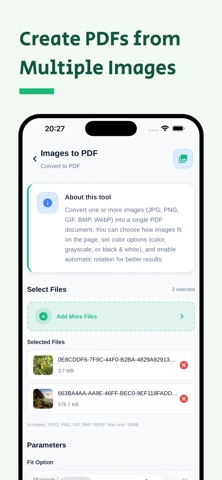
• Convert JPG, JPEG, PNG, BMP, GIF, WEBP, and HEIC photos to high‑quality PDF.
• Merge multiple images into a single PDF or convert pictures individually.
TEXT AND MARKDOWN TO PDF
• Text to PDF: Turn plain TXT files into formatted PDFs.
• Markdown to PDF: Export MD files to beautifully formatted PDFs with preserved styling.
KEY FEATURES
• Fast PDF converter with cloud processing.
• Supports 15+ document and image formats.
• Batch conversion of multiple files simultaneously.
• High‑quality output with smart compression.
• No watermarks on converted PDFs.
• Secure processing — files deleted immediately after conversion.
• Works with all standard PDF readers.
HOW TO CONVERT WITH PDFON
1. Select file type: Word, Excel, Image, Text, or Markdown.
2. Choose files from your device.
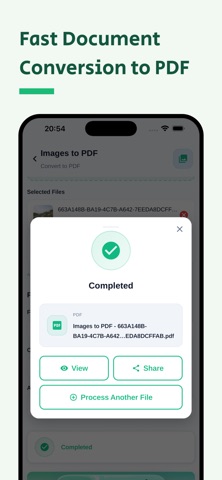
3. Tap Convert to PDF.
4. Download and share your PDF.
WHY CHOOSE PDFON
Complete support for document and image conversion needs — whether you need Word to PDF, Excel to PDF, images to PDF, or text to PDF, PDFOn handles it all in one app.
SUBSCRIPTION INFORMATION
PDFOn offers premium features through auto‑renewable subscriptions. Payment is charged to your iTunes Account at confirmation of purchase, and your subscription automatically renews unless auto‑renew is turned off at least 24 hours before the end of the current period. Your account will be charged for renewal within 24 hours prior to the end of the current period. You can manage subscriptions and turn off auto‑renewal in Account Settings after purchase. Any unused portion of a free trial period, if offered, will be forfeited when you purchase a subscription.
Privacy Policy: https://www.pdfon.pro/legal/privacy
Terms of Use (EULA): https://www.apple.com/legal/internet-services/itunes/dev/stdeula