

Converter - Video Formats
Converter - Video Formats is made and published by jiaquan zhou. AppBrain is an independent app data site and isn't affiliated with jiaquan zhou. The app name, icon, screenshots and description belong to jiaquan zhou and are shown as published on the App Store.
AppBrain's verdict
- Last updated
- October 24, 2026
Rankings
App Store top chartsApp Store Rankings for Converter - Video Formats
Competitors
Similar apps and more from jiaquan zhouMore from jiaquan zhou


Releases
Updates seen on the App Store- Version
- 1.0.0
- Launched
- October 2026
No changelog data
User feedback
Ratings and reviews on the App StoreComments on Converter - Video Formats for iOS
We don't have enough comments to show example comments. Please check back later.
Technology
Found in the app by AppBrain- Price
- Free
- App size
- 20.3 MB
- Content rating
- Everyone
Technologies used by Converter - Video Formats
About the app and developer
About Converter - Video Formats
Converter - Video Formats is an utilities app developed by jiaquan zhou.
User Ratings
The app has no ratings yet.
App Information
Converter - Video Formats is freely available from the App Store. The app size is 20.35 MB. The latest version available is 1.0.0. The last update was on October 24, 2026.
Technical Requirements
The app has a content rating of Everyone. The app has been available on the App Store since October 2026.
Developer information for jiaquan zhou
Address:
Frequently asked questions about Converter - Video Formats
Is Converter - Video Formats free?
Yes. Converter - Video Formats is free on the App Store.
Is Converter - Video Formats still available?
Yes. Converter - Video Formats is on the App Store, and the last update we saw was on October 24, 2026.
How large is Converter - Video Formats?
Converter - Video Formats is 20.35 MB.
Is Converter - Video Formats suitable for children?
App Store rates the content of Converter - Video Formats as suitable for everyone.
Who made Converter - Video Formats?
Converter - Video Formats was developed by jiaquan zhou. It is listed in the utilities category on the App Store.
Store listing
By jiaquan zhou, from the App Store
Description by jiaquan zhou Written by the developer, not by AppBrain. Click to read.
VIDEO FORMAT CONVERSION
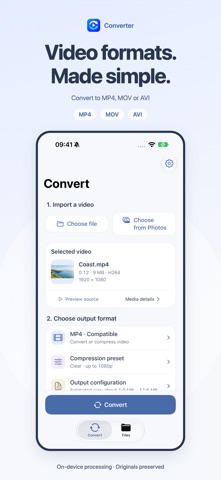
Import videos from Files or the system photo picker and export MP4, MOV or AVI. MP4 and MOV offer compatibility and preserve modes. Compatibility mode produces H.264 video; for eligible sources, preserve mode copies the original video stream without re-encoding it. Audio is handled according to compatibility.
THREE COMPRESSION PRESETS
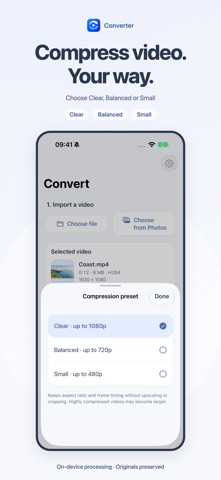
Choose Clear, Balanced or Small in MP4 compatibility mode, with maximum output resolutions of 1080p, 720p and 480p respectively. Keep the picture's proportions without upscaling or cropping. Check output settings and file size estimates where available before you start.
EXTRACT AUDIO FROM VIDEO
Export the main audio track as M4A, MP3 or WAV. Choose 128, 192 or 320 kbps for MP3. WAV exports uncompressed 16-bit PCM audio for use in other audio tools.
REMOVE SOUND FROM VIDEO
Enable audio removal in video output settings to create a separate silent copy. Available for MP4, MOV and AVI video exports. Your original video stays unchanged.
SAVE, SHARE AND ORGANISE
Preview results when playback is supported, save a copy to Files or use the system share sheet. Compatible MP4 and MOV results can also be saved to Photos. View details, rename or delete results, and find saved results again after reopening the app.
LOCAL PROCESSING
No account is required. The app does not upload media to developer servers and includes no advertising or analytics SDKs. It remembers your last output format, MP4 preset and MP3 bitrate. Clearing the cache keeps successful results.
BEFORE YOU START
Supported inputs include MOV, MP4, M4V and selected AVI files. Available outputs depend on the source codecs and tracks. The app processes one file at a time and must remain in the foreground. Moving it to the background stops the task; you can retry from the beginning when you return.
Preserve mode is not a compression option and does not guarantee a smaller file. Compressed file sizes depend on the source and settings. Videos without an audio track cannot be used for audio extraction. WAV cannot restore audio quality already lost in the source and may produce large files. AVI may require another compatible player.
Local files can be processed offline. Downloading files from iCloud or other providers may require a connection. Imports use copies and exports do not overwrite originals. Removing the app deletes its stored results; save a separate copy outside the app for long-term storage.
Available in Simplified Chinese, Traditional Chinese, English, Russian and Japanese.