

Converter+ Video to MP3
Converter+ Video to MP3 is made and published by Raphael Monteiro. AppBrain is an independent app data site and isn't affiliated with Raphael Monteiro. The app name, icon, screenshots and description belong to Raphael Monteiro and are shown as published on the App Store.
AppBrain's verdict
- Last updated
- October 2, 2026
Rankings
App Store top chartsApp Store Rankings for Converter+ Video to MP3
Competitors
Similar apps and more from Raphael MonteiroAlternatives to Converter+ Video to MP3


 Video to MP3 Converter | Audio
More from Raphael Monteiro


Releases
Updates seen on the App Store- Version
- 1.1.2
- Launched
- September 2025
No changelog data
User feedback
Ratings and reviews on the App StoreComments on Converter+ Video to MP3 for iOS
We don't have enough comments to show example comments. Please check back later.
Technology
Found in the app by AppBrain- Price
- Free
- App size
- 7.01 MB
- Content rating
- Everyone
Technologies used by Converter+ Video to MP3
About the app and developer
About Converter+ Video to MP3
Converter+ Video to MP3 is a photo & video app developed by Raphael Monteiro.
What is the rating of Converter+ Video to MP3?
Converter+ Video to MP3 has no ratings yet.
Is Converter+ Video to MP3 free?
Converter+ Video to MP3 is free. The app size is 7.01 MB. The latest version available is 1.1.2. The last update was on October 2, 2026.
What are the requirements for Converter+ Video to MP3?
The app has a content rating of Everyone. The app has been available on the App Store since September 2025.
Developer information for Raphael Monteiro
Address:
Frequently asked questions about Converter+ Video to MP3
Is Converter+ Video to MP3 free?
Yes. Converter+ Video to MP3 is free on the App Store.
Is Converter+ Video to MP3 still available?
Yes. Converter+ Video to MP3 is on the App Store, and the last update we saw was on October 2, 2026.
How large is Converter+ Video to MP3?
Converter+ Video to MP3 is 7.01 MB.
Is Converter+ Video to MP3 suitable for children?
App Store rates the content of Converter+ Video to MP3 as suitable for everyone.
Who made Converter+ Video to MP3?
Converter+ Video to MP3 was developed by Raphael Monteiro. It is listed in the photo & video category on the App Store.
What are the best alternatives to Converter+ Video to MP3?
People looking at Converter+ Video to MP3 also look at these photo & video apps: Vivid: HD Video Player, Sworty, Convert MOV to MP4 Video, Secret Box : Private Vault, Artia: Aesthetic AI Photos.
Store listing
By Raphael Monteiro, from the App Store


Description by Raphael Monteiro Written by the developer, not by AppBrain. Click to read.
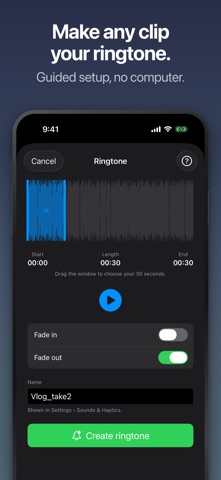
MAKE IT YOUR RINGTONE
Slide a 30-second window over any song or clip, add a fade in and a fade out, and hear it loop before you commit. Then follow the built-in guide: it walks you through GarageBand step by step, so the ringtone actually ends up on your iPhone. No computer needed — and if you do have a Mac, that shortcut is in there too.
CONVERT ANYTHING WITH SOUND
Drop in a video or an audio file and get the format you actually need. Six outputs: MP3 to play anywhere, M4A for smaller files at the same quality, WAV and AIFF when you cannot lose a thing, CAF for very long recordings, and M4R for iPhone ringtones. Pick your bitrate all the way up to 320 kbps.
TRIM IT. SHRINK IT.
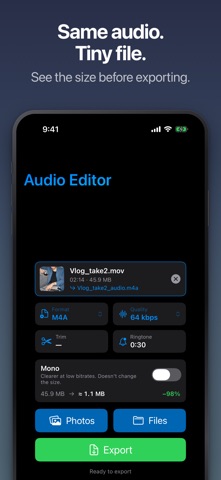
The Editor cuts a clip down to the part you want and compresses it to a fraction of its original size. Switch to mono, drop the bitrate, and watch the before and after estimate update before you export a single byte.
BRING FILES IN FROM ANYWHERE
Import straight from Photos, open a file with Converter+ from the Files app, or share one to Converter+ from any app at all. A notification brings you back the moment it is ready.
YOUR LIBRARY, YOUR WAY
Every conversion lands in a library you can search, sort and rename. Attach notes to any file, play it back in the background while you do something else, and swipe to send it anywhere through the iOS share sheet.
PRIVATE BY DESIGN
Conversion happens entirely on your iPhone. Nothing is uploaded, nothing is collected, and everything works offline.
FREE AND PRO
Free covers M4A at up to 128 kbps, one file at a time. Pro unlocks ringtones, all six formats, 320 kbps, batch conversion and playback from 0.5x to 2.5x — for a single payment, not a subscription.
M4V files cannot be converted because of Digital Rights Management restrictions.