

ConvertToMarkdown Offline
ConvertToMarkdown Offline is made and published by 岳 胡. AppBrain is an independent app data site and isn't affiliated with 岳 胡. The app name, icon, screenshots and description belong to 岳 胡 and are shown as published on the App Store.
AppBrain's verdict
- Best rank
- #22
- Top Paid, Austria
- Last updated
- September 7, 2026
Rankings
App Store top charts- Highest rank
- #22
- Chart
- Top Paid
- Utilities
- Country
- Austria
App Store Rankings for ConvertToMarkdown Offline
Top rankings
| Rank | Country | Category | List |
|---|---|---|---|
| 22 | Austria | Utilities | Top Paid |
Ranking history in Austria
Competitors
Similar apps and more from 岳 胡More from 岳 胡


Releases
Updates seen on the App Store- Version
- 1.0
- Launched
- September 2026
No changelog data
User feedback
Ratings and reviews on the App StoreComments on ConvertToMarkdown Offline for iOS
We don't have enough comments to show example comments. Please check back later.
Technology
Found in the app by AppBrain- Price
- $2.99
- App size
- 4.65 MB
- Content rating
- Everyone
Technologies used by ConvertToMarkdown Offline
About the app and developer
About ConvertToMarkdown Offline
ConvertToMarkdown Offline is an utilities app developed by 岳 胡.
What is the rating of ConvertToMarkdown Offline?
ConvertToMarkdown Offline has no ratings yet.
Is ConvertToMarkdown Offline free?
ConvertToMarkdown Offline costs $2.99. The app size is 4.65 MB. The latest version available is 1.0. The last update was on September 7, 2026.
What are the requirements for ConvertToMarkdown Offline?
The app has a content rating of Everyone. The app has been available on the App Store since September 2026.
Developer information for 岳 胡
Address:
Store listing
By 岳 胡, from the App Store

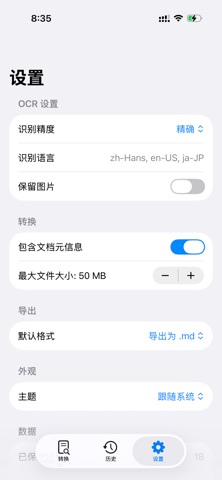
Description by 岳 胡 Written by the developer, not by AppBrain. Click to read.
== 6 Format Converters ==
• PDF → Markdown — extract text from any PDF, including scanned documents
• Word (DOCX) → Markdown — preserve headings, lists, tables, and formatting
• Excel (XLSX) → Markdown — convert spreadsheets into clean Markdown tables
• PowerPoint (PPTX) → Markdown — extract text content from slides
• HTML → Markdown — turn any web page into clean Markdown
• Image → Markdown — on-device OCR recognizes text from photos and screenshots
== Markdown Editor ==
Edit and refine your Markdown with a full-featured editor:
• Syntax highlighting — color-coded headings, bold, italic, code, links, and more
• Live preview — see rendered output as you type, with split view on iPad
• Formatting toolbar — 15 quick actions for headings, lists, code blocks, tables, links, images, and more
• System-level .md file association — open Markdown files from any app
== Reverse Conversion ==
Turn Markdown back into polished output:
• Markdown → PDF — clean, paginated documents for sharing
• Markdown → HTML — styled, ready-to-publish web pages
• Markdown → Image — capture your Markdown as a PNG
== 100% Offline & Private ==
Your documents stay on your device. Every conversion — including OCR — runs locally using Apple's built-in frameworks (PDFKit, Vision, WebKit). No servers, no accounts, no tracking, no ads.
== Key Features ==
• 6 input formats: PDF, DOCX, XLSX, PPTX, HTML, Image
• 3 export formats: PDF, HTML, PNG
• On-device OCR with Apple Vision framework
• Multi-language OCR: English, Chinese, Japanese & more
• Markdown editor with syntax highlighting
• Live preview with split-screen on iPad
• Conversion history with search
• Dark mode support
• 7 languages: English, Spanish, French, Chinese (Simplified & Traditional), Japanese, Korean
• One-time purchase — no subscriptions, no in-app purchases
== Perfect For ==
• Feeding documents to other tools
• Saving web pages and PDFs to note-taking apps
• Extracting text from photos and screenshots
• Editing and previewing Markdown files
• Converting Office documents for publishing
• Creating clean text from complex formats
== Who Uses It ==
• Developers converting documentation
• Researchers extracting text from PDFs
• Writers turning web content into notes
• Students digitizing handwritten notes via OCR
• Professionals sharing documents as Markdown
== Privacy First ==
All processing happens locally on your device. No internet connection required. Your documents are never uploaded to any server. The app works fully in Airplane Mode.
One-time purchase. Buy once, use forever.