

Copper Engrave Etchings Image
Copper Engrave Etchings Image is made and published by TAIKI HIRATA. AppBrain is an independent app data site and isn't affiliated with TAIKI HIRATA. The app name, icon, screenshots and description belong to TAIKI HIRATA and are shown as published on the App Store.
AppBrain's verdict
Established- Rating on App Store
- 5.00
- 2 ratings
- Last updated
- September 2, 2025
- Size
- 6.71 MB
It doesn't have enough ratings yet to judge what users think.
User feedback
Ratings and reviews on the App StoreComments on Copper Engrave Etchings Image for iOS
We don't have enough comments to show example comments. Please check back later.
Store listing
By TAIKI HIRATA, from the App Store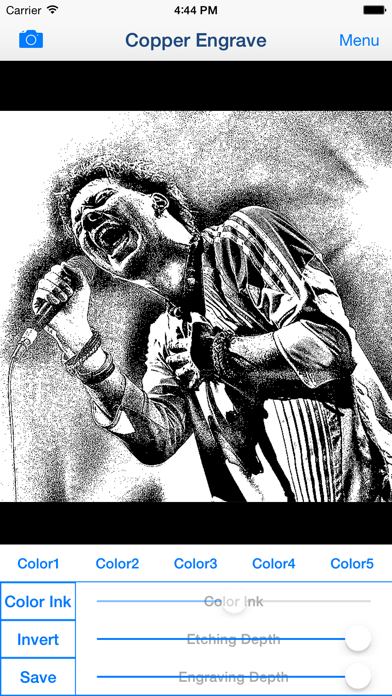
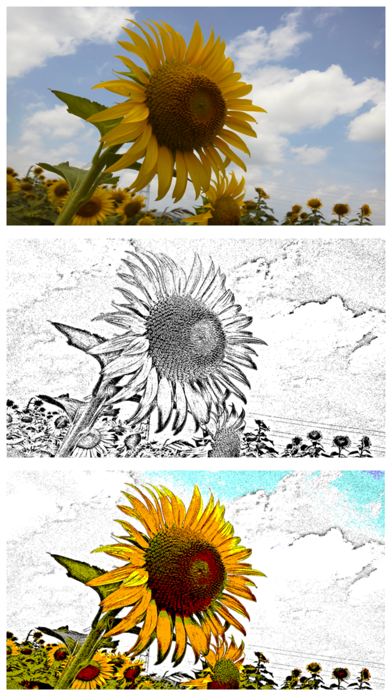
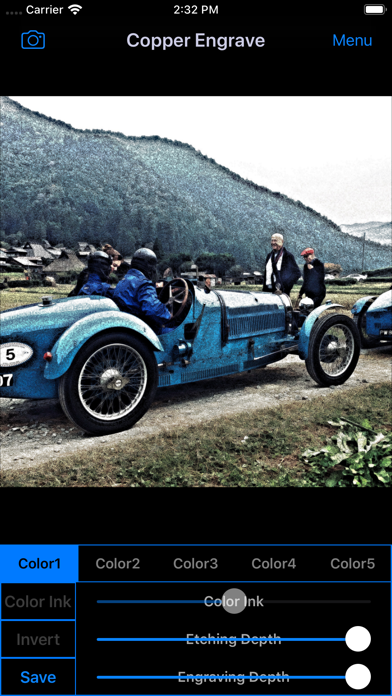
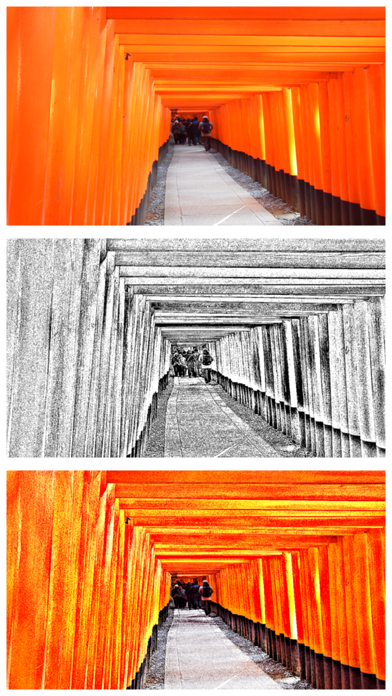


Description by TAIKI HIRATA Written by the developer, not by AppBrain. Click to read.
You can also create engraving effect movie from your videos.
In the book you read as a child, have you seen the Illustrations that represents the texture of things at a density of small black dots or black fine line?
Maybe, the illustrations might was something based on a Copperplate Engraving or Etching.
You will be able to create the Copperplate Engraving/Etching style image like that from your photographs and illustrations by Photo Editor App "Copper Engrave".
Not visible to the prints at first glance, dense representation is attractive of Copperplate engraving/Etching.
Some of Copperplate Engravings/Etchings is like a photo at all.
Copper Engraving/Etching is a technique that can be a unique representation.
But if you actually make a copperplate engraving/etching, you will need to align the tools and chemicals for it.
Is it a little difficult?
Please use "Copper Engrave" in such a case!
You will be able to create the Copperplate Engraving/Etching style image from photo stored on your smart phones or tablets by Photo Editor App "Copper Engrave"!
You can get closer to the style of painting of your choice by adjusting the thickness and compactness of the line.
You can create images such as those made of mezzotint technique by using the invert function. And you can create color images by using the color function.
*If you want to save "Color Ink Image", "Color Image" or "Inverted Image", you need to purchase Add-on.
If you enjoyed by this App, I'm glad.
■Main function of App
1. Create Copperplate Engraving/Etching Effects image and video by editing photo or video and save it.
2. Change Ink Color. *Add-on is required in order to save the image that used color ink.
3. Create Mezzotint style image and video by Invert function and save it. *Add-on is required in order to save.
4. Create color image and video by color function and save it. *Add-on is required in order to save.
■How to Edit
1. Select image you want to edit from "Camera" Button.
2. When Image was displayed, Edit Image to the desired image by "Image Adjustment Slider".
3. You can create images such as those made of mezzotint technique by "Invert" Button. And you can create color images by "Color" Button and "Color Ink" Button.
*If you want to save Color Image, Color Ink Image or Inverted Image, you need to purchase Add-on.
4. When you touch "Save" Button, current image will be saved in "Photos(Camera Roll)".
■About In-app Advertising
Banner Advertising is displayed in Home Screen.
Full Screen Advertising will be displayed, after you have saved the picture.
You can hide these Advertising by purchasing "Additional Function Add-on".
Safety and technology
Found in the app by AppBrain- Price
- Free
- App size
- 6.71 MB
- Content rating
- Everyone
Technologies used by Copper Engrave Etchings Image
Releases
Updates seen on the App Store- Version
- 2.4
- Launched
- June 2014
No changelog data
Alternatives
Similar apps and more from TAIKI HIRATAAlternatives to Copper Engrave Etchings Image







More from TAIKI HIRATA





Rankings
App Store top chartsApp Store Rankings for Copper Engrave Etchings Image
About the app and developer
About Copper Engrave Etchings Image
Copper Engrave Etchings Image is a photo & video app developed by TAIKI HIRATA.
What is the rating of Copper Engrave Etchings Image?
Copper Engrave Etchings Image is rated 5.00 out of 5 stars, based on 2 ratings.
Is Copper Engrave Etchings Image free?
Copper Engrave Etchings Image is free. The app size is 6.71 MB. The latest version available is 2.4. The last update was on September 2, 2025.
What are the requirements for Copper Engrave Etchings Image?
The app has a content rating of Everyone. The app has been available on the App Store since June 2014.
Developer information for TAIKI HIRATA
Address:
Frequently asked questions about Copper Engrave Etchings Image
Is Copper Engrave Etchings Image free?
Yes. Copper Engrave Etchings Image is free on the App Store.
Is Copper Engrave Etchings Image still available?
Yes. Copper Engrave Etchings Image is on the App Store, and the last update we saw was on September 2, 2025.
How large is Copper Engrave Etchings Image?
Copper Engrave Etchings Image is 6.71 MB.
Is Copper Engrave Etchings Image suitable for children?
App Store rates the content of Copper Engrave Etchings Image as suitable for everyone.
How do people rate Copper Engrave Etchings Image?
Copper Engrave Etchings Image scores 5.00 out of 5 stars, from 2 ratings on the App Store.
Who made Copper Engrave Etchings Image?
Copper Engrave Etchings Image was developed by TAIKI HIRATA. It is listed in the photo & video category on the App Store.
What are the best alternatives to Copper Engrave Etchings Image?
People looking at Copper Engrave Etchings Image also look at these photo & video apps: Engrave Me, Stamp Meister, Engraver handmade etching, LineEngraver Photo Editor Lite, Art Filter Camera.