

Copy All Text is made and published by Twispace. AppBrain is an independent app data site and isn't affiliated with Twispace. The app name, icon, screenshots and description belong to Twispace and are shown as published on the App Store.
AppBrain's verdict
- Last updated
- October 6, 2026
Rankings
App Store top chartsApp Store Rankings for Copy All Text
Competitors
Similar apps and more from TwispaceMore from Twispace

Releases
Updates seen on the App Store- Version
- 1.4
- Launched
- August 2026
No changelog data
User feedback
Ratings and reviews on the App StoreComments on Copy All Text for iOS
We don't have enough comments to show example comments. Please check back later.
Technology
Found in the app by AppBrain- Price
- $1.99
- App size
- 3.02 MB
- Content rating
- Everyone
Technologies used by Copy All Text
About the app and developer
About Copy All Text
Copy All Text is an utilities app developed by Twispace.
What is the rating of Copy All Text?
Copy All Text has no ratings yet.
Is Copy All Text free?
Copy All Text costs $1.99. The app size is 3.02 MB. The latest version available is 1.4. The last update was on October 6, 2026.
What are the requirements for Copy All Text?
The app has a content rating of Everyone. The app has been available on the App Store since August 2026.
Developer information for Twispace
Address:
Frequently asked questions about Copy All Text
Is Copy All Text free?
No. Copy All Text costs $1.99 on the App Store.
Is Copy All Text still available?
Yes. Copy All Text is on the App Store, and the last update we saw was on October 6, 2026.
How large is Copy All Text?
Copy All Text is 3.02 MB.
Is Copy All Text suitable for children?
App Store rates the content of Copy All Text as suitable for everyone.
Who made Copy All Text?
Copy All Text was developed by Twispace. It is listed in the utilities category on the App Store.
Store listing
By Twispace, from the App Store


Description by Twispace Written by the developer, not by AppBrain. Click to read.
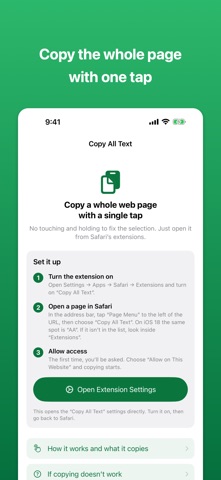
No touching and holding to fix the selection. Open it from Safari's extensions and tap one big button.
■ Not just what's on screen
Text you have to scroll to reach, text cut off inside its box, and text shortened with "…" — all of it gets copied.
■ It reaches further than you'd expect
• Text you have to scroll to see (both the page itself and scrollable boxes)
• Text hidden by overflowing its box, and the full text behind a "…"
• Lines hidden behind "Read more"
• Text already typed into input fields and text areas
• Tables (copied tab-separated, so they paste straight into a spreadsheet)
• Indentation and whitespace in code blocks
• The contents of Web Components, used by many recent sites
■ What it's good for
・Pasting a whole article into an AI chat to summarize it or ask about it
・Keeping the text of your research in a notes app or a document
・Running a foreign-language page through a translation tool in one go
・Pulling a table out and pasting it into a spreadsheet
・Getting the whole text in front of you so you can find the part you want to quote
■ There are no settings
Just open it and tap. Nothing to learn, nothing to switch, no options to remember.
■ It collects none of your data
• It has no networking code at all. The text it reads never leaves your device
• Nothing runs in the background. It reads the page only at the moment you open the extension
• It cannot see your browsing history
• The text it reads is written to your clipboard and nothing more — never saved, never sent
• Password fields and one-time-code fields are excluded
■ What it can't copy (told plainly)
• Text drawn inside images, and text drawn on a canvas
• The contents of frames embedded from other sites (video players, social posts, maps)
• The contents of collapsed sections — open them in Safari first, then copy
• Content that is only created once you scroll — scroll through it once, then copy
• While "Show password" has a field in plain text, some sites are built in a way that lets it be copied as ordinary text
■ How to use it
1. Open Settings → Apps → Safari → Extensions and turn on "Copy All Text"
2. In Safari, tap "Page Menu" to the left of the URL and choose "Copy All Text"
3. Tap "Copy Whole Page" on the screen that opens
Because of how iOS works, opening the screen can't copy on its own. You have to tap once.