AppBrain
AppBrain
  • Apps
  • Apps being viewed right now Trending apps today Most popular apps All-time most installed apps Top rated apps iPhone and iPad apps
  • Intelligence ▾
    Intelligence overview → Track any Android app or your whole market
    Track & analyze
    Keyword Tracker & OptimizerTrack & improve Play rankings App Performance ReportOne-off PDF for any app StatisticsFree Android & Play market stats
    Promote your app
    Featured Apps App Links
  • Intelligence
  • Pricing
  • Dashboard
  • Sign up
  • Log in
App Store Apps > Productivity > Copy Paste Keyboard - Quickly
Copy Paste Keyboard - Quickly icon

Copy Paste Keyboard - Quickly

1.0.3
Hyungsung Kim
0.00
0 reviews
Free

Copy Paste Keyboard - Quickly Screenshot 1 of 9
Copy Paste Keyboard - Quickly Screenshot 2 of 9
Copy Paste Keyboard - Quickly Screenshot 3 of 9
Copy Paste Keyboard - Quickly Screenshot 4 of 9
Copy Paste Keyboard - Quickly Screenshot 5 of 9
Copy Paste Keyboard - Quickly Screenshot 6 of 9
Copy Paste Keyboard - Quickly Screenshot 7 of 9
Copy Paste Keyboard - Quickly Screenshot 8 of 9
Copy Paste Keyboard - Quickly Screenshot 9 of 9
Screenshots by Hyungsung Kim, from the the App Store listing
View on the App Store

About Copy Paste Keyboard - Quickly

Copy Paste Keyboard - Quickly is a productivity app developed by Hyungsung Kim.

User Ratings

The app has no ratings yet.

App Information

Copy Paste Keyboard - Quickly is freely available from the App Store. The app size is 92.41 MB. The latest version available is 1.0.3. The last update was on November 14, 2026.

Technical Requirements

The app has a content rating of Everyone. The app has been available on the App Store since October 2026.

Copy Paste Keyboard - Quickly is made and published by Hyungsung Kim. AppBrain is an independent app data site and isn't affiliated with Hyungsung Kim. The app name, icon, screenshots and description belong to Hyungsung Kim and are shown as published on the App Store.

Description by Hyungsung Kim (from the App Store)
Save the messages you send all the time, like booking confirmations, payment requests, and shipping updates, as templates just once. Then pull them up from the Quickly keyboard in any app, fill in the customer's name, the date, and the amount, and send.

No more digging up an old message, copying it, fixing the name, and retyping the date. A few taps and you're done, with fewer slip-ups like sending a message with another customer's name still in it.

■ Right from your keyboard, in any app
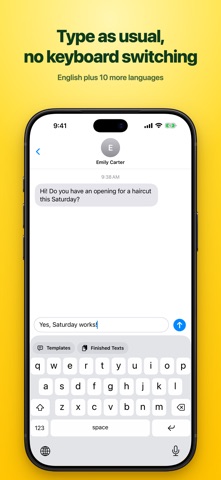
• In Messages, Mail, or any chat app, pick a template on the Quickly keyboard and fill in the values right there
• No more switching between apps to copy and paste
• The finished texts you've made are on the keyboard too, ready to use again
• Type as usual, too. Keyboards for English, Korean, Japanese, Chinese (Simplified and Traditional), German, Spanish, French, Italian, Portuguese, and Russian are built in

■ To send, just tap in what changes
• Quickly asks only for the parts of the message that change (name, date, amount), one at a time
• Watch the finished message come together as you fill it in. When you're done, it goes straight into the text field
• Fill it in the app and it's copied right away, or use the Share button to send it to another app

■ No calculator or calendar needed
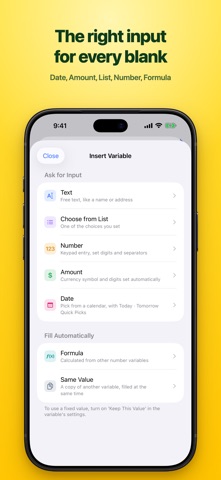
• Date: pick tomorrow, the day after, or this Saturday in one tap, without opening a calendar
• Amount: just tap the digits, and the dollar sign and commas take care of themselves
• Formula: set up something like "Hours × 50" and the amount fills itself in
• List: tap to pick from the options you choose most
• Same Value: enter it once and every spot that uses it is filled in
• Fix a value that never changes, and Quickly stops asking for it

■ Perfect for you if you
• Send booking confirmations, payment requests, quote replies, or shipping updates several times a day
• Keep writing the same message where only the name, date, and amount change
• Copy an old message and edit it before sending

■ Easy to keep organized
• Use tags to separate work and personal, and search by title or content
• Messages you fill in and send are kept in Finished Texts, so you can use them again
• You can also export a backup file

■ The same on iPhone, iPad, and Mac
• With the same iCloud account, your templates, tags, and Finished Texts stay in sync across your devices
• On Mac, pick a template in the app, fill it in, copy it, and paste it anywhere (the keyboard works on iPhone and iPad)
• Supports Light and Dark Mode

■ Only you can see your messages
• Your messages are stored only on this device and in your iCloud. Not even the developer can see them
• No sign-up, no login. Nothing you type is collected. No ads, either
• The Quickly keyboard never connects to the internet. Everything works without turning on Allow Full Access, and turning it on only adds vibration when you tap keys

■ Not sure what to write first?
• Describe the situation in one line, or paste a message you already send, and AI turns it into a template with blanks for the parts that change
• Tap "Shorter" or "More polite" to fine-tune it
• On devices with Apple Intelligence (iOS 26 or later), it's made on your device, for free. You can also ask the ChatGPT, Claude, or Gemini app you already use and paste in the answer
• Every feature works without AI. Only if you choose an AI other than Apple Intelligence yourself does your request go to that AI company
Show more Show less

More data about Copy Paste Keyboard - Quickly

Price Free
Rating No ratings
Ranking Not ranked
Version 1.0.3
App size 92.4 MB
Suitable for Everyone

More from Hyungsung Kim

Video Compressor - LeanVid icon Video Compressor - LeanVid
Hyungsung Kim
5.0
Free
2 ratings
Save Space Camera - GramCamera icon Save Space Camera - GramCamera
Hyungsung Kim
0.0
Free

Changelog of Copy Paste Keyboard - Quickly

No changelog data

Developer information for Hyungsung Kim

Hyungsung Kim

Address:

Share Copy Paste Keyboard - Quickly

Comments on Copy Paste Keyboard - Quickly for iOS

We don't have enough comments to show example comments. Please check back later.

App Store Rankings for Copy Paste Keyboard - Quickly

This app is not ranked

Technologies used by Copy Paste Keyboard - Quickly

Frequently asked questions about Copy Paste Keyboard - Quickly

Is Copy Paste Keyboard - Quickly free?

Yes. Copy Paste Keyboard - Quickly is free on the App Store.

Is Copy Paste Keyboard - Quickly still available?

Yes. Copy Paste Keyboard - Quickly is on the App Store, and the last update we saw was on November 14, 2026.

How large is Copy Paste Keyboard - Quickly?

Copy Paste Keyboard - Quickly is 92.41 MB.

Is Copy Paste Keyboard - Quickly suitable for children?

App Store rates the content of Copy Paste Keyboard - Quickly as suitable for everyone.

Who made Copy Paste Keyboard - Quickly?

Copy Paste Keyboard - Quickly was developed by Hyungsung Kim. It is listed in the productivity category on the App Store.

Apps other people are watching Popular Productivity Apps Today's trending apps Top new apps Price drops on Google Play
More hot apps 🔥
AppBrain Intelligence premium content

Subscribe now to get full and unlimited access to AppBrain Intelligence. You'll have access to:

  • App Intelligence dashboard (performance timeline, competitor comparison, country rankings, insight cards)
  • Detailed ranking data per app
  • Full timeline per developer
  • Device market shares data per country
  • Unlimited keyword tracking
1 Month

$75/mo
(billed every month)

SAVE 0%
Subscribe
3 Months

$65/mo
($195 billed every 3 months)

SAVE 13%
Subscribe
1 Year

$57.50/mo
($690 billed every year)

SAVE 23%
Subscribe
Each subscription will automatically renew 3 days before the expiration date for the same time period. Subscriptions can be cancelled at any time before the renewal.

AppBrain is an app data site, we track rankings, ratings, installs for all apps and games on Google Play and the App Store. AppBrain doesn't host app files or APKs, all install links go directly to the official store. All trademarks are owned by their respective owners.

More apps

  • Top Android apps being viewed
  • View CineCap
  • WARDOGS
  • FinderQc – QC Photos

App statistics

  • Android statistics
  • Google Play Developer stats
  • Trending Android Apps
  • Trending iOS apps
  • Top popular Apps
  • Buy the best Android phone
  • Buy & sell app businesses

About AppBrain

  • Contact
  • Privacy
  • Documentation
  • DMCA takedowns
  • Blog
  • How to improve the earnings of your ad units
© 2010-2026 - AppBrain